Catalina installation USB drive
Solved
Alvarez60
Posted messages
103
Status
Member
-
Alvarez60 Posted messages 103 Status Member -
Alvarez60 Posted messages 103 Status Member -
Hello everyone,
I'm encountering a problem while creating a USB installation key for Catalina.
I followed the steps for erasing and creating the key from Disk Utility (formatted as Mac OS Extended Journaled, GUID Partition Table) and the operation is fine.
The error occurs during the overwrite in the terminal (error erasing disk error number (-69888, 0).
I tried reformatting the key, but the error persists, despite my various searches on the forums. I should mention that this is a 64 GB Philips USB key purchased from Fnac.
Any help would be appreciated, especially since I'm a bit of a novice!
Thank you in advance.
I'm encountering a problem while creating a USB installation key for Catalina.
I followed the steps for erasing and creating the key from Disk Utility (formatted as Mac OS Extended Journaled, GUID Partition Table) and the operation is fine.
The error occurs during the overwrite in the terminal (error erasing disk error number (-69888, 0).
I tried reformatting the key, but the error persists, despite my various searches on the forums. I should mention that this is a 64 GB Philips USB key purchased from Fnac.
Any help would be appreciated, especially since I'm a bit of a novice!
Thank you in advance.
6 answers
-
Hello,
This error occurs when the USB drive has the same name as another volume mounted on the Mac. Most often, the title given to the drive is "Untitled," so you should change that name.
Sometimes it also happens when the drive is being used by another application, for example Disk Utility, another Terminal window, etc.
Try changing the name of the drive, and restart the Mac... -
Hello Francis,
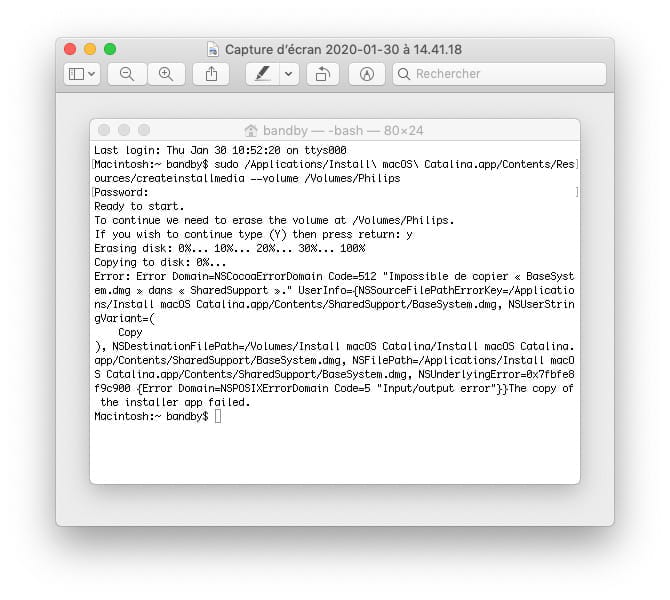
Thank you for your quick response. Indeed, after renaming the key and restarting the Mac, the key was successfully erased in the terminal, but I have a new error "code 512" regarding the copy. I'm attaching the screenshot below.
Thanks again for your help;
-
Hi,
Maybe one of the conditions is not met?
The requirements for Catalina are:
- a 12 GB USB drive, instead of the 8 GB for previous versions
- the Catalina installer application must be an original application, obtained directly from the App Store and located in the Applications folder of the Mac that downloaded this installer.
- of course, the command must be syntactically correct.
See this help:
https://support.apple.com/fr-fr/HT201372#create
At this stage, I can't say more... -
Good evening,
No, the conditions are indeed met. The application downloaded from the App Store is indeed an original app and is located in the Applications folder on my Mac.
I have checked the command I took from the Apple support you mentioned, replacing "My Volume" with the name of the USB drive.
However, I notice that when I try to eject the USB drive, I always get an error window telling me that it is impossible to eject the drive because it is in use, etc..., despite a reboot.
Yet, I have no applications open. Only Finder for the terminal.
Have a good evening. -
Try formatting the drive with "Disk Utility" (an application found in Applications / Utilities) before starting the procedure...
-
I finally managed to do the operation with another USB key.
Thank you again for your help.
Have a great weekend.