Missing/Unreadable files on two exFat USB drives
Devilhawk4
-
fabul Posted messages 42168 Registration date Status Moderator Last intervention -
fabul Posted messages 42168 Registration date Status Moderator Last intervention -
Hello,
I acquired two 500GB USB drives that are formatted as exFAT (I only noticed this recently).
I cut and pasted numerous files (videos, photos, PDFs, MP3s, ...) onto these USB drives.
Unfortunately, I had to realize that the folders were present but the files were "invisible" because they occupy space on the USB drives.
I thought it was the USB drives that had a problem, but I found that I was not the only one experiencing issues with exFAT formatted drives/USBs.
Aside from formatting advice to another format, I haven't found how to recover the "hidden" files.
I tested Recuva, chkdsk, and I also checked the hidden files and system files on the USB drive, but I see nothing.
I also tried Ubuntu, but these USB drives are unreadable on that system.
The only visible and functioning files are all the PDFs, a few videos (of low quality), and some music.
Is there a possibility to recover these files?
I am using Windows 10.
Thank you in advance for your help/response.
I acquired two 500GB USB drives that are formatted as exFAT (I only noticed this recently).
I cut and pasted numerous files (videos, photos, PDFs, MP3s, ...) onto these USB drives.
Unfortunately, I had to realize that the folders were present but the files were "invisible" because they occupy space on the USB drives.
I thought it was the USB drives that had a problem, but I found that I was not the only one experiencing issues with exFAT formatted drives/USBs.
Aside from formatting advice to another format, I haven't found how to recover the "hidden" files.
I tested Recuva, chkdsk, and I also checked the hidden files and system files on the USB drive, but I see nothing.
I also tried Ubuntu, but these USB drives are unreadable on that system.
The only visible and functioning files are all the PDFs, a few videos (of low quality), and some music.
Is there a possibility to recover these files?
I am using Windows 10.
Thank you in advance for your help/response.
6 answers
-
Hello,
You probably got scammed with Fake Capacity USB drives.
Files copy into empty space past the "Real" memory limit.
The files are lost.
These USB drives are cheap, but they are either worth little (if they can be flashed) or nothing at all.
Post me logs from ChipGenius so we can see if there's something we can do to save your drives and give them their true size, their actual capacity, which can vary from about 1 to 32GB.
https://www.softpedia.com/get/System/System-Info/ChipGenius.shtml -
When you have proof, you can claim it from the seller.
If ChipGenius does not provide you with enough evidence, you can analyze it with H2testw; this can serve as a second piece of evidence, but analyzing with a read/write of 500GB can take a long time, especially if it's USB 2.0.
And you need to format the drive before testing it with H2testw.-
Here is what I get:
Description: [E:]Mass Storage Device USB (General UDisk)
Device Type: Mass Storage Device
Protocol Version: USB 2.00
Current Speed: High Speed
Max Current: 100mA
USB Device ID: VID = 048D PID = 1234
Device Vendor: General
Device Name: UDisk
Device Revision: 0100
Manufacturer: General
Product Model: UDisk
Product Revision: 5.00
Controller Vendor: ChipsBank
Controller Part-Number: CBM? - New Controller - 0xE60 - [2017-12-12]
Flash ID code: 2CC40832A600 - Micron - 1CE/Single Channel [TLC]
Tools on web: http://dl.mydigit.net/special/up/chipsbank.html
Possible Flash Part-Number
----------------------------
Unknown
Flash ID mapping table
----------------------------
[Channel 0] [Channel 1]
2CC40832A600 --------
-------- --------
-------- --------
-------- --------
-------- --------
-------- --------
-------- --------
-------- --------
However, when I click on the Flash ID Code, I get a window with unreadable text like: ÉÁ´æ´óʦ½Øͼ_1575554493.
What should I do?
-
-
It may be a too recent ChipsBank controller, the exact reference is not described.
You can try a ChipsBank tool to see if it detects it.
Download Chipsbank CBM2099 UMPTool v7100 (2019-01-03); CBM209X_UMPToolV7100(2019-01-03).rar; size: 4,466,045 bytes
(The latest)
Here: https://www.usbdev.ru/files/chipsbank/cbm2099umptool/
You can set it to English and check the settings in "Settings"
Flash it as a key (Normal) (not Autorun)
In Fix capacity mode
Capacity Optimize
Etc...
Your memory (without details on capacity) is described somewhere as 32Gb
So you could have 32Gb (actual) keys
If the ChipsBank tool is not updated enough to recognize your controller and memory, you can return in the future to the same USBDEV.RU page to find a more recent tool, or try an older tool,
(You never know). -
Hello,
Apologies for the delay, here is some information:
The ChipsBank application doesn't seem to recognize my USB drives.
However, I managed to find, in the application files, an H2testw application that I launched.
It creates files on the USB drive and verifies each file it has created itself (I'm mentioning this for those who are interested). The test isn't finished yet (that's why I didn't write sooner), but it will be completed today. From what I can see already, it will be a 16GB USB drive (I haven't tested the second one, but it should be the same). I don't know if the software will offer me to modify the drive to display only 16GB.
I will come back to provide more information this evening.-
You can try ChipsBank APTool, the latest
https://www.usbdev.ru/files/chipsbank/cbm2099aptool/
But it can be dangerous to completely lose your USB key, DO NOT CHECK 8 bit, I had issues sometimes.
Check the boxes on the right in Settings with question marks ?????? and flash it
Then, try UMPTool again, it might detect it this time
Otherwise, you can try older tools or newer ones when they come out.
-
-
-
Hello,
you can reinstall the USB device driver to fix your invisible USB:
Step 1: Go to Device Manager.
Step 2: Look for the Universal Serial Bus controllers option, right-click on USB drivers, then click on Update Driver Software. Do this for all USB drivers by selecting them one by one.
Step 3: Now restart your computer system.
Regarding the retrieval of your data, you need to check if the USB device can be found in disk management: Press Win + R, then type Diskmgmt.msc to open the window. If yes, you can use a third-party tool, I often use Bitwar data recovery; you can also choose one that you rely on, then you can recover your videos and other files.

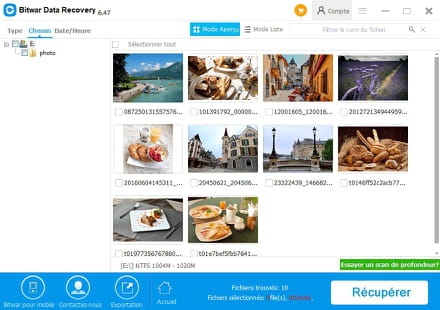
I'm not sure whether it can help you, but I hope you can resolve the issue and recover your data soon.