Scanning with Canon Maxify MB2750
Jeanou_49650
Posted messages
2
Status
Member
-
Jojolaguitare Posted messages 12012 Registration date Status Member Last intervention -
Jojolaguitare Posted messages 12012 Registration date Status Member Last intervention -
Hello
I have a Canon Maxify MB2750 printer that I just bought. I no longer have a separate scanner. I need to send a photocopy of my ID card by email. How can I save a copy from my printer to a folder on my PC?
Thank you very much for your help and I send you my best regards.
I have a Canon Maxify MB2750 printer that I just bought. I no longer have a separate scanner. I need to send a photocopy of my ID card by email. How can I save a copy from my printer to a folder on my PC?
Thank you very much for your help and I send you my best regards.
2 answers
-
Hello.
For the Canon Scan function . . . Turn on your printer. Open the control panel >>> Devices and Printers >>> Canon >>> and click on Scanner Management. (you can optionally create a shortcut for Scan on the desktop or in the taskbar)
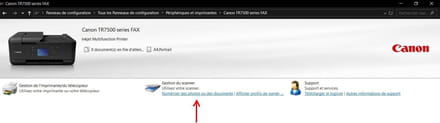
When scanning your ID card, if you haven't changed the default destination, this scanned image will go directly into the IMAGES folder.
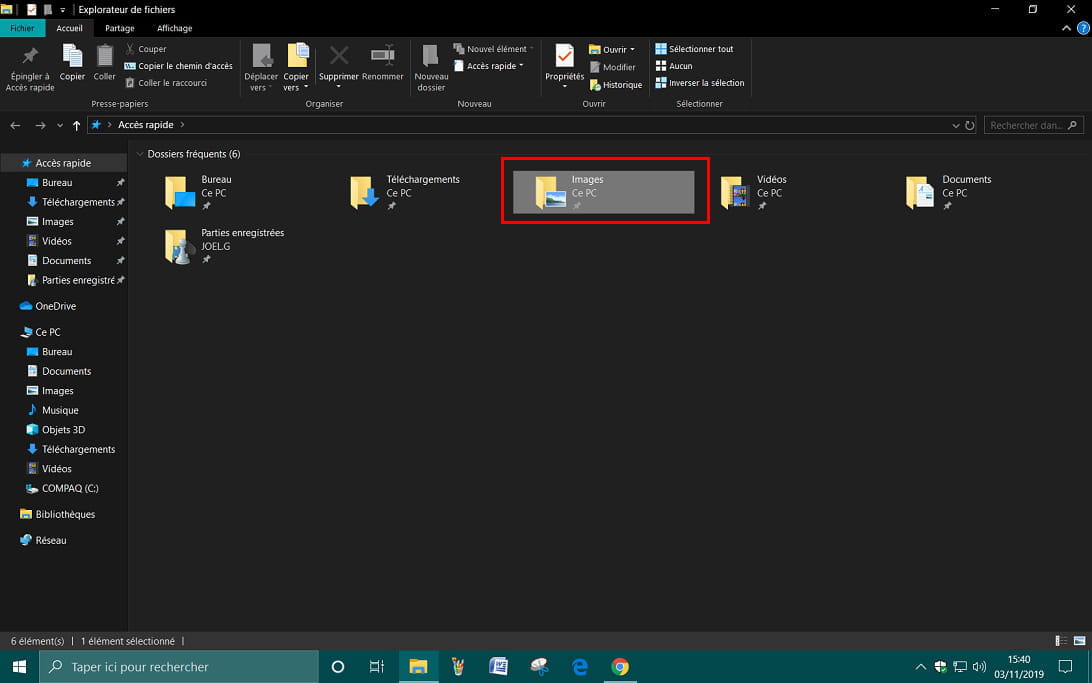
All that's left to do is copy this image to your folder.
See you later . . .
--
"Patience leads to success, haste leads to failure" -
Hello
Just like before, this printer has a built-in scanner; you just need to scan using the app provided with the printer, which will generate an image or pdf file (see your manual) that you can then send in an email.
Best regards
--
"We swallow the flattering lie in one gulp, and we drink the bitter truth drop by drop."