Exclamation mark next to the Wi-Fi icon
lifto
Posted messages
120
Status
Member
-
brupala Posted messages 111157 Registration date Status Member Last intervention -
brupala Posted messages 111157 Registration date Status Member Last intervention -
Hello,
I have the Freebox Mini 4K from Free (VDSL).
Already, the speed is not excellent, and every evening starting around 6:00 PM, I experience Wi-Fi disconnections on all devices connected to the box (every 5 to 15 minutes), which is frustrating.
Indeed, an exclamation mark appears next to the Wi-Fi icon.
I have already contacted customer service, who replaced the box, but the problem persists.
I am therefore reaching out to you for a possible solution.
Best regards,
Configuration: Android / Chrome 77.0.3865.116
I have the Freebox Mini 4K from Free (VDSL).
Already, the speed is not excellent, and every evening starting around 6:00 PM, I experience Wi-Fi disconnections on all devices connected to the box (every 5 to 15 minutes), which is frustrating.
Indeed, an exclamation mark appears next to the Wi-Fi icon.
I have already contacted customer service, who replaced the box, but the problem persists.
I am therefore reaching out to you for a possible solution.
Best regards,
Configuration: Android / Chrome 77.0.3865.116
2 answers
-
Hi,
try to fix other Wi-Fi channels on the box.
You can use an app to see which ones are less used at your place.
--
and ... There you go!-
-
-
-
If it's the same on all devices, I think we'll need to change this Fbx.
Are you connected to the private network of the Fbx, not on freewifi or freewifi-secure?
Actually no, freewifi-secure is not possible, your mobile doesn't have a Free SIM card because you have VoLTE enabled and that doesn't exist with Free. -
-
-
Good evening
Go to Freebox OS (http://mafreebox.freebox.fr/)
Double click on Status of the Freebox
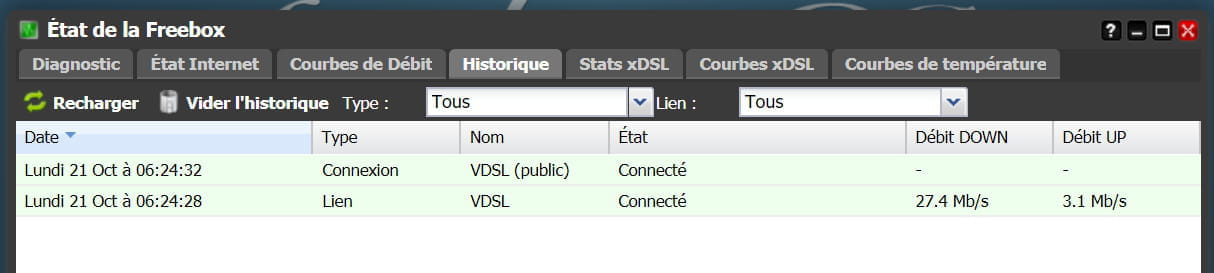
Then click on History.
You should see something like this:
Normally, there should be two lines without disconnection indications.
What do you observe?