Message "la batterie CMOS est défectueuse ou a été récemment remplacée"
Solved
CDIfrederic
Posted messages
13
Status
Member
-
CDIfrederic Posted messages 13 Status Member -
CDIfrederic Posted messages 13 Status Member -
Hello everyone on this forum.
I am a self-employed IT professional and I've encountered a problem that I don't know how to solve.
It all started with an error like 000000xxx your PC has encountered a problem. I should clarify that this is a Gigabyte Sabre 15 laptop.
I've changed the battery and cleared the CMOS because I received this message each time:
the CMOS battery is bad or was recently replaced.
Inside the PC, there's a 1TB HDD and a 250GB NVMe M.2.
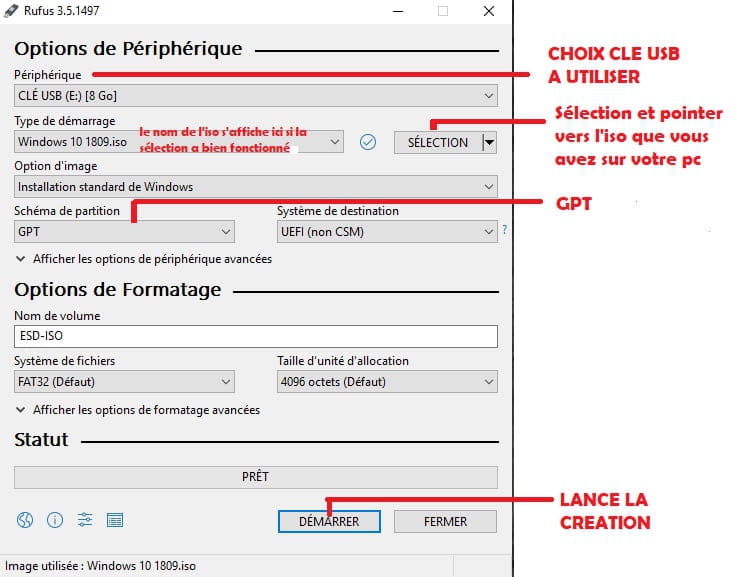
I have to be in legacy mode to boot from my Windows 10 USB drive.
I cleanly install Windows 10 on the SSD after removing the HDD, just to clarify.
Everything works in legacy mode.
The problem is that I start it up the next day and this message appears, and I reverted to UEFI.
As a result, it can no longer boot and gives me the message "reboot and select proper boot device."
It's driving me crazy; I don't know where this could be coming from.
Should I reset the BIOS?
Thanks for your feedback, see you soon.
I am a self-employed IT professional and I've encountered a problem that I don't know how to solve.
It all started with an error like 000000xxx your PC has encountered a problem. I should clarify that this is a Gigabyte Sabre 15 laptop.
I've changed the battery and cleared the CMOS because I received this message each time:
the CMOS battery is bad or was recently replaced.
Inside the PC, there's a 1TB HDD and a 250GB NVMe M.2.
I have to be in legacy mode to boot from my Windows 10 USB drive.
I cleanly install Windows 10 on the SSD after removing the HDD, just to clarify.
Everything works in legacy mode.
The problem is that I start it up the next day and this message appears, and I reverted to UEFI.
As a result, it can no longer boot and gives me the message "reboot and select proper boot device."
It's driving me crazy; I don't know where this could be coming from.
Should I reset the BIOS?
Thanks for your feedback, see you soon.