Unable to uninstall Utorrent with Windows 10
Solved
centaurus45
Posted messages
30
Status
Member
-
centaurus45 Posted messages 30 Status Member -
centaurus45 Posted messages 30 Status Member -
Hello
I don't understand anything. Utorrent appears as soon as I start the computer even though it's not in the startup programs. Before that, I have a window with a choice of version to make before opening. https://www.cjoint.com/c/IJdh5bHqMLK
Then it opens https://www.cjoint.com/c/IJdh5LqMozK
I try to uninstall it but I can't find it anywhere
When I click on the Windows button, it's not there https://www.cjoint.com/c/IJdh7gqJHcK
When I search on the disk in the programs, nothing https://www.cjoint.com/c/IJdiapfHwYK
Same in programs (86) https://www.cjoint.com/c/IJdibpQ1gJK
The only place I find something is on Ccleaner but even there I can't delete anything
https://www.cjoint.com/c/IJdib1laqJK
Could you please tell me how to uninstall it once and for all.
Thank you in advance for your help.
I don't understand anything. Utorrent appears as soon as I start the computer even though it's not in the startup programs. Before that, I have a window with a choice of version to make before opening. https://www.cjoint.com/c/IJdh5bHqMLK
Then it opens https://www.cjoint.com/c/IJdh5LqMozK
I try to uninstall it but I can't find it anywhere
When I click on the Windows button, it's not there https://www.cjoint.com/c/IJdh7gqJHcK
When I search on the disk in the programs, nothing https://www.cjoint.com/c/IJdiapfHwYK
Same in programs (86) https://www.cjoint.com/c/IJdibpQ1gJK
The only place I find something is on Ccleaner but even there I can't delete anything
https://www.cjoint.com/c/IJdib1laqJK
Could you please tell me how to uninstall it once and for all.
Thank you in advance for your help.
8 answers
-
pistouri Posted messages 19010 Registration date Status Contributor Last intervention Ambassador 8 732
Hello,
1- Check if you see it in the Windows directories:
Display hidden files and folders.
Open This PC, go to View and check 'Hidden items'
Then follow this path:
This PC → Local Disk (C) → Users → (Your username) → AppData → Roaming → uTorrent
If you see it, check for → Uninstaller
Run it to uninstall.
Hide hidden files and folders to finish.
Restart the PC.
2- With Autoruns
Run it as Administrator (Right-click).
Go to the Logon tab.
Uncheck the box if you see it.
3- With Revo
If you don’t see it:
In the search box type uTorrent.
4- Disable the reopening of programs upon restarting Windows 10.
Settings → Accounts → Sign-in options
Disable the option → Use my sign-in info to automatically finish setting up my device after an update or restart.
See you later!
-
Hello,
When you launch uTorrent, it repositions itself at the Windows startup.
The goal is for it to be permanently open to load ads.
See this page: how to remove uTorrent from Windows startup.
And if you want to uninstall uTorrent, you can remove it like a regular application.
If you can't do it,
then Revo Uninstaller can help.
On the other hand,
CCleaner is not really useful, even though it is recommended everywhere.
You should uninstall it.
If you want to keep it, disable the CCleaner monitoring, which is unnecessary as it starts up with Windows and slows it down with its incessant cleaning, see: https://www.malekal.com/supprimer-ccleaner-demarrage-windows/
-
pistouri Posted messages 19010 Registration date Status Contributor Last intervention Ambassador 8 732
Hello Renardrougeetnoir,
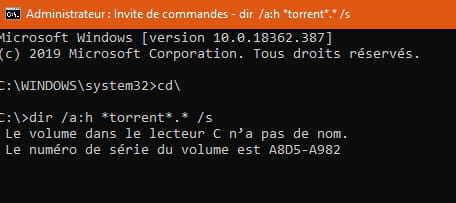
Can you tell us where you found the source of this barbaric command → dir /a:h *torrent*.* /s
Have you tried it, did you test to uninstall it?
You didn't explain where to find the command prompt? (We need to think of those who know nothing about computers).
It doesn't work in Administrator mode or non-Administrator mode, I tested it with images:
uTorrent is still there:
Otherwise, it is well located in this Windows directory:
This-PC → Local Disk (C) → User → (Your username) → AppData → Roaming → uTorrent
you just need to delete everything.
If it resists, delete it with Unlocker
You'll see an Unlocker line in the right-click context menu.
There are no applications to uninstall it.
Only the application to launch it.
The path:
This-PC → Local Disk (C) → User → (Your username) → AppData → Roaming
In Roaming go down to uTorrent
Right-click on the uTorrent folder and then click on Unlocker
Select → Delete
Finish with → Confirm
Restart your PC.
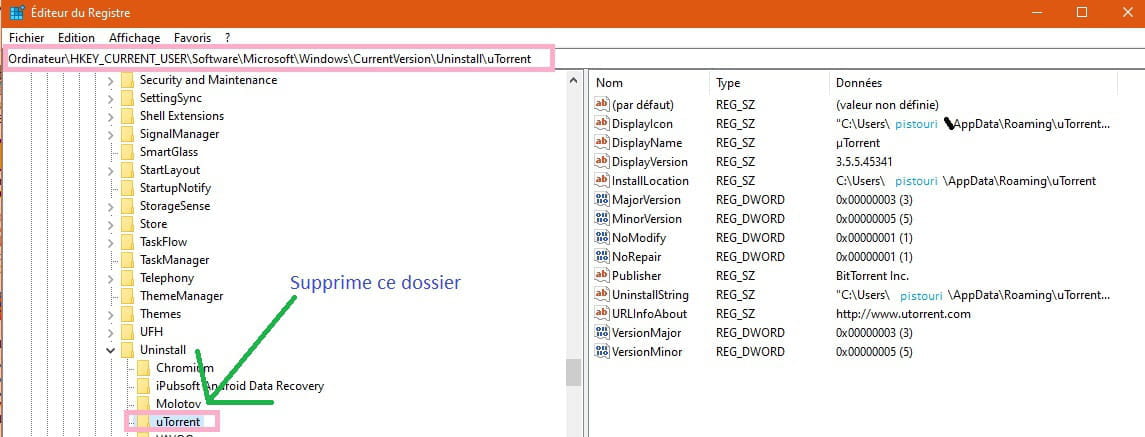
Then check if it is present in the registry.
Keyboard shortcut Windows + R and type → regedit
Go to this registry key:
HKEY_CURRENT_USER\Software\Microsoft\Windows\CurrentVersion\Uninstall\uTorrent
Only delete the folder → uTorrent
If you can't find it:
In the registry click on Edit then on Find
In the search box type → uTorrent
Click on → Find Next
Wait a bit for it to find it.
Then delete the uTorrent folder.
Ideally, make sure to uncheck the box during installation or an update:
→ Start uTorrent when Windows starts up
A+
--
pistouri -
Good evening,
I tried to uninstall Utorrent with Revo Uninstaller but I got this window that popped up
https://www.cjoint.com/c/IJfujWnXBqK
Then I clicked ok and I got this
https://www.cjoint.com/c/IJfukKb4KNK
What should I do now
Thank you -
pistouri Posted messages 19010 Registration date Status Contributor Last intervention Ambassador 8 732
Hello,
The Utorrent application is 0 KB.
So it's a ghost application.
With Revo, since you click on '' Scan '' to see if it finds any orphaned leftovers.
Click on Delete all if you see any.
Close Revo and restart the PC.
Check if it is present.
If you can't do it, manually repeat procedure 4.
A) This PC → Local Disk (C) → Users → (Your username) → AppData → Roaming
B) HKEY_CURRENT_USER\Software\Microsoft\Windows\CurrentVersion\Uninstall\uTorrent
Ps/ For your connection issue with CCM, avoid Internet Explorer for posting
Use another browser and disable your ad blocker for CCM only if you have one.
See you later
-
Hello,
Thank you Pistouri for helping me, I followed the instructions and apparently Utorrent has been successfully removed.
Thank you all for your help.-
You checked in the registry to see if you still have the uTorrent folder.
All that's left is to delete the temporary files.
You can either do it with the Windows Disk Cleanup, keeping the default boxes checked.
Or:
Press the Windows + R keys
Copy and paste → %TEMP%
Delete everything.
You can then mark your topic as resolved
Have a good end of the weekend.
-
-
Thank you Pistouri, I followed your instructions for the temporary files, I consider the matter resolved.
-
Hello.
I don't see why my message was deleted.
Dir /a:h *torrent*.*
Let me explain /a:h is used to check if the file is hidden and in which folder it is located.
*torrent means that there is also μTorrent
torrent*.* to see all the files containing torrent as well as their extensions.
This is by no means barbaric; you just need to know the commands for Cmd.exe, that's all, it doesn't cause any damage and I don't see how it's against the charter.