
FontForge overlay issue
Solved
Aaelis
Posted messages
81
Status
Member
-
Aaelis Posted messages 81 Status Member -
Aaelis Posted messages 81 Status Member -
Hello, 
Here, I’m editing a font (free). I’m adding strokes (for school). The problem is that when I export the font (with FontForge), I run into an issue at the joints of the lowercase b. For example, if the b is the first letter (before other b's or any other letter for now), the right junction becomes white. If the b is in the middle of other bs everything is fine, but if it’s the first position in a word, the left junction has the issue... I don’t understand at all why this happens...
Thank you for your help.
Configuration: Windows / Firefox 69.0
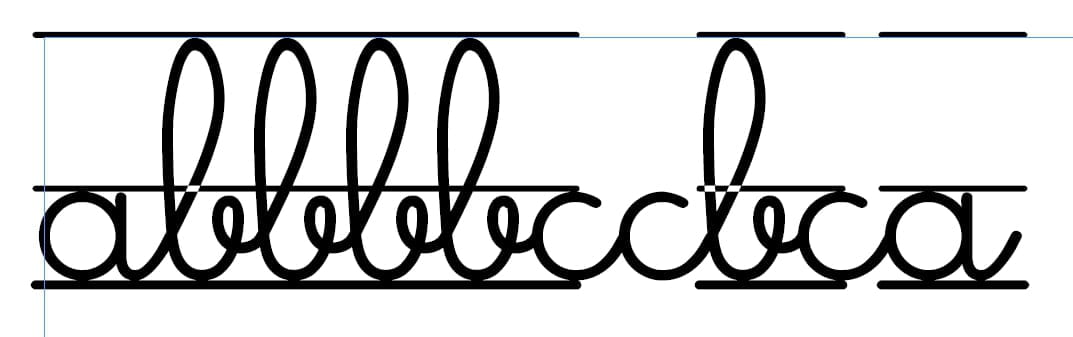
Here, I’m editing a font (free). I’m adding strokes (for school). The problem is that when I export the font (with FontForge), I run into an issue at the joints of the lowercase b. For example, if the b is the first letter (before other b's or any other letter for now), the right junction becomes white. If the b is in the middle of other bs everything is fine, but if it’s the first position in a word, the left junction has the issue... I don’t understand at all why this happens...
Thank you for your help.
Configuration: Windows / Firefox 69.0
2 answers
-
If you talk about the small white surface at the intersection of the added straight line and the line that forms the top of the letter b, it’s because of the overlap..
In one case, it’s the bar of the previous letter that is too long and hides the cut on the next b.
In fact, for what you want to do, you don’t need to add a simple bar, but incorporate it into the drawing of the letter... look at how a character is made.. it’s a vector surface and it’s mandatory so that when you change the size of the body, the shape follows without deformation or loss of definition
For example, for the character $ which for this font is a bar that crosses an “S”, the drawing is as follows :
The bar is included in the drawing and not placed on the drawing -
I don’t know FontForge,
It seems that the stroke you add is wider than the width of the letter (on the right)…
If I understand correctly what you want to do, you need all characters to possess this stroke or strokes so that when composing a word the whole thing forms a continuous line.
However, for the first letter of a word and the last you will have this stroke that will protrude because it corresponds to the character’s tracking value.-
Hello.
Indeed, that’s what I want to do. The problem I have is that if we look at the b, there is this space "blank" in a few cases. If it’s the first b, for example, even if it’s preceded by a letter with the bars already (the a is done, not the c). And that little white square overlay annoys me a lot x), I can’t seem to remove it
-

