Slide Show Recording
Solved
BOZO13
Posted messages
42
Registration date
Status
Member
Last intervention
-
BOZO13 Posted messages 42 Registration date Status Member Last intervention -
BOZO13 Posted messages 42 Registration date Status Member Last intervention -
Hello
Seventy years old, therefore not very skilled in computers. I have started to create slideshows with Xnvien.
I have saved about fifty .jpg photos and even a music background, I started playback and it's perfect. Then I clicked on "create an exe/scr file and saved it on a USB stick. It works on both the desktop and the laptop. But it doesn't work when I put the USB stick in the Freebox.
I tried to burn it, but it also failed. The box tells me "insert a valid disk." It's a normal DVD 4.7 GB.
Thank you very much in advance for alerting me to what I missed.
Christian
Seventy years old, therefore not very skilled in computers. I have started to create slideshows with Xnvien.
I have saved about fifty .jpg photos and even a music background, I started playback and it's perfect. Then I clicked on "create an exe/scr file and saved it on a USB stick. It works on both the desktop and the laptop. But it doesn't work when I put the USB stick in the Freebox.
I tried to burn it, but it also failed. The box tells me "insert a valid disk." It's a normal DVD 4.7 GB.
Thank you very much in advance for alerting me to what I missed.
Christian
5 answers
-
Good evening, the extension of your slideshow is certainly an executable file (.exe) and is therefore only readable by a computer. You need to save it in video format (.avi or .mp4) in order to burn it onto a CD or DVD and thus be able to read it on other devices.
-
Hello matos 1301
First of all, a big thank you for your quick response and availability.
The "create a video" box is indeed greyed out, but I have looked everywhere and can’t find a way out. I searched for Addon in every corner... nothing.
If you have the solution, it would be a great pleasure for me.
Christian
-
-
Hello,
You need to create a video file and not an executable, as this type of file can only be played on a computer.
After adding all your images, choosing the transition type, and adding or not adding music, you need to click on Create Video:
A new window opens, in which you can choose the resolution (size to be defined according to the images) of your video slideshow, and the codec, etc.:
The video file can be in AVI (preferably choose XviD, I think) or in WMV, because personally, I couldn't create a slideshow with MPG-1/MPG VCD which should also be MPEG-1 in theory.
The AVI should work on the Freebox, for the WMV I don't know... and for burning, since the file shouldn't be very large, I don’t think it’s really useful to "waste" a DVD.
If the Create Video button is not active, see here: https://newsgroup.xnview.com/viewtopic.php?t=37406
Best regards
PS: I am using the portable version
-
Hello Ziggourat
First of all, a big thank you for your promptness and availability.
The "create a video" box is indeed grayed out, but I've searched everywhere and can't find a way around it. I've looked for Addon in every corner... nothing.
If you have the solution, it would be a great pleasure for me.
Christian -
Go to this page: https://www.xnview.com/fr/xnview/#addons and download the one titled "Slide video export," then create a subfolder named after the addon in the "Addon" folder of the Xnview directory and move the contents of the previously downloaded zip file there.
-
-
-
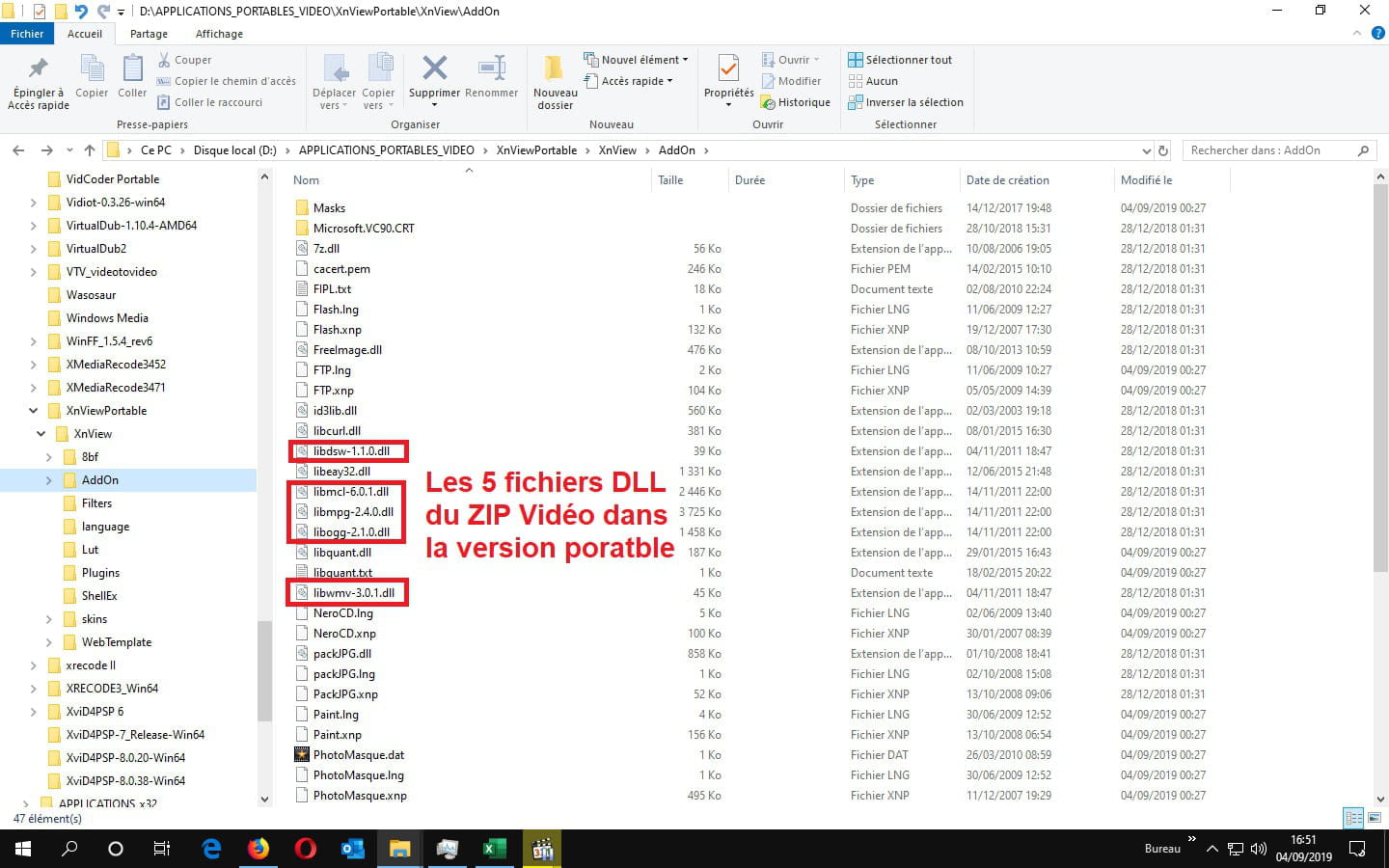
With the portable version, the 5 files contained in the ZIP archive are already in the Addon directory:

Try to place them this way in your Addon folder and not in a folder you create...
-
-
Hello Ziggourat
I tried Xvid and Mpeg VCD and the result is the same (PJ Capture)
One question arises, do I have the right version? I downloaded it from a site called "top 10 free software... etc." should I change version or site?
Closing to provide the results I realize that I have an icon on the desktop of an "essai.avi" trial being the name I gave in my attempts to "create a video".
Sorry to keep asking.
Thanks again
Christian
-
Well, it's not working because the encoding is not happening due to the DLL
libwmv-3.0.1.dll
which is not recognized by the software, see your message HERE.
If you want a hassle-free version since it's complete, but will take up more space, take the Extended version from the official website: https://www.xnview.com/fr/xnview/
Furthermore, the size of the image of your video slideshow is 640x480, which corresponds to an image in 4:3, so if you want to have an image in 16:9, you need to set for example 640x360, or 720x406, or 960x540 or 1280x720, etc., which is a ratio of about 1778.
Important note: the effects are not present with the video slideshow on my end, while they are if I play the preview with the Play button or if I create an EXE file :(
Since this software does not meet my expectations for a video slideshow, personally, I would rather use another software, but it's up to you... ;-) -
-
-
Re-Hello Ziggourat
After uninstalling the "classic" version, I installed the "extended" one. The video box is not grayed out from the start, but unfortunately, the results for the four possible encoding options are the same. Windows stops working.
I don't know what to do anymore.
What solution can I choose?
Best regards
Christian-
If you are on Windows 10, you have the Photos app that could allow you to create a video slideshow.
Then there are the two older editing applications from Windows: Windows Movie Maker 2.6 and Windows Live Movie Maker that you can download and install with this post from extempor: https://forums.commentcamarche.net/forum/affich-34518845-installation-de-movie-maker-sur-windows-10#1
Then you probably have all the free editing software that should allow it like:
- OpenShot Video Editor: https://www.commentcamarche.net/telecharger/tv-video/16615-openshot-video-editor/
- Shotcut: https://www.commentcamarche.net/telecharger/tv-video/20067-shotcut/
- VSCD Video Editor: http://www.videosoftdev.com/fr/free-video-editor
- HitFilm Express: https://fxhome.com/hitfilm-express
- DaVinci Resolve: https://www.blackmagicdesign.com/fr/products/davinciresolve
The last two are more geared towards advanced amateurs!
Then, there is also PhotoRécit which, as I remember, is very easy to use.
There should be others like PhotoStage from NCH, but the free version, if it exists, likely has limitations: https://www.nchsoftware.com/slideshow/fr/index.html
From the same publisher, I use their editing software (VideoPad in the English version for free) because the French version is "problematic" regarding its free use.
To summarize, if you're looking for an easy software, check out PhotoRécit or one of the two versions of Movie Maker, or even PhotoStage, but if you want something more "advanced," you need to use editing software.
-
-
Hello Ziggourat
Thank you very much
I will try to choose among all of them.
For your information
I do not speak English at all
My PC runs on Windows 8.1
I would like to be able to add background music
Have a good weekend
Christian-
I realize that I forgot to tell you that there are also online sites that allow you to create slideshows like Kizoa, Animoto, or Renderforest for example.
Not using them, I have no idea if it's possible to export creations to your computer, nor the limitations of these sites in free use.
As for English, I don't speak it either, but by watching tutorials and the location of the buttons, you can manage to get by anyway ;-)
Finally, if your computer crashes while creating a slideshow, it might be that it's not powerful enough for the encoding phase, but I doubt that it's really the cause of it though... -
-