
Desautomatise movie maker
Solved
prachel
-
ziggourat Posted messages 24643 Registration date Status Contributor Last intervention -
ziggourat Posted messages 24643 Registration date Status Contributor Last intervention -
Hello,
Movie Maker works normally, but since my last video edit, all the photos on my PC open in Movie Maker, even those that are in separate folders (in Pictures).
What can I do to open my photos independently of Movie Maker?
Thank you
Configuration: Windows / Chrome 75.0.3770.100
Movie Maker works normally, but since my last video edit, all the photos on my PC open in Movie Maker, even those that are in separate folders (in Pictures).
What can I do to open my photos independently of Movie Maker?
Thank you
Configuration: Windows / Chrome 75.0.3770.100
3 answers
-
Hello, I no longer have WMM, it is no longer offered by Microsoft.
To answer your question, I think I remember that you have a box that says "add videos and photos." You will find your software organization with the photo folder, and you will look in your subfolders for the files necessary for your editing but not your entire folder. Here’s a summary to illustrate the method.
https://www.youtube.com/watch?v=M5dDWZzPvI0
--
"Donkeys change their minds, not fools."
Please remember to mark your message as "resolved" if that’s the case. -
Hello,
Right-click on your Photo (Image) --> Properties --> Opens with --> Edit and choose the application with which you want images to open by default.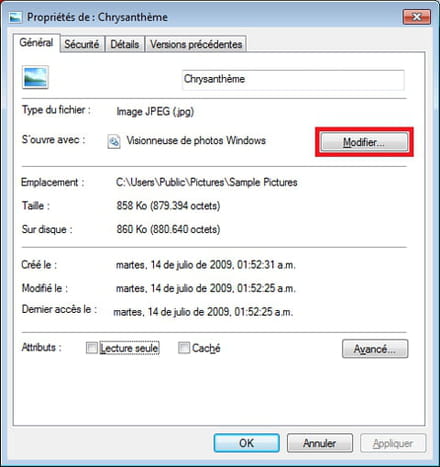
There are other ways to do it, but this one seems quite simple to me: https://forums.cnetfrance.fr/tutoriels-windows-10/489459-windows-10-comment-changer-le-programme-par-defaut-pour-ouvrir-un-fichier
Best regards
-


