
Steam Crash on Startup [LavasoftTCPService.dll]
Solved
Yvac
Posted messages
6
Registration date
Status
Member
Last intervention
-
Yvac Posted messages 6 Registration date Status Member Last intervention -
Yvac Posted messages 6 Registration date Status Member Last intervention -
Hello,
I've been having a problem with Steam for a while now, and after trying to uninstall and reinstall it, as well as scanning with Malwarebytes, none of the solutions have worked.
My problem is that Steam crashes on startup after displaying this message:
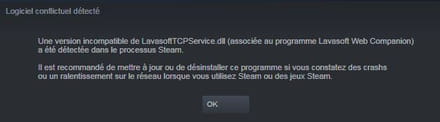
If anyone has a solution, I would appreciate it. Thank you in advance.
Yvac
I've been having a problem with Steam for a while now, and after trying to uninstall and reinstall it, as well as scanning with Malwarebytes, none of the solutions have worked.
My problem is that Steam crashes on startup after displaying this message:
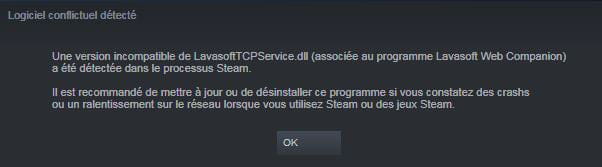
If anyone has a solution, I would appreciate it. Thank you in advance.
Yvac
1 answer
-
Hello,
Uninstall Web Companion using RevoUninstaller in advanced scan mode.
If you can't uninstall it, do the following:
Download FRST and once downloaded, save it on the desktop, then open it, you will see this: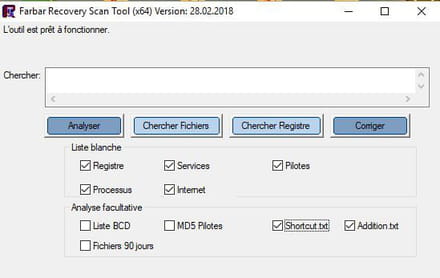
Then check the shortcut box like this: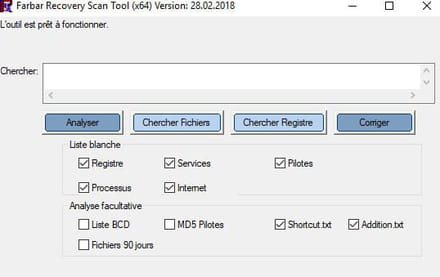
Click on Analyze, at the end of the scan, you will have three text files on the desktop: FRST, Addition, and Shortcut. Send these reports to https://pjjoint.malekal.com/, see this tutorial paragraph Send the analysis reports to pjjoint, then provide the three links generated by Pjoint in your next message.
bazfile
Moderator/Contributor security.-
-
Here are the links to the reports:
-frst.txt : https://pjjoint.malekal.com/files.php?id=FRST_20190606_j6z15l10c7k15
-addition.txt : https://pjjoint.malekal.com/files.php?id=20190606_7t7x11h9r6
-shortcut.txt : https://pjjoint.malekal.com/files.php?id=20190606_t6q10b6d8w14 -
Uninstall the following software with RevoUninstaller in advanced scan mode:
- Spybot Search & Destroy this software is useless.
- VLC Media Player Packages
- ValueApps
Procedure to follow in the indicated order:
1- Open FRST
- Copy the entire script that is in the box below:Start::
CreateRestorePoint:
CloseProcesses:
Winsock: Catalog9 01 C:\Windows\SysWOW64\LavasoftTcpService.dll [342016 2015-08-20] (Lavasoft Limited)
Winsock: Catalog9 02 C:\Windows\SysWOW64\LavasoftTcpService.dll [342016 2015-08-20] (Lavasoft Limited)
Winsock: Catalog9 03 C:\Windows\SysWOW64\LavasoftTcpService.dll [342016 2015-08-20] (Lavasoft Limited)
Winsock: Catalog9 04 C:\Windows\SysWOW64\LavasoftTcpService.dll [342016 2015-08-20] (Lavasoft Limited)
Winsock: Catalog9 15 C:\Windows\SysWOW64\LavasoftTcpService.dll [342016 2015-08-20] (Lavasoft Limited)
Winsock: Catalog9-x64 01 C:\Windows\system32\LavasoftTcpService64.dll [422400 2015-08-20] (Lavasoft Limited)
Winsock: Catalog9-x64 02 C:\Windows\system32\LavasoftTcpService64.dll [422400 2015-08-20] (Lavasoft Limited)
Winsock: Catalog9-x64 03 C:\Windows\system32\LavasoftTcpService64.dll [422400 2015-08-20] (Lavasoft Limited)
Winsock: Catalog9-x64 04 C:\Windows\system32\LavasoftTcpService64.dll [422400 2015-08-20] (Lavasoft Limited)
Winsock: Catalog9-x64 15 C:\Windows\system32\LavasoftTcpService64.dll [422400 2015-08-20] (Lavasoft Limited)
C:\Windows\SysWOW64\LavasoftTcpService.dll
C:\Windows\system32\LavasoftTcpService64.dll
C:\Program Files (x86)\Lavasoft
FF HKLM\SOFTWARE\Policies\Mozilla\Firefox: Restriction
cmd: netsh winsock reset
EmptyTemp:
Hosts:
Reboot:
End::
2- Once the script is copied, return to FRST and click on Fix.
FRST will automatically take the script from the clipboard and execute it.
Let the correction take place, and once it is finished, restart your computer.
Then once your computer has restarted:
4- You will have a Fixlog file on your desktop, send it via https://pjjoint.malekal.com/ then put the link generated by Pjoint in your next message.
5- Reset your internet browsers https://forums.commentcamarche.net/forum/affich-37585758-reinitialiser-son-navigateur
6- CHECK AND LET ME KNOW IF YOUR PROBLEM IS STILL PRESENT. -
-
Here is the link to the fixlog: https://pjjoint.malekal.com/files.php?id=20190606_v11d5z14q15m15
And my problem has been solved, thank you.
-


