How to flash the BIOS
Hello,
I can't update my BIOS.
Let me explain my process:
My motherboard is: GA-Z77-D3H
I went to: https://www.gigabyte.com/fr/Motherboard/GA-Z77-D3H-rev-12#support-dl-bios
I downloaded for Europe
I extracted the file and put it on a USB drive
I went to my BIOS to flash it
And when I start the file at 30%, it gives me an error.
I can't update my BIOS.
Let me explain my process:
My motherboard is: GA-Z77-D3H
I went to: https://www.gigabyte.com/fr/Motherboard/GA-Z77-D3H-rev-12#support-dl-bios
I downloaded for Europe
I extracted the file and put it on a USB drive
I went to my BIOS to flash it
And when I start the file at 30%, it gives me an error.
7 answers
-
ContributorHello,
Your approach seems good... and yet, something is not right...?
So, we need to give more details...
-- What is the version of your motherboard..?
-- Have you checked if the downloaded version is newer than your BIOS/motherboard version..?
-- How are you flashing...? using the BIOS functions... or from Windows..?
-- Generally, it happens in two stages...
a) Loading the file from your USB stick to the BIOS first.
b) Flash operation, the buffer memory is written into the Flash or Nand memory and the progress bar moves slower...
When you say 30%, is it during process a) or process b)..??
-- Have you formatted your USB stick just before..? and is it empty..? it could also be too slow, you need to check its specifications..?
Does the error message say a bit more..?? give the full text.. -
ContributorHello,
Here are the details of the procedure, starting from page 64, BIOS Update Utilities:
http://download.gigabyte.eu/FileList/Manual/mb_manual_ga-z77(h77)-d3h_v1.2_e.pdf
Error with the format of the USB key used or the file on it, who knows.
Go over the procedure described.
--Auto message
If you are here, it means you don't know, so... listen and understand;-)
Mini Reminder to the volunteers who are helping you: Respond, Respect, Politeness,... -


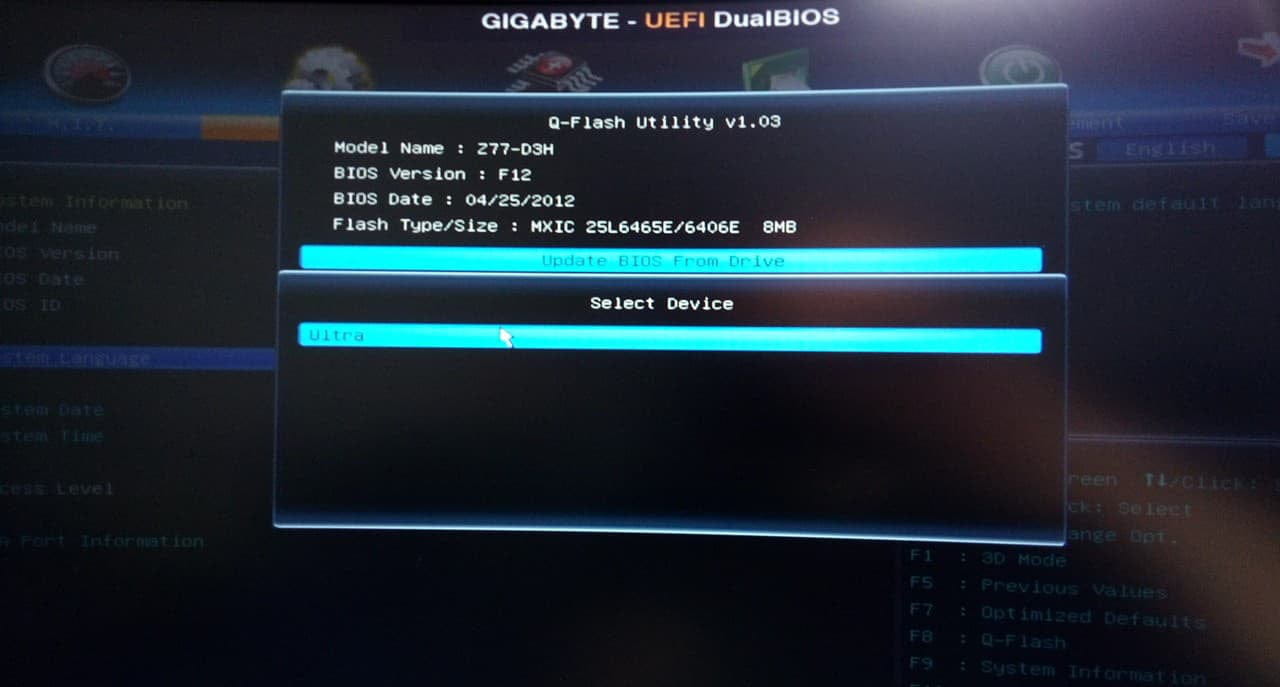
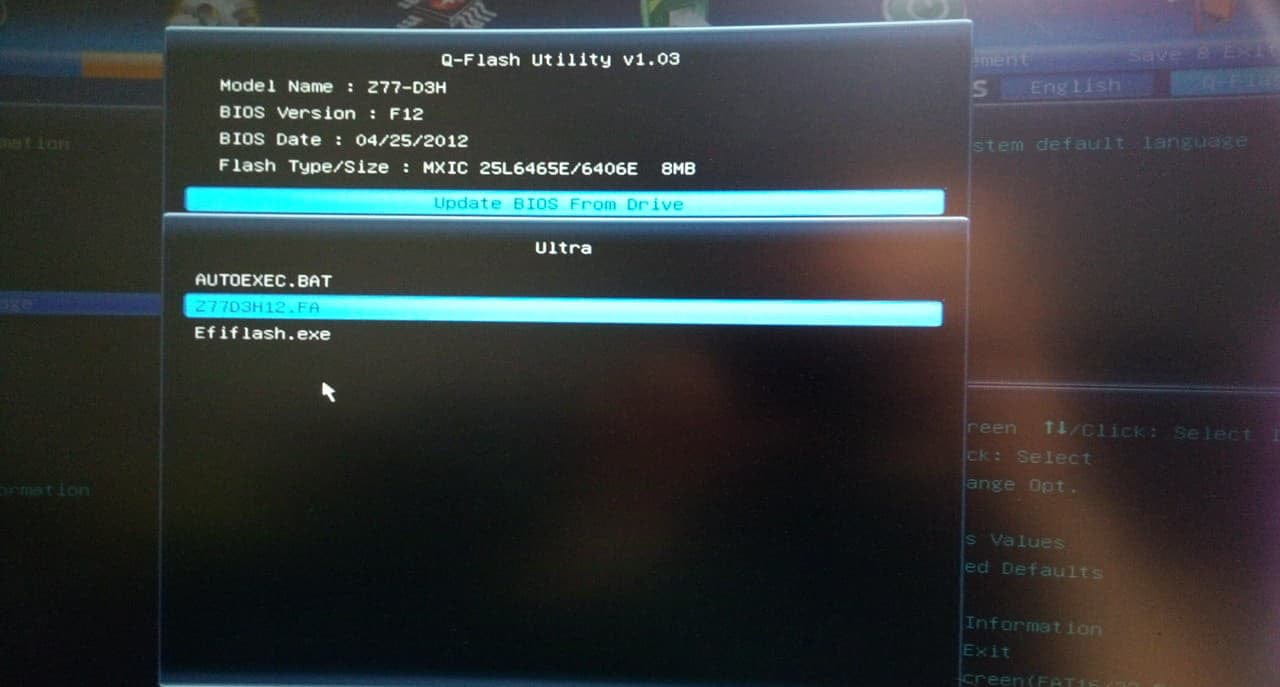
Here's how I proceed and I've tried the Fa and FBb versions
Thank you, I will check that,
and my BIOS version is 2012 and the latest is 2014-
ContributorA BIOS version is designated as follows: MXIC 25L6465E/6406 ____ 2012 or 2014 is not enough, there are so many BIOS released in 2012 for example...
Your photos are unreadable for me... You'd better post them on the cjoint.com site and come here to give the link https://cjoint.com/
The brand of a USB key does not determine its read and write response times... It's by copying a file onto it that we see the speed in megabits per second... let's say a decent key is around 80 megabytes in read and about 15 in write... But some are at 0.8, which means it takes all day to copy a video..!
USB3 is not good for these things... it wants to go fast... USB keys and the BIOS are not capable of that... it's better to be on USB2, go slower and eventually succeed... The championship is for the others.
So... we need to be sure that this BIOS corresponds properly to your motherboard... from what I've seen, it only matches three versions of this motherboard Rev 1.0, 1.1, and 1.2.
-
-
When I extract it to the USB key, it doesn't show the same thing as on the site; it extracts it like this and doesn't ask me to reboot the PC, I do it myself.

And the USB key is a SanDisk Ultra 32GB USB 3. -
ContributorThey say to have a FAT32 key (it needs to be formatted properly in FAT32)
put the BIOS file on it.
But it's probably not the problem...
Did you see that there are three different versions for the same motherboard with seemingly different BIOS?
Your link
https://www.gigabyte.com/fr/Motherboard/GA-Z77-D3H-rev-12#support-dl-bios
And two others
https://www.gigabyte.com/fr/Motherboard/GA-Z77-D3H-rev-11#support-dl-bios
and
https://www.gigabyte.com/fr/Motherboard/GA-Z77-D3H-rev-10#support-dl-bios
I don't know if you can see anywhere if it's rev 1.0 or 1.1 or 1.2
(does the f12 mean 1.2? Good question...)
-
ContributorMoreover, you have three things about this motherboard:
1 > What is DualBIOS™? Motherboards supporting DualBIOS have two built-in BIOS, a primary BIOS and a backup BIOS. Typically, the system operates on the primary BIOS. However, if the primary BIOS becomes corrupted or damaged, the backup BIOS will take over at the next system boot and copy the BIOS file into the primary BIOS to ensure the normal operation of the system. For system security reasons, users cannot manually update the backup BIOS.
So this is a recovery BIOS mode in case of issues. It cannot be modified.
2 > What is Q-Flash™? With Q-Flash, you can update the system's BIOS without having to first enter operating systems such as MS-DOS or Windows. Integrated into the BIOS, the Q-Flash tool frees you from the hassles of the complicated BIOS flashing process.
What you need to do, but there may be an issue with the USB format, which must be FAT, and only put the file related to the BIOS
(it should be without autoexec and efiflash, just the Z77.... file that you have after extraction)
3 > What is @BIOS™? @BIOS allows you to update the system's BIOS in the Windows environment. @BIOS will download the latest BIOS file from the nearest @BIOS server site and update the BIOS.
If you have this option, take it, it will fetch the correct BIOS from the internet and install it.
-
Contributorbysentin1 did you manage with your BIOS?
--Auto message
If you are here, it's because you don't know, so... listen and understand ;-)
Mini Guidelines for the volunteers who help you: Reply, Respect, Politeness,...