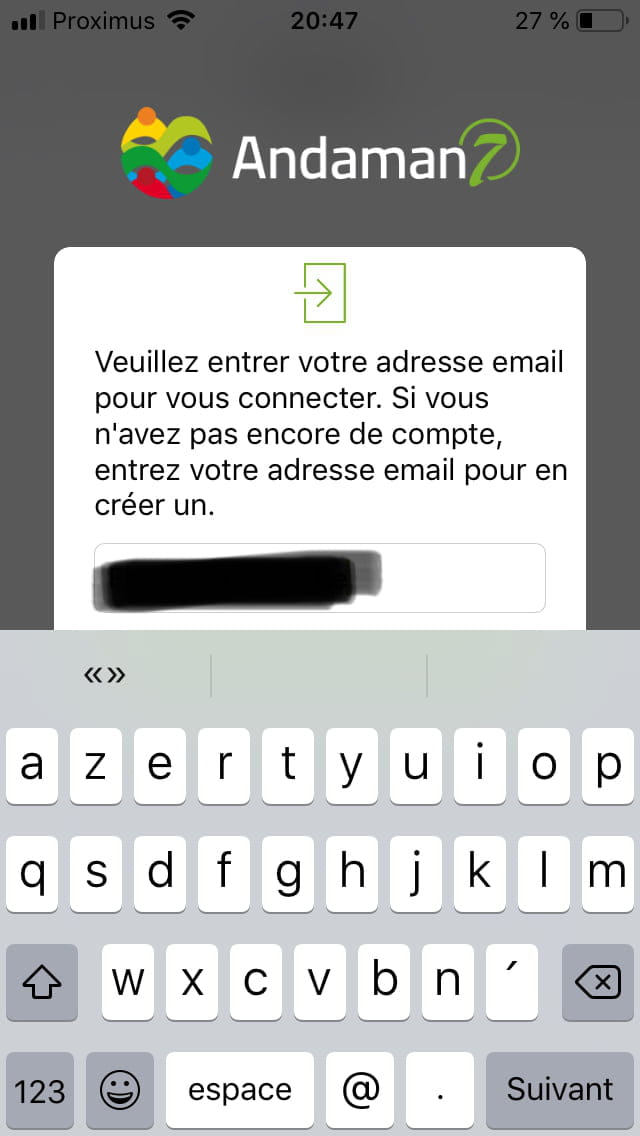
Hide the keyboard on iPhone SE to continue
Solved
Anonymous user
-
Anonymous user -
Anonymous user -
My question is ridiculous, but I'm really stuck...
I'm on an iPhone SE and I want to sign up for an app. The problem is that I'm typing my email address and the "Next" button is hidden by the keyboard, which I can't lower. The "Next" key on my keyboard doesn't do anything, and I also don't know how to rotate the screen.
Basically: I'm stuck.
Thank you for your help.
I'm on an iPhone SE and I want to sign up for an app. The problem is that I'm typing my email address and the "Next" button is hidden by the keyboard, which I can't lower. The "Next" key on my keyboard doesn't do anything, and I also don't know how to rotate the screen.
Basically: I'm stuck.
Thank you for your help.
3 answers
-
Well then... for some reason, I had closed it without closing the application. I just reopened it, and the keyboard has disappeared.
I've done it 100 times, and now, by accident, it worked.
Thanks anyway for taking the time to respond to me.-
(Uniquely, the person who wrote the problem presentation can do it)
Gear ("cogwheel") at the top right next to the title.
=> Think of future readers by marking it as resolved ;)
https://www.commentcamarche.net/infos/25917-marquer-un-fil-de-discussion-comme-etant-resolu/ -
Hi, you made it, that's the main thing. I did some research, and it seems that this problem only occurs on the iPhone SE, which doesn't have the same on-screen keyboard as a more recent iPhone that has arrows to bring the keyboard down.
Fred.ml
-
-
Hello,
Touch the top of the screen (where the time is).
Turn off the screen (in sleep mode) and turn it back on.
Is it working?
--
Please keep me updated => "It's resolved thanks to / I found that I needed to" or "Still stuck"
because I often have several steps and always have a trick up my sleeve!!! -
Hello, try this, after typing your email address, touch the information page to see if the keyboard disappears.
If the keyboard doesn't disappear, tap the page or try to slide it up/down, left/right to make the keyboard go away.
--
Fred.ml