
Videos displaying with incorrect orientation.
Solved
kisscool73
Posted messages
93
Status
Member
-
pistouri Posted messages 19010 Registration date Status Contributor Last intervention -
pistouri Posted messages 19010 Registration date Status Contributor Last intervention -
Hello,
I'm doubting I'll receive an answer to my question, but I'm asking anyway.
I've been using the "Mega pack codec Klite" forever, and recently I downloaded a new version to update my codecs. (I use Media Player Classic to watch my videos)
Since then, videos taken with my phone (and only those from my phone) open on my PC with random orientations (often vertical instead of horizontal, sometimes upside down...)
Everything suggests that the problem comes from the videos or my phone.
But even the videos that opened correctly before this update no longer open in the right orientation. The majority of videos taken with my phone can no longer be viewed in the correct orientation, whereas before the update, I never had any problems.
I reinstalled "klite codecs," but there was no difference. Then I reinstalled the old version, but it's still the same. I scrutinized the settings, but I couldn't find anything to solve my problem, just shortcuts to rotate the video. However, there is no longer a full-screen option available because it allows me to see the video in the right direction, but with huge black borders around it.
If anyone has an idea about my problem or a solution to suggest, I’m open to any proposals.
Configuration: Windows / Chrome 72.0.3626.121
I'm doubting I'll receive an answer to my question, but I'm asking anyway.
I've been using the "Mega pack codec Klite" forever, and recently I downloaded a new version to update my codecs. (I use Media Player Classic to watch my videos)
Since then, videos taken with my phone (and only those from my phone) open on my PC with random orientations (often vertical instead of horizontal, sometimes upside down...)
Everything suggests that the problem comes from the videos or my phone.
But even the videos that opened correctly before this update no longer open in the right orientation. The majority of videos taken with my phone can no longer be viewed in the correct orientation, whereas before the update, I never had any problems.
I reinstalled "klite codecs," but there was no difference. Then I reinstalled the old version, but it's still the same. I scrutinized the settings, but I couldn't find anything to solve my problem, just shortcuts to rotate the video. However, there is no longer a full-screen option available because it allows me to see the video in the right direction, but with huge black borders around it.
If anyone has an idea about my problem or a solution to suggest, I’m open to any proposals.
Configuration: Windows / Chrome 72.0.3626.121
1 answer
-
pistouri Posted messages 19010 Registration date Status Contributor Last intervention Ambassador 8 732
Hello,
1- With your phone:
Never film vertically.
Hold your smartphone horizontally to film in landscape mode.
Then do a test on your PC once the video is transferred.
2- Troubleshooting solution with shortcuts in Media Player Classic
Open Media Player Classic
Click on "View" then "Options".
Click on "Keys" under the "Player" section on the left side. This displays a list of all key commands on the right side. Keyboard shortcuts are a combination of appropriate keys that perform a task in the player.
Alt + 877 for example
Try the other combinations
Alt + 878 to Alt + 882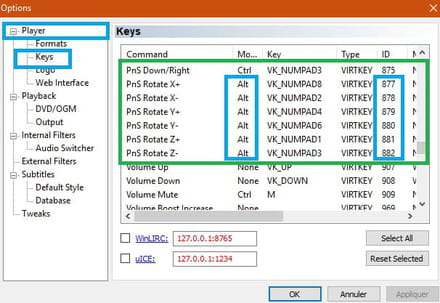
3- Use another video player
One of the most reputable is VLC
Then open the VLC software
Click on Media in the menu bar then on Open file
Browse through your hard drive’s file tree for the video made with your smartphone
Then click on Tools in the menu bar then on Effects and Filters
Select the Video Effects tab then the Geometry tab
Check the transform box
In the dropdown list choose the type of rotation you want to apply to your video (90°, 180° or 270°)
Click the close button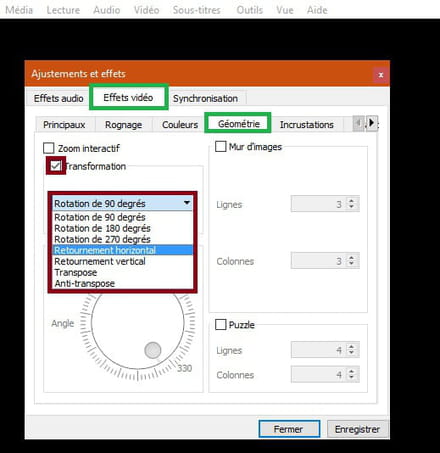
4- Try with the (less known) player Light Alloy
- The codecs are built in by default in Light Alloy without needing to install an additional codec pack.
A+
-
Thank you so much for your incredibly detailed response.
I really thought I would be left without an answer, as my problem is so specific and particular.
Following your response, I tried opening the videos with VLC, and it's the same but in a different way lol.
Actually, it's always upside down or in the wrong orientation, but it's never the same issue with VLC or Windows Media Player Classic (for example: incorrectly oriented on Windows Media Player Classic, and upside down on VLC)
So I tried on Windows Media Player "simple" (not the classic), and there it works as before, all the videos are oriented correctly without issues.
Thank you for your solution, but it still bothers me a bit because I want to continue using WMPC, whereas now I have to remember to right-click to open with ... to see the video the right way.
Why can one software play my videos always the right way and others cannot! Especially since before the WMPC update, I didn't have this problem, which makes me think that it's not the videos that are the issue, but rather the players. -
Hello,
→ Why can some software always read my videos the right way and others cannot!
Maybe you didn't mention the version of your Windows.
Or maybe a Windows Update, sometimes there are glitches in the fixes.
Have a good evening.
-


