Unable to connect to the Xbox W10 app
Solved
mistercroquant
Posted messages
57
Status
Member
-
pistouri Posted messages 19010 Registration date Status Contributor Last intervention -
pistouri Posted messages 19010 Registration date Status Contributor Last intervention -
Hello,
I just installed Windows 10 and I can't connect to the Xbox app, I keep getting this message:

The problem is that I need it to play a game I downloaded from the Windows Store.
I sent a report via Microsoft’s feedback hub and as I expected, no response!
Do you have a solution? Thank you!
Configuration: Windows / Chrome 72.0.3626.121
I just installed Windows 10 and I can't connect to the Xbox app, I keep getting this message:

The problem is that I need it to play a game I downloaded from the Windows Store.
I sent a report via Microsoft’s feedback hub and as I expected, no response!
Do you have a solution? Thank you!
Configuration: Windows / Chrome 72.0.3626.121
4 answers
-
pistouri Posted messages 19010 Registration date Status Contributor Last intervention Ambassador 8 732
Hello,
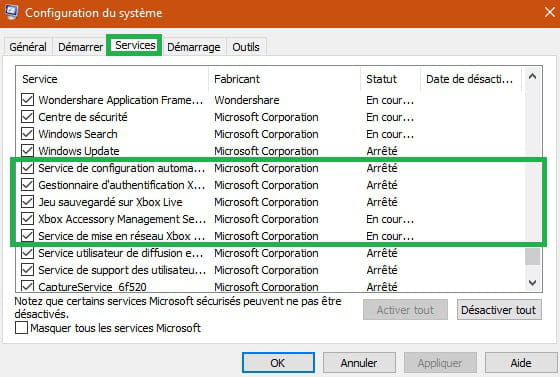
1- Check if Xbox services start with your PC
In the Cortana search box type → msconfig
Open → System Configuration
Or with the keyboard keys Windows + R
Go to the Services tab
Make sure all Xbox services are checked (on the left)
After checking all Xbox services, save the changes.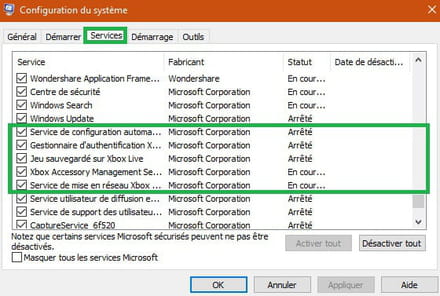
Watch the video for better understanding here
2 - Make sure Xbox services are not disabled
In the Cortana search bar type → services
Look for the following services:
Xbox Live Authentication Manager
Xbox Live Saved Games
Xbox Live Networking Service
Xbox Accessory Management




Startup type → Automatic
If the service is not started, click on Start to start the services.
Click Apply and then OK to save changes.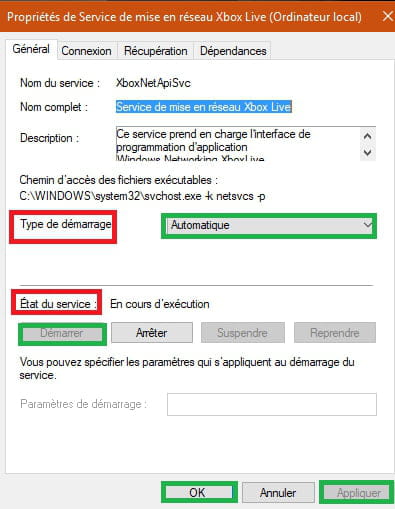
Tip to find a mentioned service more quickly
Select a service in highlight (blue) regardless of the service.
For example, type the letter '' j '' and search for the service Xbox Live Saved Games
Same for others, type the letters S, G, X
3- Make sure Windows Update is up to date.
Settings → Updates & Security
Install any missing updates if you see any.
A+