
Recognition of a GPS connected to a USB port
fortitude75
Posted messages
6
Status
Member
-
fortitude75 Posted messages 6 Status Member -
fortitude75 Posted messages 6 Status Member -
Hello
I previously used a car GPS "TomTom One," which I connected to the PC via a USB port to read or write POI (points of interest) files between the two devices, with the GPS appearing in Windows File Explorer as an external drive. No problem.
When the "One" reached the end of its life, I purchased a "TomTom GO 510." When I connect it to the PC via USB, it is recognized, but Windows does not assign it an external drive letter, and it does not appear in File Explorer. Therefore, there is no possibility to copy files between the GPS and the PC as I did with the "One." I noticed that this GPS appears as a 'Network Card' and no longer as a 'Drive'. (See attached screenshot)
Is there a way to work around this problem?
Thank you.
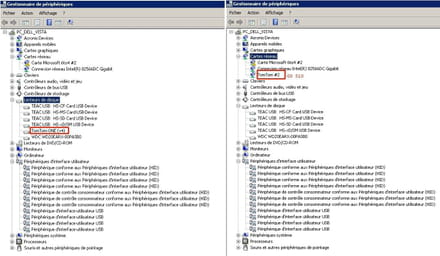
I previously used a car GPS "TomTom One," which I connected to the PC via a USB port to read or write POI (points of interest) files between the two devices, with the GPS appearing in Windows File Explorer as an external drive. No problem.
When the "One" reached the end of its life, I purchased a "TomTom GO 510." When I connect it to the PC via USB, it is recognized, but Windows does not assign it an external drive letter, and it does not appear in File Explorer. Therefore, there is no possibility to copy files between the GPS and the PC as I did with the "One." I noticed that this GPS appears as a 'Network Card' and no longer as a 'Drive'. (See attached screenshot)
Is there a way to work around this problem?
Thank you.

6 answers
-
Hello,
I think the best thing you can do to start with is to check the manufacturer's website for your GPS.
Normally, you should find your answer there.
--
Greetz from
Dj Dakta -
Thank you djdakta, but that was just my initial reaction. On TomTom's site there is nothing about it, and on the associated discussion forum, nothing either.
That is why I posted this question on CCM, which is much more technically oriented, especially since this issue can affect any USB device, not just a GPS: Why are some USB devices recognized as a 'Network Card', while others are recognized as a 'Disk Drive'? -
So,
Would you like to try the following:
Open Device Manager,
under the heading "Network adapter" your device should appear,
Uninstall the driver by right-clicking on the name of your device and choosing
uninstall driver then restart the device
by pressing the power button
until you hear a drum roll.
Reconnect your device.
What happens after doing this?
--
Greetz from
Dj Dakta -
I found this on a TomTom discussion forum:
1. Reset:
• GPS so device "off" and connected to the computer, keep the power button pressed until the TomTom restarts and displays a black screen with white lettering (a bit like computer boot). This can take up to 25/30 seconds.
• Once on this screen, turn off the device, wait 10 seconds and turn it back on by pressing the power button until you hear the drums.
2. MyDRIVE setup:
• On your computer, next to the clock, right-click the Mydrive icon and go to the "Settings" menu > click "Cache" > "Clear cache".
• Click on Save settings"
The connection between your device and MyDRIVE should then be established and any available updates should start or be offered to you.
--
Greetz from
Dj Dakta -
In case the reset doesn’t work and by comparison I had the same issue on a recent Garmin and the problem came from the device’s own GPS “auto-detection.” I tried quite a few things before finding the info, none of which helped. Among other things: resetting the GPS, updating the USB drivers on the PC, etc. What was odd was that on my desktop PC (less than a year old) I had exactly the same thing; I could hear the USB detection sound but there was no drive letter mapping. On my laptop, no detection issues.
The cause:
By default the GPS is set to AUTO to know whether it should just “charge” or switch to “MTP file” mode, which enables the ability to “map.” Apparently Garmin isn’t top in this area and I have the latest GPS updates.
On Garmin I had to dig through the forums to find the menu, which is hidden and allowed me to switch to MTP mode rather than AUTO. Since then, my new GPS works fine on all machines.
Idea in case this could exist on TomTom.
—
“We swallow the lie that flatters us and drink, drop by drop, a truth that is bitter to us.” -
Thanks for the responses.
1 - Uninstalling the driver:
I tried the procedure on my laptop with W10: The mystery thickens because unlike what happened under Vista, the GPS does not appear in 'Network connections' (Of course, it does not appear in 'Disk drives' either). So, no driver to uninstall.
2 - Reset:
I performed the procedure, which went fine, but the problem persists.
3 - MyDrive configuration:
What TomTom calls 'MyDrive' is actually the GPS itself, connected via USB (And they call 'MyDriveConnect' their program that must be installed on the PC.)
Since the GPS icon does not appear in the taskbar, we cannot click it to clear its cache.
4 - It is quite possible that the solution proposed by madmyke is the right one: In any case, the symptoms are identical to what he observed with his Garmin. Now, to find how, at TomTom, to switch from 'AUTO' mode to 'MTP' mode to get an external drive letter.

