"Unable to access Windows due to 'secure boot violation' message"
Walloute
-
Malekal_morte- Posted messages 178136 Registration date Status Moderator, Security Contributor Last intervention -
Malekal_morte- Posted messages 178136 Registration date Status Moderator, Security Contributor Last intervention -
Hello,
I have an Asus x7751L, Windows 10
During a startup, I received a message:
“SECURE boot violation
invalid signature detected. Check secure boot policy in setup”
Since then, I have disabled the secure-boot option in BIOS.
Now, when I try to start it, the screen stays stuck on the Asus logo.
In the Boot Option Priorities, there are 3 options:
windows boot manager (P0: *string of characters*)
P1: *string of characters*
P0: *string of characters*
I changed this order, but it doesn’t change anything.
I tried to boot with a USB drive made with the tool downloadable from the Microsoft site to create an installation medium, hoping to eventually get to the Repair your computer > Troubleshoot > Advanced options > System Restore option, because I have work-related data on this computer that I really want to recover. But the BIOS does not recognize my USB drive.
I don’t know what to do anymore, and I would not have dared to ask for help before spending 3 days searching through several forums.
If anyone has any ideas, that would be great, thank you :)
I have an Asus x7751L, Windows 10
During a startup, I received a message:
“SECURE boot violation
invalid signature detected. Check secure boot policy in setup”
Since then, I have disabled the secure-boot option in BIOS.
Now, when I try to start it, the screen stays stuck on the Asus logo.
In the Boot Option Priorities, there are 3 options:
windows boot manager (P0: *string of characters*)
P1: *string of characters*
P0: *string of characters*
I changed this order, but it doesn’t change anything.
I tried to boot with a USB drive made with the tool downloadable from the Microsoft site to create an installation medium, hoping to eventually get to the Repair your computer > Troubleshoot > Advanced options > System Restore option, because I have work-related data on this computer that I really want to recover. But the BIOS does not recognize my USB drive.
I don’t know what to do anymore, and I would not have dared to ask for help before spending 3 days searching through several forums.
If anyone has any ideas, that would be great, thank you :)
2 answers
-
Hi,
You can disable secure boot in the BIOS options, see: https://www.malekal.com/comment-desactiver-le-secure-boot/
But normally it's not necessary.
Your secure boot violation message may be due to the fact that your USB key is incorrect.
You need a 8 GB USB drive to put the Windows installer on it.
This is especially true if you encounter errors 0x800... during installation.
In this case:
Redo your USB stick with Media Creation Tool: https://www.microsoft.com/fr-fr/software-download/windows10
If that doesn't work, try making one again with Rufus: how to download Rufus.
Download the ISO file, for example with Adguard: Download Windows ISO
Launch Rufus and then specify the ISO file
In partition type, choose GPT.
For more details, refer to this tutorial for details: how to create a bootable USB drive for Windows installation
-
Thank you Malekal_morte-
indeed, by choosing GPT for the partition type, the key works.
So I launched that and selected "repair the computer > troubleshoot > advanced options > system restore"
I waited for it to restore with a restore point from 02/05, then it asked to restart, and it still brings me back to the fixed Asus logo. Nothing happens.
Thank you very much for your help- Completely reinstall Windows 10, it’s the best option.
Follow this tutorial that explains how to install Windows 10: how to install Windows 10.
All the steps are provided from A to Z with tips at the end to secure Windows 10.- Let yourself be guided to install Windows 10.
- Choose custom (not upgrade)
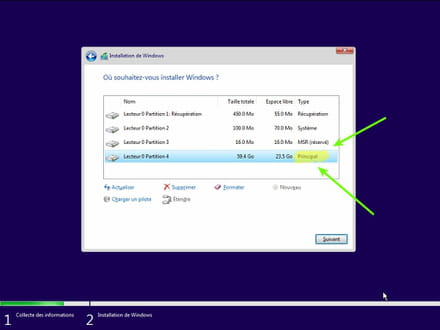
- During the partition phase, select the main partition and click next.
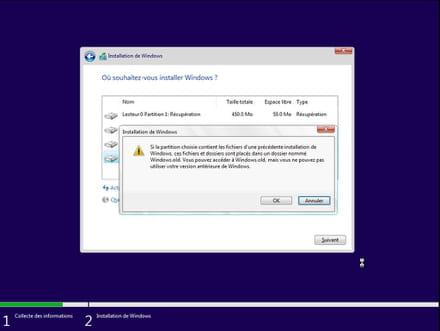
- The installer will inform you that Windows is already present and will propose to move it.
- Follow the Windows installation procedure using the tutorial above.
Just don't format.
Your user data will be copied into the Windows.old folder.
Once Windows is installed, I recommend following these tips to properly configure and use Windows: Tips after reinstalling Windows.
-
Thank you very much!
I will do that
What does "user data" include?
I have a lot of ongoing projects on my desk (I am a graphic designer). Am I going to lose files?- In fact, it copies the folders C:\users and C:\Program Files into Windows.old
If you need to recover data, see these links:
https://www.malekal.com/comment-recuperer-ses-donnees-lorsque-windows-pc-est-plante-en-panne/
https://forums.commentcamarche.net/forum/affich-37585760-recuperer-les-donnees-de-son-disque
-