No sound from my JACK outputs
Solved
CraftxD
Posted messages
29
Status
Member
-
kaneagle Posted messages 86298 Registration date Status Moderator Last intervention -
kaneagle Posted messages 86298 Registration date Status Moderator Last intervention -
Hello,
The second issue I'm encountering after assembling my new PC.
I can't get sound from my JACK outputs (those from the motherboard and the tower). Sound comes out fine from my headphones or my screen via HDMI, but I can't get it on my speakers.
As for the drivers, it says that the port is not connected, that the migration could not be completed... And I can't open the Realtek manager to configure my different audio outputs.
Any idea how to resolve this issue?
Thank you! :)
The second issue I'm encountering after assembling my new PC.
I can't get sound from my JACK outputs (those from the motherboard and the tower). Sound comes out fine from my headphones or my screen via HDMI, but I can't get it on my speakers.
As for the drivers, it says that the port is not connected, that the migration could not be completed... And I can't open the Realtek manager to configure my different audio outputs.
Any idea how to resolve this issue?
Thank you! :)
11 answers
-
Hello,
Press Windows + R
Type --> control panel and OK.
Sounds
In the Playback tab, do you have Realtek High Definition Audio (speakers) set as default?
Example image:
--
Human beings are at their best when things are at their worst. -
Try this audio driver --> Realtek
-
Hi,
Did you connect the front panel (HD Audio) where it needs to be? Because you see, if you connected it elsewhere, it might create a conflict and prevent you from installing the Realtek manager properly as well.
Otherwise, you can also go to the Device Manager and uninstall the Realtek driver, then restart the PC so it can reset and maybe fix the problem at the same time.-
Hello, I need to identify the cable in question; I struggled a bit with the connection, so this kind of issue is quite plausible. But I need to figure out which cable it is ^^ (I have a Phantek P400)
I will also try uninstalling Realtek and rebooting the PC. I'll do that tomorrow and keep you updated. -
-
So, here’s the news. I went into the BIOS, nothing in there giving me info about the JACK port status.
I checked the connection, it’s fine (that’s the first thing I did because it’s the simplest ^^).
I uninstalled the driver and restarted my PC, here’s what I have in the device manager and in the playback settings:
https://puu.sh/ChZiz/1e26dae45c.png
https://puu.sh/ChZiK/acf0eb1e79.png
It tells me that the Realtek driver is up to date but there’s still a warning on it. -
-
Ok, so with the triangle, it clearly shows that your Realtek audio device is not working, even with the basic Windows drivers.
You need to search on the manufacturer's website for your motherboard for the latest driver, and make sure that your front panel is not halfway connected (I know, but I insist).
-
-
Hi
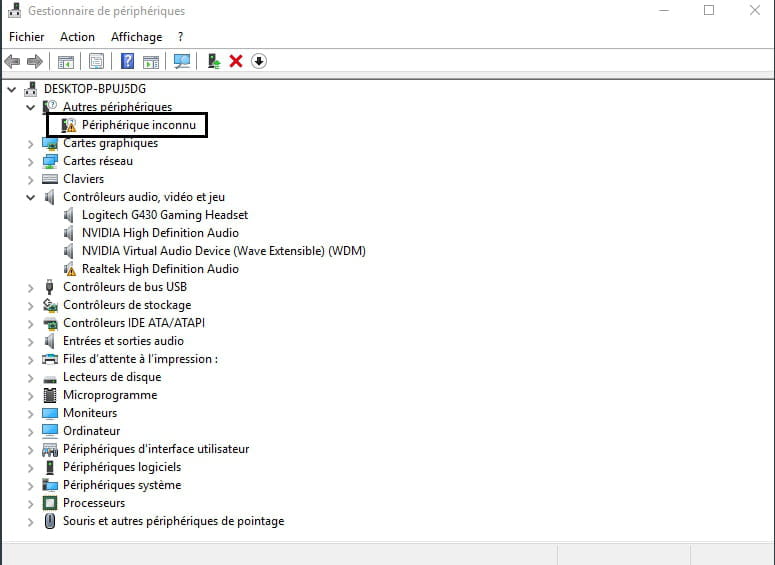
In this screenshot, you have 1 alert on "unknown device"
Give the identifier of this device >> https://www.commentcamarche.net/faq/35597-trouver-le-numero-d-identification-d-un-peripherique

See you
--
The radiation rate is higher at the employment office than at Chernobyl. -
Manually install the audio driver:
Download and install --> 7Zip 64 bits
Right-click on the driver --> realtek_nahimic_audio.zip
Select --> 7Zip
Choose --> extract to "realtek_nahimic_audio\"
Go to Device Manager
Audio, video and game controllers
Right-click on the Realtek High Definition Audio
Update driver
Browse my computer ......
Browse
Go to the unzipped driver folder --> realtek_nahimic_audio
Select the folder --> WIN64
OK, next
Restart.
--
The human being is at its best when things are at their worst. -
re
look at Kaneagle's message and install the driver >> https://forums.commentcamarche.net/forum/affich-35749827-pas-de-son-en-sortie-de-mes-prises-jack#27
for the unknown device identifier, copy/paste it in your response
@+
--
the radiation level is higher at the employment center than at Chernobyl -
I took the driver from this location, the first one since I have a Windows Redstone4 version:
https://fr.msi.com/Motherboard/support/Z370-GAMING-PRO-CARBON-AC#down-driver&Win10%2064
I'm getting this zip: realtek_nahimic_UAD_audio.zip
I'm going to do your method Kaneagle and I'll let you know :) -
Here are the new statuses following the various manipulations:
https://puu.sh/Ci0JI/4fc8643cb4.png
and I have this in my sound configurator:
https://puu.sh/Ci0Ke/c753bbbf41.png
https://puu.sh/Ci0Kw/23415fed24.png
I mentioned earlier the identifier of the unknown device.
For now, I still have no sound on the JACKs. -
Set --> Realtek (R) Audio as default.
--
Human beings are at their best when things are at their worst.-
-
Strange?
Look at this --> message 26
Realtek High Definition audio is alerting and is no longer present after the driver installation??
Click on Realtek (R) Audio
Uninstall
Restart the PC. -
-
VICTORY!!!!!!!!!!!!!!!!!! I uninstalled Realtek (R) Audio again and rebooted the PC and the sound finally comes out of the JACK port :)
Thank you very much for this information and your answers, my ears thank you as well, the headphones were starting to hurt ^^
We'll see with the speakers arriving if the surround works too, otherwise, I will get back to you :) -
-
-
re
I still have an unknown device in the list, I don't know where it comes from
do a copy/paste of the identifier of this device in your reply
PS: the first line is enough
@+
-
Asmedia
Right-click on --> 200036106_....cab
Select --> 7Zip
Choose --> extract to "200036106_....\"
Go to Device Manager
Right-click on the device
Update driver
Browse my computer ......
Browse
Select the unzipped driver folder --> 200036106_....
OK, next
Restart.
--
Human beings are at their best when things are at their worst.