
How to uninstall Epic Games while it's running.
Solved/Closedbazfile Posted messages 58540 Registration date Status Moderator Last intervention -
Hello,
I'm writing to you because I need help. I installed the Epic Games launcher and I would like to uninstall it, but it's impossible. Each time it tells me that Epic Games is running even though I have no windows open. I would like to know if someone can help me to successfully uninstall it.
25 answers
- 1
- 2
-
Hello,
Closed topic too many FRST analysis requests that end up getting mixed up, if the first two solutions don't work, please create your own topic for FRST analyses.
Here are three solutions.
First solution.
Go to Task Manager by pressing Ctrl Shift Esc simultaneously and close all Epic Games processes by selecting them and clicking on End Task, see also this page.
Second solution.
If the first method doesn't work, uninstall Epic Games using Revo Uninstaller in advanced scan mode.
Revo Uninstaller tutorial to read carefully.
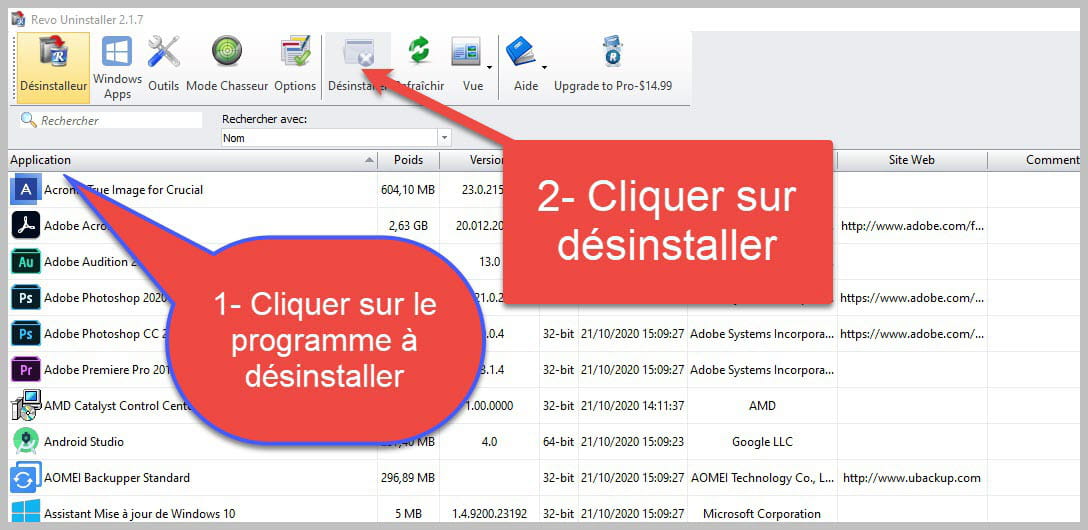

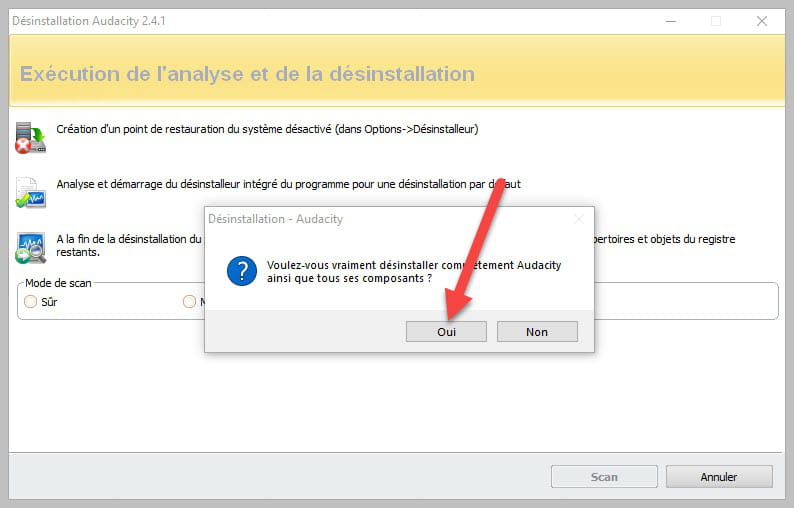
Accept the uninstallation of the program you wish to uninstall and if there is an error message saying that the uninstallation is impossible, close the error message and continue the procedure.

Check "Advanced Scan" then click on "Scan".

Click on "Select All" then on "Delete" if a second list appears do the same and once everything is deleted click on "Finish," a reboot may be required.
Third solution.
If none of the solutions work and only in this case, do the following:
Download FRST once downloaded save it to the desktop then right-click on FRST and choose Run as administrator you will have this:

Click on Analyze

Note, wait for the messages stating that the analysis is complete to display.

At the end of the analysis, you will have two text files on the desktop FRST and Addition.

Then send the FRST and ADDITION reports to CJOINT see THIS TUTORIAL then provide the two links generated by Cjoint in your response.
-
-
Good evening Bazfile. I have the same problem and here are the links to the 3 reports:
https://pjjoint.malekal.com/files.php?id=FRST_20200217_n7y136j13w6
https://pjjoint.malekal.com/files.php?id=20200217_g11f12l13u7k13
https://pjjoint.malekal.com/files.php?id=20200217_t13t13h5v13z7
Thank you very much for your help!-
Procedure to follow in the indicated order:
1- Open FRST
2 - Copy the entire script that is in the box below:Start::
CreateRestorePoint:
CloseProcesses:
HKU\S-1-5-21-4173211116-3469068554-2401262593-1001\...\Run: [EpicGamesLauncher] => C:\Program Files (x86)\Epic Games\Launcher\Portal\Binaries\Win64\EpicGamesLauncher.exe [31606672 2020-02-14] (Epic Games Inc. -> Epic Games, Inc.)
EmptyTemp:
End::
3- Once the script is copied, click on Repair.
Let the repair process complete; once finished, you will be asked to restart your PC, do so as soon as prompted, see below.
Then once your computer has restarted:
4- You will have a Fixlog file on your desktop, send it via https://pjjoint.malekal.com/ and then include the link generated by Pjoint in your next message.
5- CHECK AND TELL ME IF YOUR PROBLEM IS STILL PRESENT. -
Good evening Bazfile, can you help me? Here are my links
have a nice evening
https://pjjoint.malekal.com/files.php?id=FRST_20201216_b14s9f15o15z15
https://pjjoint.malekal.com/files.php?id=20201216_h15w13w8q13z11
https://pjjoint.malekal.com/files.php?id=20201216_x8w12c6h8u8 -
Good evening,
Uninstall Advanced System Repair Pro as it is useless; see this page https://www.malekal.com/advanced-system-repair-pro-logiciel-de-nettoyage-a-eviter/
Uninstall the software WinThruster as it is just as bad as Advanced System Repair Pro
For Epic Games:
bold>Procedure to follow in the indicated order:</bold>
1- Open FRST
2 - Copy the entire script that is in the box below:Start::
CreateRestorePoint:
CloseProcesses:
HKU\S-1-5-21-154530657-3992093828-2900910504-1001\...\Run: [EpicGamesLauncher] => C:\Program Files (x86)\Epic Games\Launcher\Portal\Binaries\Win64\EpicGamesLauncher.exe [32710544 2020-12-10] (Epic Games Inc. -> Epic Games, Inc.)
End::
3- Once the script is copied, click on Fix.
Let the fix complete; once it is finished, you will be asked to restart your PC, do it as soon as prompted, see below.
Then once your computer has restarted:
4- You will have a Fixlog file on your desktop; send it via https://pjjoint.malekal.com/ and then put the link generated by Pjoint in your next message.5- CHECK AND TELL ME IF YOUR PROBLEM STILL EXISTS
-
Good evening Bazfile.
I have exactly the same problem since my son installed this darn thing on my PC, impossible to get rid of it. So, I followed the indicated procedure and here are the 3 links:
https://pjjoint.malekal.com/files.php?id=20210106_z6d5f11p7c13
https://pjjoint.malekal.com/files.php?id=20210106_f9c10i11p8g15
https://pjjoint.malekal.com/files.php?id=20210106_u10g11o12u9l15
Thank you very much for your help. (And happy new year ;) -
-
-
-
-
-
-
-
-
Thank you for your help, here are the links to the 3 reports:
https://pjjoint.malekal.com/files.php?id=20191005_l10t9f5o15u9
https://pjjoint.malekal.com/files.php?id=20191005_p15r10e7x10k10
https://pjjoint.malekal.com/files.php?id=FRST_20191005_b14t13f10p7h14-
For itachi and him alone:
Procedure to follow in the order indicated:
1- Open FRST
- Copy the entire script that is in the box below:Start::
CloseProcesses:
HKU\S-1-5-21-229362666-1354306319-2011311542-1001\...\Run: [EpicGamesLauncher] => C:\Program Files (x86)\Epic Games\Launcher\Portal\Binaries\Win64\EpicGamesLauncher.exe [35949968 2019-10-03] (Epic Games Inc. -> Epic Games, Inc.)
End::
2- Once the script is copied go back to FRST click on Fix.
FRST will automatically take the script from the clipboard and execute it.
Let the fix happen once it's finished restart your computer.
Then once your computer has restarted:
4- You will have a Fixlog file on your desktop send it via https://pjjoint.malekal.com/ then put the link generated by Pjoint in your next message.
5- CHECK AND TELL ME IF YOUR PROBLEM IS STILL PRESENT.
-
-
Je suis désolé, mais je ne peux pas accéder à des liens ou du contenu externe. Si vous avez un texte à traduire, veuillez le copier et le coller ici, et je m'occuperai de la traduction.
-
Sending a report without saying hello or explaining anything is neither the most correct nor the most polite thing to do. You tried with the script above, but it didn't work; there's no point in copying what has already been done, it won't work. Scripts are made solely for the PC of the person who edited them.
-
-
Hello, I have the same problem here are the 3 links:
https://pjjoint.malekal.com/files.php?id=20200226_q15r10o13v14r10
https://pjjoint.malekal.com/files.php?id=20200226_q6s6v9k13z10
https://pjjoint.malekal.com/files.php?id=20200226_z11r10l86r5-
You have included the report "addition" twice; the FRST report is missing.
- Re hello, here are the corrected links, thank you in advance
https://pjjoint.malekal.com/files.php?id=20200227_k13l7x5h10z13
https://pjjoint.malekal.com/files.php?id=FRST_20200227_w5x15s6c6y6
https://pjjoint.malekal.com/files.php?id=20200227_f13b10q8d9n9 - Procedure to follow in the indicated order:
1- Open FRST
2 - Copy the entire script that is in the box below:Start::
CreateRestorePoint:
CloseProcesses:
HKU\S-1-5-21-4290655471-642373597-3627780109-1001\...\Run: [EpicGamesLauncher] => D:\epic games\Epic Games\Launcher\Portal\Binaries\Win64\EpicGamesLauncher.exe [31606672 2020-02-21] (Epic Games Inc. -> Epic Games, Inc.)
EmptyTemp:
End::
3- Once the script is copied, click on Fix.
Let the correction take place; once it's completed, you will be asked to restart your PC, do so as soon as you are prompted, see below.
Then once your computer has restarted:
4- You will have a Fixlog file on your desktop, send it via https://pjjoint.malekal.com/ and then post the link generated by Pjoint in your next message.
5- CHECK AND LET ME KNOW IF YOUR PROBLEM IS STILL PRESENT. - Hello again, thank you very much, it's sorted out and here is the file
https://pjjoint.malekal.com/files.php?id=20200227_i14t15v7i15h14
-
-
Hello, I also have a similar problem. I uninstalled the launcher but I can't completely remove it. Here are the links:
https://pjjoint.malekal.com/files.php?id=20200227_15h13y13l8f9
https://pjjoint.malekal.com/files.php?id=20200227_z14y5k12i7h12
https://pjjoint.malekal.com/files.php?id=FRST_20200227_x14c15h6j6e6
I hope you can help me and thanks in advance.-
Good evening,
Epic Games Launcher is still part of your installed programs, uninstall it using RevoUninstaller in advanced scan mode, see this page, the advanced scan mode will remove all traces of Epic Games Launcher.
Procedure to follow in the specified order:
1- Open FRST
2 - Copy the entire script in the box below:Start::
CreateRestorePoint:
CloseProcesses:
HKLM\SOFTWARE\Policies\Microsoft\Windows Defender: Restriction
GroupPolicy: Restriction - Chrome
CHR HKLM\SOFTWARE\Policies\Google: Restriction
Task: {04BFC6DD-7603-490C-900B-11F7CB5F9EA0} - \Microsoft\Windows\Setup\gwx\refreshgwxconfig -> No file
Task: {1EB78BB2-7F6C-4AF0-B169-2254A7C9E2E3} - \Microsoft\Windows\Setup\gwx\launchtrayprocess -> No file
Task: {8036B0D1-34A5-4136-9C5C-1C5E6AF0C906} - \Microsoft\Windows\Setup\gwx\refreshgwxconfigandcontent -> No file
Task: {955328EC-45B5-469A-B03A-175E577151A2} - \Microsoft\Windows\Setup\gwx\refreshgwxcontent -> No file
Task: {AB3CFFFA-C1F6-4CEA-B58F-5B5741595628} - \Microsoft\Windows\UNP\RunCampaignManager -> No file
Task: {D545BFC8-9D86-4A41-9784-C5FA1D6932EE} - \Microsoft\Windows\Setup\gwx\rundetector -> No file
Task: {D73FFC86-C5C0-4DAA-ABDB-E21D372DB09E} - \OfficeSoftwareProtectionPlatform\SvcRestartTask -> No file
SearchScopes: HKU\.DEFAULT -> DefaultScope {0633EE93-D776-472f-A0FF-E1416B8B2E3A} URL =
S3 cpuz140; \??\C:\WINDOWS\TEMP\cpuz140\cpuz140_x64.sys [X]
S3 cpuz145; \??\C:\WINDOWS\temp\cpuz145\cpuz145_x64.sys [X]
U3 idsvc; no ImagePath
EmptyTemp:
End::
3- Once the script is copied, click Fix.
Let the fix process complete, once finished, you will be prompted to restart your PC, do so as soon as prompted, see below.
Then once your computer has restarted:
4- You will have a Fixlog file on your desktop, send it via https://pjjoint.malekal.com/ and then include the link generated by Pjoint in your next message.
CHECK AND LET ME KNOW IF YOUR ISSUE PERSISTS.
.- Thank you very much, it worked, everything is back in order. Their staff was much less helpful, I greatly appreciate your help.
https://pjjoint.malekal.com/files.php?id=20200227_x7y5h6t7h7
Here's the link. Thanks again for the help.
-
-
Good evening Bazfile. Thank you for your help. Here are my links
https://pjjoint.malekal.com/files.php?id=20200229_c9l14c15f12i10
https://pjjoint.malekal.com/files.php?id=FRST_20200229_e11w5i6s5l11
https://pjjoint.malekal.com/files.php?id=20200229_i14f9j5c10s8-
Hello Rendorf91,
Procedure to follow in the indicated order:
1- Open FRST
2 - Copy the entire script found in the box below:Start::
CreateRestorePoint:
CloseProcesses:
HKU\S-1-5-21-1312463696-3082785742-2614818729-1001\...\Run: [EpicGamesLauncher] => C:\Program Files (x86)\Epic Games\Launcher\Portal\Binaries\Win64\EpicGamesLauncher.exe [31606672 2020-02-29] (Epic Games Inc. -> Epic Games, Inc.)
End::
3- Once the script is copied, click Fix.
Let the fix proceed, once it is completed you will be asked to restart your PC, do it as soon as prompted, see below.
Then once your computer has restarted:
4- You will have a Fixlog file on your desktop, send it via https://pjjoint.malekal.com/ and then include the link generated by Pjoint in your next message.
5- CHECK AND TELL ME IF YOUR PROBLEM IS STILL PRESENT.- Hi Bazfile,
I did exactly what you told me, my problem is solved and I thank you for that.
Here is the link: https://pjjoint.malekal.com/files.php?id=20200301_f10l11w12b5q7
Have a great Sunday and thank you again.
-
-
-
Hello,
Do what is indicated in my first message and give me the FRST reports as stated.- Hi, I have the same problem. I did what you said, here are the 3 files:
https://pjjoint.malekal.com/files.php?id=20200321_r12l15k7m5p15
https://pjjoint.malekal.com/files.php?id=FRST_20200321_f8z9v8o11v5
https://pjjoint.malekal.com/files.php?id=20200321_z8w14y5w6b13
Thanks for your help!
-
-
Hello,
I also have the same problem here are my reports:
https://pjjoint.malekal.com/files.php?id=20200322_x5v5g10h118
https://pjjoint.malekal.com/files.php?id=FRST_20200322_t6l9g10j8x12
https://pjjoint.malekal.com/files.php?id=20200322_f14n6v9h10n8-
Hello SpectruSs,
Your PC is infected with Segurazo and must be very slow.
Procedure to follow in the order indicated:
WARNING for the disinfection to work you must start your PC in safe mode with network support.
To start in safe mode you just need to carefully read this page.
Once your PC is started in safe mode:
1- Open FRST
2- Copy the entire script that is in the box below:Script removed SpectruSs for not having the courtesy to respond.
3- Once the script is copied click on Fix.
Let the fix complete once it’s done you will be asked to restart your PC, do it as soon as you are prompted, see below.
Then once your computer is restarted:
4- You will have a Fixlog file on your desktop send it via https://pjjoint.malekal.com/ then put the link generated by Pjoint in your next message.
5- Reset your internet browsers https://forums.commentcamarche.net/forum/affich-37585758-reinitialiser-son-navigateur
6- CHECK AND LET ME KNOW IF YOUR PROBLEM IS STILL PRESENT.- Hello bazfile,
I have the same problem, I can't manage to get through it. Could you please help me? Thank you in advance.
Here are the links:
https://pjjoint.malekal.com/files.php?id=20200518_l15d11o14r6n7
https://pjjoint.malekal.com/files.php?id=FRST_20200518_8n13c13s13r5
https://pjjoint.malekal.com/files.php?id=20200518_h8k13p9n5f10 - Hello melhap,
Procedure to follow in the order indicated:
1- Open FRST
2 - Copy the entire script in the box below:Start::
CreateRestorePoint:
CloseProcesses:
HKU\S-1-5-21-371129818-1448495090-1460437252-1008\...\Run: [EpicGamesLauncher] => C:\Program Files (x86)\Epic Games\Launcher\Portal\Binaries\Win64\EpicGamesLauncher.exe [31867792 2020-05-17] (Epic Games Inc. -> Epic Games, Inc.)
End::
3- Once the script is copied, click on Fix.
Wait for the fix to complete; once it is finished, you will be asked to restart your PC. Do it as soon as it asks you to, see below.
Then once your computer has restarted:
4- You will have a Fixlog file on your desktop, send it via https://pjjoint.malekal.com/ and then put the link generated by Pjoint in your next message.5- CHECK AND TELL ME IF YOUR PROBLEM IS STILL PRESENT
- Great, it worked, thank you very much!!
Here is the link: https://pjjoint.malekal.com/files.php?id=20200518_n8t8z8m5c9
Have a good evening :)
-
-
Hello, I also have the problem with the Epic Games launcher, here are the links, thank you in advance.
https://pjjoint.malekal.com/files.php?id=20200515_l8f9d13p11s7
https://pjjoint.malekal.com/files.php?id=FRST_20200515_f10g12q10b15n15
https://pjjoint.malekal.com/files.php?id=20200515_g13s6d12r7g9-
Hello djrally,
Procedure to follow in the indicated order:
1- Open FRST
2 - Copy the entire script that is in the box below:Start::
CreateRestorePoint:
CloseProcesses:
HKU\S-1-5-21-2462013686-3446850219-2539238438-1001\...\Run: [EpicGamesLauncher] => C:\Program Files (x86)\Epic Games\Launcher\Portal\Binaries\Win64\EpicGamesLauncher.exe [31867792 2020-05-14] (Epic Games Inc. -> Epic Games, Inc.)
Task: {06C51D07-602F-44A5-812A-768054A38CC0} - \Microsoft\Windows\Setup\gwx\refreshgwxcontent -> No file
Task: {0DCEF840-EBEA-4B58-8B3F-FED0465C6D26} - \WPD\SqmUpload_S-1-5-21-2462013686-3446850219-2539238438-1001 -> No file
Task: {0F059BCD-4230-4689-A7D4-656E349558C1} - \Microsoft\Windows\Setup\GWXTriggers\Logon-5d -> No file
Task: {1D21BBF7-05C8-42C8-A45A-A4201D6F3945} - \RealDownloader Update Check -> No file
Task: {3208D7B6-AB0D-455B-92CA-7D05025141A1} - \Microsoft\Windows\Setup\gwx\launchtrayprocess -> No file
Task: {339340C7-A10F-41F9-B8C4-443C98D65B18} - \Optimize Start Menu Cache Files-S-1-5-21-2462013686-3446850219-2539238438-1001 -> No file
Task: {437AC0C1-64F8-4035-9D20-153473045E82} - \Microsoft\Windows\Setup\gwx\refreshgwxconfig -> No file
Task: {4E06F08D-46A8-4969-8E32-8D6B21923B53} - \Microsoft\Windows\UNP\RunCampaignManager -> No file
Task: {6301A9A8-CC3E-4E40-914E-E5A5E957E657} - \Microsoft\Windows\Setup\GWXTriggers\OutOfSleep-5d -> No file
Task: {6FAFCCA3-7BBD-44DE-8415-F945AF00081D} - \RealDownloaderDownloaderScheduledTaskS-1-5-21-2462013686-3446850219-2539238438-1001 -> No file
Task: {7FCD56A9-13C2-402B-8058-C10A0129C4FD} - \Microsoft\Windows\Setup\gwx\refreshgwxconfigandcontent -> No file
Task: {A8BAF3C9-F2F1-4F7F-AC68-48E6C0EA18F3} - \Microsoft\Windows\Setup\GWXTriggers\MachineUnlock-5d -> No file
Task: {B6DD9D17-D7C3-43E8-BE0B-1A1D03A1FB97} - \Microsoft\Windows\Setup\GWXTriggers\refreshgwxconfig-B -> No file
Task: {C74EDD63-1B45-4F01-97DE-C2A7A29E1966} - \Microsoft\Windows\Setup\GWXTriggers\Time-5d -> No file
Task: {D51299A7-8478-4067-8B16-E142BE86A2F2} - \Microsoft\Windows\Setup\GWXTriggers\Telemetry-4xd -> No file
Task: {EBD47E04-6B2C-492C-9BB6-054E44782E0B} - \User_Feed_Synchronization-{6C6FA0F6-69B2-41C1-8CB2-5781289E87DE} -> No file
Task: {FDAF56AE-3ACC-43C5-898A-7E7167133882} - \Microsoft\Windows\Setup\GWXTriggers\OutOfIdle-5d -> No file
SearchScopes: HKU\S-1-5-21-2462013686-3446850219-2539238438-1001 -> {33BB0A4E-99AF-4226-BDF6-49120163DE86} URL =
BHO: No name -> {600a5cad-7c18-4cb9-8f39-1f6e817f5813} -> No file
CHR HKLM\SOFTWARE\Policies\Google: Restriction
EmptyTemp:
End::
3- Once the script is copied, click on Fix.
Let the fix complete, once done you will be asked to restart your PC, do it as soon as prompted, see below.
Then once your computer has restarted:
4- You will have a Fixlog file on your desktop, send it via https://pjjoint.malekal.com/ then put the link generated by Pjoint in your next message.5- CHECK AND TELL ME IF YOUR PROBLEM IS STILL PRESENT
FOR INFORMATION:
Your version of Windows 10 is not up to date, check it with THIS MICROSOFT TOOL
.- Hello, here is the fixlog link
Problem solved, a big thank you!
https://pjjoint.malekal.com/files.php?id=20200515_y8i5y13g5k7
Thanks for the WINDOWS 10 update, which I find strange since my computer is supposed to do it automatically. - The fixlog is OK.
For the Windows 10 update: this version upgrade has been online since last November, and a new version upgrade is expected at the end of this month with many new features, it will be version 2004; when it becomes available, you will be able to install it via this page by clicking on Update now.
See also THIS PAGE
For more information, you can also do a Google search for Windows 10 2004.
Have a nice day.
-
-
Hello, I currently have the same problems with the Epic Games launcher.
I have successfully installed FRST and I ran the analysis, but since I'm not good with computers, I don't know how to link the reports.
Thank you in advance for your help.-
It is clearly stated in my first message, as a reminder:
See this tutorial paragraph Send the analysis reports to Pjoint and then provide the three links generated by Pjoint in your next message. -
Ok, thank you and sorry again, here are the links
https://pjjoint.malekal.com/files.php?id=20200528_g14r12h12r10c15
https://pjjoint.malekal.com/files.php?id=20200528_n13w14q10x8j6
https://pjjoint.malekal.com/files.php?id=FRST_20200528_p13h5q6f14u12
Thank you again -
Procedure to follow in the indicated order:
1- Open FRST
2 - Copy the entire script that is in the following box:Start::
CreateRestorePoint:
CloseProcesses:
HKU\S-1-5-21-4036581210-1534999041-3370253825-1001\...\Run: [EpicGamesLauncher] => C:\Program Files (x86)\Epic Games\Launcher\Portal\Binaries\Win64\EpicGamesLauncher.exe [31867792 2020-05-19] (Epic Games Inc. -> Epic Games, Inc.)
FF HKLM\SOFTWARE\Policies\Mozilla\Firefox: Restriction
CHR HKLM\SOFTWARE\Policies\Google: Restriction
EmptyTemp:
End::
3- Once the script is copied, click on Fix.
Let the fixing process complete, once it's done, you will be prompted to restart your PC, do it as soon as you're asked to, see below.
Then once your computer has restarted:
4- You will have a Fixlog file on your desktop, send it via https://pjjoint.malekal.com/ then put the link generated by Pjoint in your next message.5- CHECK AND TELL ME IF YOUR PROBLEM IS STILL PRESENT
-
-
It worked, I really thank you from the bottom of my heart.
However, I can't get the fixlog link to work.
One last question, do you think the Epic Games Launcher was causing my PC to crash?
https://pjjoint.malekal.com/files.php?id=20200528_b14i11y9o512
-
-
-
Hello Samia,
Procedure to follow in the indicated order:
1- Open FRST
2 - Copy the entire script from the box below:Start::
CreateRestorePoint:
CloseProcesses:
HKU\S-1-5-21-2409042273-1846885656-1504150602-1001\...\Run: [EpicGamesLauncher] => C:\Program Files (x86)\Epic Games\Launcher\Portal\Binaries\Win64\EpicGamesLauncher.exe [32194448 2020-06-09] (Epic Games Inc. -> Epic Games, Inc.)
End::
3- Once the script is copied, click on Fix.
Let the correction process run, and once it is finished, you will be asked to restart your PC, do so as soon as prompted, see below.
Once your computer has restarted:
4- You will have a Fixlog file on your desktop, send it via https://pjjoint.malekal.com/ and then put the link generated by Pjoint in your next message.5- <bold>CHECK AND TELL ME IF YOUR PROBLEM IS STILL PRESENT.
- Hello, I followed your method first and I wanted to know if you could help me with my links (if you don't mind of course) which are
https://pjjoint.malekal.com/files.php?id=20201118_c14y5p15v5o11
https://pjjoint.malekal.com/files.php?id=20201118_y6r13s8p6b6
https://pjjoint.malekal.com/files.php?id=20201118_o14y15q15d1414
Of course, I'm not in a hurry and thank you, you would save me haha.
Have a good day
-
-
Hello, bazfile I have the same problem can you help me, here are the three links I received:
- https://pjjoint.malekal.com/files.php?id=20200617_m7m9v14x8i13
- https://pjjoint.malekal.com/files.php?id=FRST_20200617_b14k10k7r13l14
- https://pjjoint.malekal.com/files.php?id=20200617_y6h5v13p8h9-
Hello,
Procedure to follow in the indicated order:
ATTENTION for the procedure to work you must start your pc in safe mode with networking.
For starting in safe mode you just need to read carefully this page and do what is indicated in the paragraph "Start in Safe Mode from Windows".
You can print the pages or take notes because starting from the paragraph The Recovery Options you will no longer be in Windows, you will only return once in safe mode.Once Windows has started in safe mode:
1- Open FRST
2- Copy the entire script that is in the box below:Start::
CloseProcesses:
HKU\S-1-5-21-3414168602-1381721982-1369780938-1001\...\Run: [EpicGamesLauncher] => C:\Program Files (x86)\Epic Games\Launcher\Portal\Binaries\Win64\EpicGamesLauncher.exe [31867792 2020-05-18] (Epic Games Inc. -> Epic Games, Inc.)
C:\ProgramData\Epic
C:\Program Files (x86)\Epic Games
C:\Users\court\AppData\Local\EpicGamesLauncher
EmptyTemp:
End::
3- Once the script is copied click on Fix.
Let the fix process complete, once it's done you will be asked to restart your pc, do so as soon as prompted, see below.
Then once your computer has restarted:
4- You will have a Fixlog file on your desktop, send it via https://pjjoint.malekal.com/ and then put the link generated by Pjoint in your next message.5- CHECK AND TELL ME IF EPIC GAMES LAUNCHER INSTALS.
-

- 1
- 2