Resetting Microsoft Solitaire statistics
jacquesLAPEYRE
Posted messages
22
Status
Member
-
pistouri Posted messages 19010 Registration date Status Contributor Last intervention -
pistouri Posted messages 19010 Registration date Status Contributor Last intervention -
Hello,
I am an avid player of the Microsoft Solitaire Collection that I play on Windows 10.
Some time ago, I found two methods to reset the statistics of these games.
The first
Show hidden folders.
Go to C:\Users\my name\AppData\Local\Packages\Microsoft.MicrosoftSolitaireCollection_8wekyb3d8bbwe\LocalState
Rename the UserData file to UserData.bak
Restart the Solitaire program, which resets the statistics by creating a new UserData folder.
Delete the UserData.bak file.
But for some time now, this hasn't been working.
In my initial attempts, the UserData file did not appear in my directory, and now the Microsoft.MicrosoftSolitaireCollection file has disappeared.
I turned to the second method, which is simpler
In the programs column, uninstall the Microsoft Store collection.
Then reinstall it.
Unfortunately, the statistics are not reset.
Can anyone help me? Thank you.
Configuration: Windows / Firefox 62.0
I am an avid player of the Microsoft Solitaire Collection that I play on Windows 10.
Some time ago, I found two methods to reset the statistics of these games.
The first
Show hidden folders.
Go to C:\Users\my name\AppData\Local\Packages\Microsoft.MicrosoftSolitaireCollection_8wekyb3d8bbwe\LocalState
Rename the UserData file to UserData.bak
Restart the Solitaire program, which resets the statistics by creating a new UserData folder.
Delete the UserData.bak file.
But for some time now, this hasn't been working.
In my initial attempts, the UserData file did not appear in my directory, and now the Microsoft.MicrosoftSolitaireCollection file has disappeared.
I turned to the second method, which is simpler
In the programs column, uninstall the Microsoft Store collection.
Then reinstall it.
Unfortunately, the statistics are not reset.
Can anyone help me? Thank you.
Configuration: Windows / Firefox 62.0
Related links:
- Microsoft Solitaire Collection is not working anymore.
- Error when upgrading from w8.1 to w10
- I can't play jeu.fr because of the Google Chrome update.
- Error 0x8007042B when installing Windows update
- Petition against the end of free Windows 10 updates
- Microsoft extended Windows 10 support until the end of 2027
10 answers
-
pistouri Posted messages 19010 Registration date Status Contributor Last intervention Ambassador 8 731
Create 2 folders on the Desktop
Folder 1 named → gameprogress original
Folder 2 named → statistic original
Show hidden files and folders then navigate to this path
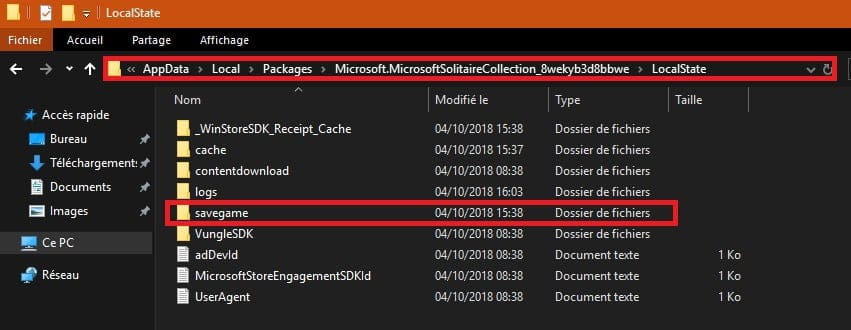
C:\Users\your name\AppData\Local\Packages\ Microsoft.MicrosoftSolitaireCollection 8wekyb3d8bbwe\LocalState
Open → LocalState
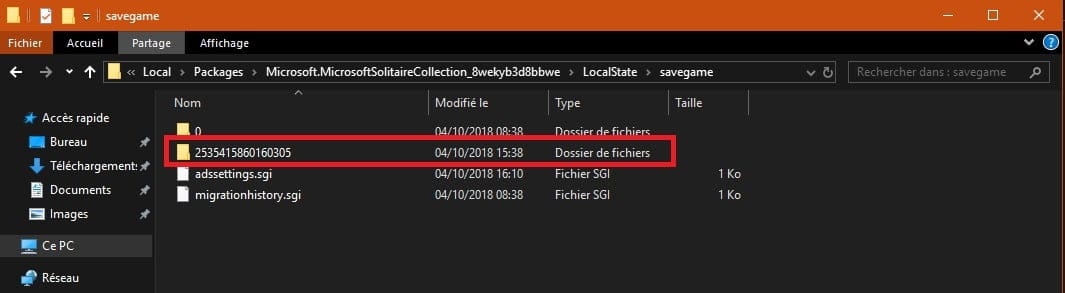
Open → savegame

You see the first 2 folders
Folder 0 and Folder with a series of numbers (2535415860160305)
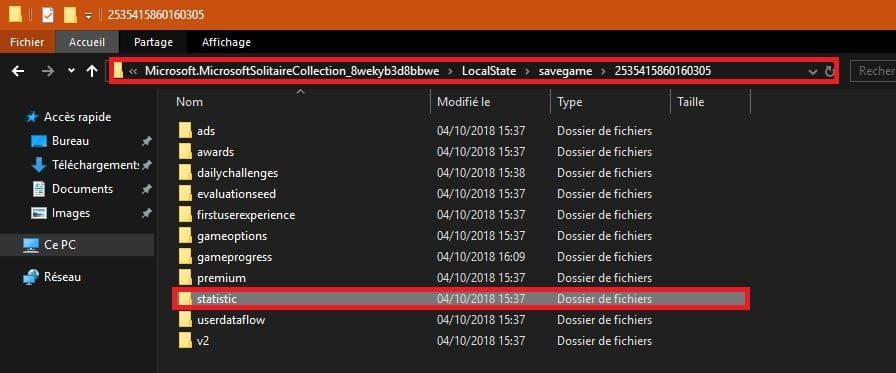
Open the folder with the series of numbers
If you hover over it without clicking, you can read: ads, adwads, daillychallenges, evaluationseed,....

Go to the gameprogress folder

Copy and paste the 4 .sgi files
freecell.sgi
klondike.sgi
rategame.sgi
spider.sgi

Copy and paste these 4 files into folder 1 → gameprogress original
Then delete the 4 files in gameprogress
Do the same with the folder → statistic

You only have 1 file statistic.sgi to save in folder 2 → statistic original
Then delete it in statistic

Close the windows
Hide the hidden files and folders
Restart the PC and check in the game MicrosoftSolitaireCollection if you have the statistics or scores.
A+
--
scalpel -
Hello there
1. Open Disk Cleanup (at the bottom left "here to search" type Disk Cleanup)
2. Select the Windows drive letter and click OK.
3. In the list of files to delete, select Game statistics files.
4. Click OK.
Hoping to have helped you
Raphaway -
Thank you for your response.
You told me
1. Open Disk Cleanup (at the bottom left "here to search" type Disk Cleanup)
I can't find how to open Disk Cleanup. Can you be more specific?
Thank you. -
Hello to you
Sorry, it’s true that I wasn’t precise enough
When you’re on your Windows desktop, at the bottom left, you have a small search bar that says "Type here to search" and here you type "disk cleanup" of course this is if you’re on Windows 10
If not (you’re on Windows 7), it’s the same process except you go to Start (the little Windows flag at the bottom left) and then you have a small search bar that says "Search programs and files" and there you type "disk cleanup"
Then follow my instructions and it should work
Good luck
If you have any further problems, don’t hesitate
Raphaway-
Hello Raphaway,
For more precision →you have a small search bar marked here to search
This is called Cortana, which may not be visible if not displayed, right-click on the taskbar and then
Cortana and Show Cortana Icon or Show Search Box
It is worth noting that the game Microsoft Solitaire is only available on the Windows Store with Windows 10
Also not seen → Game Statistics Files in the Disk Cleanup feature.
-
-
Thank you for allowing me to continue my research
But in the list of files to clean, I don't find Game Statistics Files.
To be continued -
pistouri Posted messages 19010 Registration date Status Contributor Last intervention Ambassador 8 731
Hello,
Try this tip:
I wasn't able to reproduce or verify the path to the UserData folder as my Microsoft Solitaire is at
zero since I haven't played or simply because I just upgraded to version 1809 which may have reset
the counter to zero.
The path:
Show hidden files and folders → go to THIS PC and then to View and check → Hidden items
Go to the folder LocalState→UserData
This PC → Local Disk (C) → Users → Your username → AppData → Local → Packages → Microsoft.MicrosoftSolitaireCollection_8wekyb3d8bbwe → LocalState → UserData
What works is to delete the entire folder with the long string of numbers above the Guest folder (that is, not just the subfolder statistic.ark), which then deletes the statistics and all game settings.
→ Hide the hidden files and folders once the procedure is complete.
Source here
Info:
Microsoft Solitaire is called Microsoft Solitaire Collection on my Windows 10
A+
--
pistouri -
Hi there
Quick question, do you have an account for this game in question because after launching the game I saw that there is an account system and I think your stats are directly saved on this account. Try switching accounts and keep us updated
Good luck
Raphaway-
Microsoft Solitaire Collection or Microsoft Solitaire is downloaded from the Windows Store
And so you need a Microsoft account to connect to it, otherwise there are no games; it's the same for the other games
from the Windows Store, but you can play as a guest.
There are no options in the Microsoft account to modify the data of a game. -
There is indeed a counting system once you're logged into Microsoft Solitaire Collection
To save scores, you need to sign in with your Microsoft account at → Xbox otherwise you remain a guest

There are no options to reset the counters to 0
I have checked all the sections, I can find my achievements in the game Microsoft Solitaire Collection but nothing more

It seems that scores are stored in the cloud without being able to delete them even by uninstalling
the application, at least resetting them
I haven't tried


A+
-
-
To the attention of Pistouri.
Thank you for your detailed message.
I followed your instructions step by step without any problem except that in the game progress folder there were not four files but only two, klondique.sgi and rategame.sgi, which I moved to the original gameprogress.
At the end of the process you indicated to me, the statistics and scores are still there. Sorry.-
In summary, you should back up the .sgi files as a precaution → statistic and gameprogress (no matter how many files, this corresponds to all the games in the Microsoft Solitaire collection)
Then delete these same files in the hard drive path → C:\Users\my name\AppData\Local\Packages\Microsoft.MicrosoftSolitaireCollection_8wekyb3d8bbwe\LocalState
You could have created a restore point, but I didn't suggest it because it works randomly
In fact, the restore point created isn't a problem in itself; it's only during the restoration that error messages appear (the most common being 0x80070091), it's really hit or miss....
-
-
pistouri Posted messages 19010 Registration date Status Contributor Last intervention Ambassador 8 731
Hello,
After saving the .sgi files in folders 1 and 2, did you delete them in → C:\Users\my name\AppData\Local\Packages\ Microsoft.MicrosoftSolitaireCollection 8wekyb3d8bbwe\LocalState
→ statistic
→ gameprogress
Then restart the PC
Have you looked when connecting on Xbox if there is an option, because I didn't see anything on my side in
achievements.
It seems, as I said, that this is kept in the Xbox cloud with no possibility to delete
According to what I heard, it's possible with Ccleaner
Since I don't use it, I wanted to take a closer look at cleaning
If you don't have Ccleaner, get it from the CCM software library for example here
Leave the boxes checked by default
I didn't see any boxes to clean Microsoft games at first glance
But there is a but, install CCEnhancer
This will add other applications to clean.
Run it and update it, then run Ccleaner right after
In Ccleaner go to → Cleaner
Go to the tab → Applications
Scroll down to → Windows Store
Check the 2 boxes:
- Xbox*
- Xbox identity provider*
I didn't see other relevant boxes, unless you see some.
Proceed with the cleaning (the analysis) then restart the PC and check

I haven't tested it.
There's still the reset procedure (1 in 2 chances that it works)
Go to Settings → Apps → Apps & features → MicrosoftSolitaireCollection
Click on Advanced options then on → Reset (at the bottom of the page)
A+
--
pistouri-
Hello
Thank you for your willingness to help me find a solution
I have tried everything you suggested
Deleting the Sgi files.
CCleaner
Reset
I haven't gone into CCenhancer.
I'll leave it at that for now until Windows adds a button to reset the statistics on its dashboard
I don’t understand why the two methods I mentioned in my first message in this discussion (deleting the UsersData file or uninstalling/reinstalling game programs) that worked for months no longer do.
The mysteries of Windows
Thanks again
Best regards
-
-
pistouri Posted messages 19010 Registration date Status Contributor Last intervention Ambassador 8 731
Hello,
In your first message, User Data was present, that was before major updates (twice a year) which
deleted that directory or folder due to the updates.
Not a big deal for CCenhancer, yet you could have seen - Xbox* and - Xbox identity provider* and tried cleaning them.
One solution would be to log in with another Microsoft account (haven't tried) or create a new user account, but that's not the purpose of this.
It's this backup of statistics in the cloud or a folder in Windows that needs to be searched for
and there I don’t know where to turn despite a ton of searches on more elaborate English-speaking sites. I won't give up, always hopeful to find a solution, I don't know if Microsoft will add
a dashboard as you said or an option like a little button, let's hope for it, the question is already on
their support.....we just have to keep our fingers crossed!!... for the answer!!
Have a good evening.
--
pistouri