Pivot Table Formatting Comparison of Two Columns
Solved
Plop
-
Plop -
Plop -
Hello everyone,
Before getting into the details, I want to clarify that I am totally new to Excel and only know the very basic and simple functions in a very vague way.
I would like to apply formatting to my pivot table in order to compare two columns in a "colored" way, and thus have it display a different format (= color) for each item (a "rule" if I understood correctly?):
- when the "total sum" on the same row is less than "sum of prices"
- when the "total sum" on the same row is equal to "sum of prices"
- when the "total sum" on the same row is greater than "sum of prices"
- add exceptions that will not have any formatting
Here is a sample table with fake data where I would like:
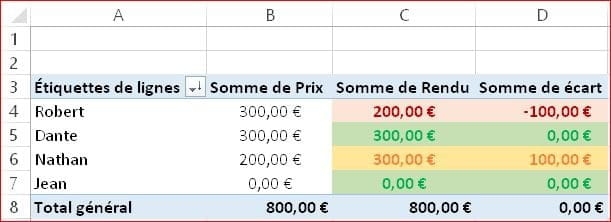
- Robert's result to be displayed in red to indicate that he owes me €100
- Dante's result to be displayed in green to indicate that he has settled everything
- Nathan's result to be displayed in orange to indicate that I owe him €100
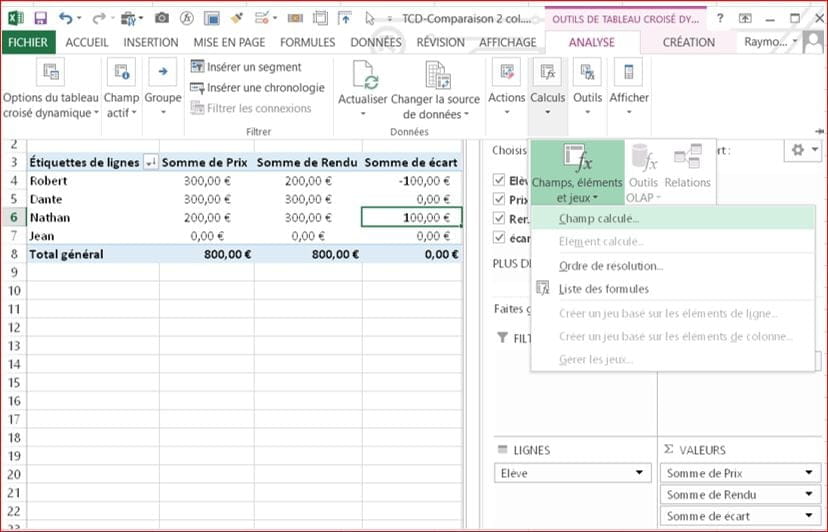
- and possibly, if possible, add a field where the amount he owes me or that I owe him is calculated.
https://www.cjoint.com/doc/18_09/HIex7d1UJXL_TCD-Comparaison-2-colonnes.xlsx
Therefore, I need to apply this color code and potentially this new field to my pivot table with about twenty students.
Thank you in advance to those who take the time to help me.
Before getting into the details, I want to clarify that I am totally new to Excel and only know the very basic and simple functions in a very vague way.
I would like to apply formatting to my pivot table in order to compare two columns in a "colored" way, and thus have it display a different format (= color) for each item (a "rule" if I understood correctly?):
- when the "total sum" on the same row is less than "sum of prices"
- when the "total sum" on the same row is equal to "sum of prices"
- when the "total sum" on the same row is greater than "sum of prices"
- add exceptions that will not have any formatting
Here is a sample table with fake data where I would like:
- Robert's result to be displayed in red to indicate that he owes me €100
- Dante's result to be displayed in green to indicate that he has settled everything
- Nathan's result to be displayed in orange to indicate that I owe him €100
- and possibly, if possible, add a field where the amount he owes me or that I owe him is calculated.
https://www.cjoint.com/doc/18_09/HIex7d1UJXL_TCD-Comparaison-2-colonnes.xlsx
Therefore, I need to apply this color code and potentially this new field to my pivot table with about twenty students.
Thank you in advance to those who take the time to help me.
5 answers
-
Hello Plop.
So you are also new to CCM: You are only sending a simple image, without any data, instead of sending the Excel file.1) Go to https://www.cjoint.com/
2) Click on [Browse] to select your file (max 15 MB)
3) Scroll down to click on the blue button [Create the Cjoint link]
4) After a few seconds, the second page will appear, with the link in bold; right-click on it and choose "Copy link"
5) Go back to your discussion on CCM, and in your message, click "Paste".
=>See the guide https://www.commentcamarche.net/faq/29493-utiliser-cjoint-pour-heberger-des-fichiers
There are no special actions for the pivot table; you use the Conditional Formatting tool just like for a regular data table.
--
Retirement is nice! Especially in the Caribbean...
Raymond (INSA, AFPA)-
Hello Raymond PENTIER,
Thank you very much for your quick response and your suggestions.
Regarding the data, it is confidential, but I am attaching a file with fake data to my response so that you can help me if possible.
https://www.cjoint.com/doc/18_09/HIex7d1UJXL_TCD-Comparaison-2-colonnes.xlsx
Thus, I would like:
- Robert's result to be displayed in red to indicate that he owes me €100
- Dante's result to be displayed in green to indicate that he has paid me in full
- Nathan's result to be displayed in orange to indicate that I owe him €100
And possibly, if possible, to add a field where the sum that he owes me or that I owe him is calculated.
So, I need to manage to assign this color coding to my Pivot Table with about twenty students, and possibly create this new field.
Thank you for taking the time to help me resolve my little problem (which has been blocking me for 4 hours '^^).
Best regards.
-