LifeCam HD 3000
greg1396
Posted messages
20
Registration date
Status
Member
Last intervention
-
greg1396 Posted messages 20 Registration date Status Member Last intervention -
greg1396 Posted messages 20 Registration date Status Member Last intervention -
Hello,
My problem is as follows:
I have my webcam that no longer has its drivers and of course I don't have the installation CD.
After uninstalling/deleting/re-downloading drivers from 30,000 sites and following 40,000 tutorials,
I still cannot get it to work.
Yet it works on another computer, so I tried copying the drivers from the other computer but there was no change.
I need your help, thank you.
I am on Windows 10 Home 64 bit.
My problem is as follows:
I have my webcam that no longer has its drivers and of course I don't have the installation CD.
After uninstalling/deleting/re-downloading drivers from 30,000 sites and following 40,000 tutorials,
I still cannot get it to work.
Yet it works on another computer, so I tried copying the drivers from the other computer but there was no change.
I need your help, thank you.
I am on Windows 10 Home 64 bit.
9 answers
-
Hello,
See the Microsoft drivers for Win7 (they should work)
https://www.microsoft.com/accessories/fr-fr/d/lifecam-hd-3000
--It's very difficult to catch a black cat in a dark room.
Especially when it's not there...-
-
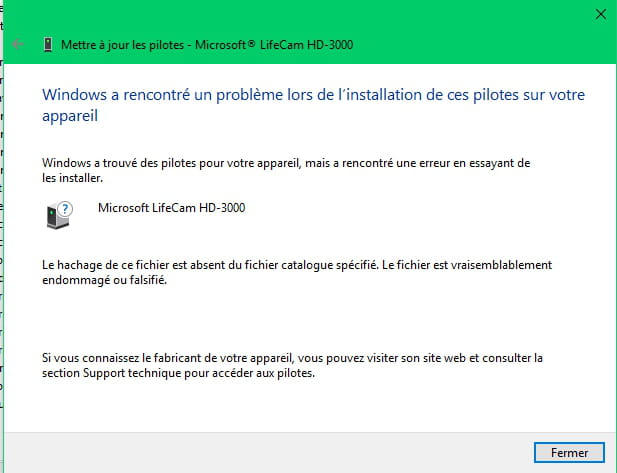
Also tried
I went up to Vista to see if it worked
When I try to install the drivers, I get this message
Windows found a driver but encountered an error while trying to install it
-
-
Hello,
Press Windows + R
Type --> devmgmt.msc and OK.
Give the hardware ID of the device
Look at this --> Find a device's identification number
Post the number in your next message.
--
Human beings are at their best when things are at their worst. -
Download and install --> 7Zip 64 bits
Download this driver --> LifeCam
and place it in your documents.
Right-click on --> Microsoft_LifeCam_5.20.102.zip
Select --> 7Zip
Choose --> extract to "Microsoft_LifeCam_5.20.102\"
Go to Device Manager
Right-click on the device
Update driver
Browse my computer ......
Choose from a list of drivers...
Provided disk
Browse
Go to your documents
Go to the unzipped driver folder --> Microsoft_LifeCam_5.20.102
Select the file --> TrueColor.inf and OK.
Restart.
--
Human beings are at their best when things are at their worst. -
Right-click on the device
Uninstall
Click on --> Action
Scan for hardware changes.
--
Human beings are at their best when things are at their worst. -
Have you tried with Windows Update?
--
Human beings are at their best when things are at their worst. -
Try this one --> LifeCam
Unzip it and install it manually.
Select the same file --> TrueColor.inf
--
The human being is at their best when things are at their worst. -
Have you selected a device from the list?
Don't do that.
Right-click on the device
Update driver
Browse my computer ......
Choose from a list of drivers...
Provided disk
Browse
Go to your documents
Go to the unzipped driver folder --> Microsoft_LifeCam_5.20.102
Select the file --> TrueColor.inf and OK.
Restart.
--
The human being is at its best when things are at their worst. -
Try this latest proposed driver --> LifeCam1
Right-click on --> LifeCam1.zip
Select --> 7Zip
Choose --> extract to "LifeCam1\"
Go to Device Manager
Right-click on the device
Update driver
Browse my computer ......
Choose from a list of devices...
Have Disk
Browse
Go to your documents
Go to the unzipped driver folder --> LifeCam1
Select the file --> LifeCam.inf and OK.
Restart.
-
Go to Device Manager
Right-click on the device
Uninstall (including all drivers)
Go to USB bus controllers
Right-click on USB root hub
Uninstall
Unplug the webcam
Restart the PC and see what happens in Device Manager.
--
The human being is at their best when things are at their worst.