The default gateway is unavailable.
Solved/Closed
AntoineR
-
Romain -
Romain -
Hello,
I have a problem connecting to the Internet via Wi-Fi:
my PC, connected via Ethernet, accesses the net just fine (hence this message)
the other devices (phone, laptop, tablets) that usually connect via Wi-Fi can detect the Livebox network, connect to it, but then refuse to access the net:
So, I don't think the problem is with the devices, but rather with the Livebox. I have restarted it several times, but the problem has persisted since yesterday.
Does anyone have any ideas or helpful advice?
Best regards,
Antoine
I have a problem connecting to the Internet via Wi-Fi:
my PC, connected via Ethernet, accesses the net just fine (hence this message)
the other devices (phone, laptop, tablets) that usually connect via Wi-Fi can detect the Livebox network, connect to it, but then refuse to access the net:
- from the laptop, I ran the troubleshooting, and it says that "the default gateway is not available."
- the phone tells me it will connect as soon as "the network is of better quality."
So, I don't think the problem is with the devices, but rather with the Livebox. I have restarted it several times, but the problem has persisted since yesterday.
Does anyone have any ideas or helpful advice?
Best regards,
Antoine
1 answer
-
Hello,
- Shut down the PC
- Unplug the box from the wall socket
- Wait a few minutes
- Plug the box back into the wall socket
- Wait for all the LEDs to be lit
- Start the PC.
If the problem persists:- Press Windows + X then select --> Windows PowerShell (admin) or Command Prompt (admin) and hit Enter.
- Type these commands, pressing Enter after each one:
ipconfig /flushdns
netsh winsock reset
netsh winhttp reset proxy
netsh winhttp reset tracing
netsh winsock reset catalog
netsh int ip reset all
netsh int ipv4 reset catalog
netsh int ipv6 reset catalog
Then restart the computer.
If it still doesn't work:- Press Windows + R then
control panel
and OK. - Network and Sharing Center
- Change adapter settings
- Right-click on the Wi-Fi connection
- Properties
- Select --> Internet Protocol Version 4 (TCP/IPv4)
- Click on --> Properties
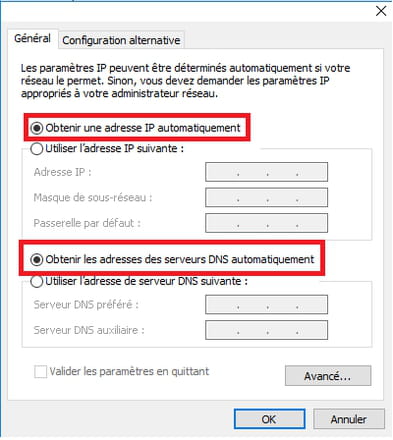
- Check that these two boxes are checked:
- Obtain an IP address automatically
- Obtain DNS server addresses automatically
- Do the same with Internet Protocol Version 6 (TCP/IPv6)