
Unable to print with EPSON
Solved
ghitazur
Posted messages
3
Status
Member
-
jmarion3 Posted messages 49498 Registration date Status Contributor Last intervention -
jmarion3 Posted messages 49498 Registration date Status Contributor Last intervention -
Hello,
I don't know if you can help me, I'm at my wit's end, I can't get my EPSON printers to work anymore.
- EPSON XP 215 used just once. I have a PC running Windows 10 (I've done the updates and I don't know where I stand now) for this printer the PC informs me that there is no driver; the printer's test page (hardly readable) indicates: driver 7.14.0;0
I went to the Epson website and I wasn't able to understand which driver I should download.
- EPSON STYLUS X 7450 used intensively, I had to change the magenta cartridge and since then it refuses to work while having stopped flashing for lack of ink, it doesn't connect to the PC, the USB cable (still the same) apparently is no longer suitable. I should note that since I updated Windows I haven't been able to use the scanner but the prints were perfect. So I tried the XP 215 with the result I mentioned to you that is, the PC tells me no driver!!!
Can you help me?
Thank you.
I don't know if you can help me, I'm at my wit's end, I can't get my EPSON printers to work anymore.
- EPSON XP 215 used just once. I have a PC running Windows 10 (I've done the updates and I don't know where I stand now) for this printer the PC informs me that there is no driver; the printer's test page (hardly readable) indicates: driver 7.14.0;0
I went to the Epson website and I wasn't able to understand which driver I should download.
- EPSON STYLUS X 7450 used intensively, I had to change the magenta cartridge and since then it refuses to work while having stopped flashing for lack of ink, it doesn't connect to the PC, the USB cable (still the same) apparently is no longer suitable. I should note that since I updated Windows I haven't been able to use the scanner but the prints were perfect. So I tried the XP 215 with the result I mentioned to you that is, the PC tells me no driver!!!
Can you help me?
Thank you.
2 answers
-
Hello;
Are you sure about the reference of the Epson X7450? Because I think it should be a DX7450 instead? >> To be confirmed .....
For the Epson XP 215
This printer should be automatically recognized by Windows 10 by following the steps below
1-Control Panel
2-Devices and Printers
3-Add a printer (2nd line from the top right)
4-Click on "The desired printer is not listed"
5-Check the last small box at the bottom >> Next
6-Leave the top box checked >> Next
7-Click on Windows Update >> Let the machine search for compatible printers
8-In the window that opens >> Left Column >> Search for Epson >>>>>>> in the right column scroll down to Epson >> On the right >> Epson XP215-217 Series
9-Connect the printer and plug in the USB cable when the system prompts
See screenshot below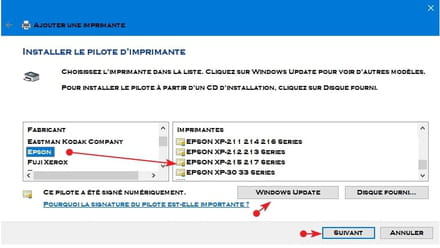
A + for your comments but if none >> Subject resolved
Best regardsAging well: It's preferring the time that remains to the time that passes
-
Thank you Marion, indeed it's Epson DX 7450, I skipped the D sorry
the problem is that the XP 215 is listed, the system displays it correctly, it indicates connection issue and if I connect it, it replies status: maintenance required, driver unavailable. I've checked and the driver is indeed installed, I fear that following the Windows 10 update I will end up without a scanner and without printers... sob sob
sorry and thank you again..... best regards
-

