Lire des fichiers .ifo .vob .bup sur Mac
Kadiri.Mamoun
Posted messages
2
Status
Member
-
kadiri.mamoun -
kadiri.mamoun -
Hello, I just retrieved a hard drive from my father containing several folders supposedly with old videos of us. I have a MacBook and the files are unreadable and are in .Bup, .ifo, and .vob format... they were recorded with a camcorder. I downloaded AVC player but I was only able to open a few videos... most of the other files are unreadable... what should I do?
Do all the files make up a single video or is it something else?
Thank you.
Do all the files make up a single video or is it something else?
Thank you.
2 answers
-
Hello,
VLC should be able to read your files even on Mac. It should at least be able to play large VOB files.
Try putting them in the same directory (folder) and then after opening VLC, drag and drop them into VLC.
A DVD-Video can contain a single movie but can also have various "chapters" with or without a menu. It all depends on how it was made and with what software or hardware.
I’m providing some additional information if needed.
What you described resembles a DVD-Video structure which consists of two directories AUDIO_TS (empty) and VIDEO_TS containing the IFO, BUP, and VOB files.
The structure is often as follows (the JACKET directories or others are not present):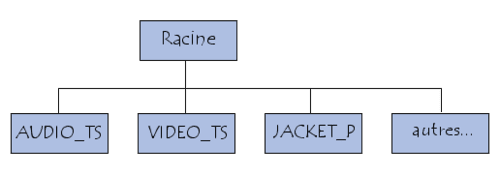
The content of a DVD-Video looks like this for example (this was done with an old version of Nero but that doesn't matter):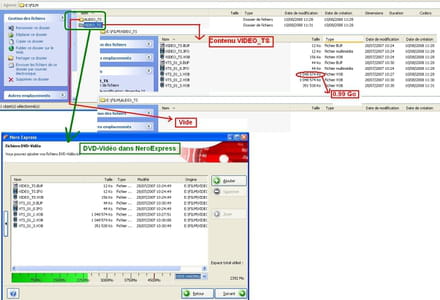
Schematic for a DVD-Video containing 2 Titles (chapters) and "sub-chapters", the architecture is roughly like this: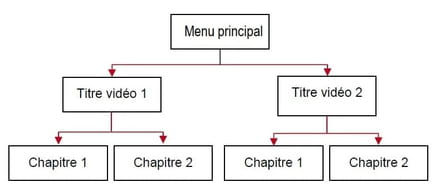
For more information, see here: https://www.figer.com/Publications/dvd.htm#contenu-dun-dvd-pal
Best regards
--
Long live Bobo! ~ Little fish will become big ~-
Thank you very much for your reply!! It works! I am able to watch the videos!
I have a question if you can answer me.. I plan to edit these videos but since they are files accessible only through the DVD platform on AVC, I won't be able to edit them directly... do you think there's a solution to convert this entire folder to MP4 or something else?
Thanks again!!- Try Avidemux for Mac.
I know that with the portable Nightly version on Windows, it recognizes the content/structure from a valid DVD-Video and allows you to assemble all the VOB files.
You add and choose the first VOB of 0.99 Go.
I think its operation is the same on Mac.
After HandBrake (in Source, you select the VIDEO_TS folder if it exists) or other software for Mac might also be able to do it.
-
-
-
Hello, welcome as a new member. The brand and model of the camcorder would be valuable for us to inform you.
"Donkeys change their minds, not idiots."
Please remember to mark your message as "resolved" if that is the case.-
-
Hello, each type of camcorder indeed provides a different solution; I deduce that they are analog cassettes.
Hello, to transfer the content from an analog VHS, VHS/C, 8mm, Hi8 cassette or an analog video stream, you need to connect the camcorder or the VCR or another device to an 'external box' that handles the 'hardware' conversion of the analog stream to 'digital,' and you connect the box to the computer via a USB cable. The file is converted to MPEG2, a format easy to burn and compatible with all players, with the possibility of editing using 'Studio.'
Connect the box and camcorder or VCR using an S-VHS connection (recommended) or composite (less good) (RCA yellow) and a cable for audio (2 RCA red, white). For the VCR, you need a SCART connection with an adapter or cable with 'out' direction or with a switch for in/out, output S-VHS or composite RCA yellow (less good); connect only one video plug plus the audio, two RCA outputs red and white.
Remember to select PAL for color.
I recommend the Dazzle Video Recorder box.
You can also find it second-hand on the web and sell it when you no longer need it.
There are exotic products like USB keys and 4 wires, cheaper but be careful, as they often lead to headaches, judging by the messages from desperate members on the forum.
With the format being 4:3, the image quality can only be judged on a living room TV screen. The link:
https://www.pinnaclesys.com/fr/products/dazzle/dvd-recorder-hd/ -
-