Unable to format SSD
Solved
Hello everyone,
I want to format my SSD because it was under Linux and it is impossible for me to format or partition it under Linux while it's working.
Despite my inexperience in computing and thanks to a YouTuber, I was able to follow step by step the disassembly of it.
Now, I don't know how to format it because I don't have compatible media with my SSD.
I have available an all-in-one screen, another HP laptop, and an old desktop.
Do you have a solution for me to install the original Windows?
Thank you.

P.S.: Sorry for the spelling mistakes.
I want to format my SSD because it was under Linux and it is impossible for me to format or partition it under Linux while it's working.
Despite my inexperience in computing and thanks to a YouTuber, I was able to follow step by step the disassembly of it.
Now, I don't know how to format it because I don't have compatible media with my SSD.
I have available an all-in-one screen, another HP laptop, and an old desktop.
Do you have a solution for me to install the original Windows?
Thank you.
P.S.: Sorry for the spelling mistakes.
14 answers
-
jeannets ContributorHello,
Formatting is not necessary... When installing Windows on this disk, it will offer to format it at the very beginning of the installation...
So... Whether you install Windows from a DVD or a USB drive, your PC will boot from the DVD/USB and run the PC. The SSD in place will be completely free; you can format it and then install Windows on it...
It's normal that you can't do it while being active... you can't cut the branch of the tree you're sitting on.-
-
zipe31 ContributorHi,
The formatting is not necessary... When installing Windows on this disk, it will offer to format it at the very beginning of the installation...
Uh... not quite. Windows is basically very stupid and if it doesn't detect a system of its own (FAT and/or NTFS), it just won’t want to format the existing partitions; you first need to destroy all existing partitions (via the advanced options of the installer) and recreate at least one in the correct format. -
-
-
_The_Frost_there was no need to disassemble it
you must follow the steps to create a bootable USB key for Win10
https://www.commentcamarche.net/informatique/windows/187-creer-une-cle-usb-bootable-de-windows-10/ -
kaumuneHi
Uh, just to point out (and this doesn't change the previous answers) that's not an SSD in the picture... but a regular hard drive
--
-
-
jeannets ContributorOkay, so it's very different for an HDD; it probably has defects, that's why you can't format it..
But normally with a Live CD of Linux, you should be able to format this drive with "Gparted"... You format it to NTFS and then install Windows on it with your installation DVD. (if the drive is good) otherwise, you'll need to get a new drive. -
-
-
-
jojo010687 AuthorI have tried the following:
partitioning the hard drive, without success!
installing the utility gparted, impossible!
(unable to install the simple player VLC and to update the library)
Format error during the installation of Windows on the HDD because the format of the latter is not compatible.
Basically, every time I try a method, I end up getting stuck.
Buy another HDD? I already have an external hard drive and furthermore, I currently do not have the means to buy one for €50.-
-
jeannets ContributorIf you can't install Gparted... take a Linux live CD, Gparted is on it... and from a live CD you will be able to format your hard drive which will be freed... if the disk has no defects.
If the disk has defects, we can find out with HD_tune... but there's no solution... other than changing the disk. -
-
jeannets Contributor
 jojo010687 - Feb 28, 2018 at 9:24 PM
Sorry to send you a private message, but I can't see the messages I post on my topic!

It's an HP Pavilion AMD A10 (450€) that I bought at Leclerc. It was running Windows 8.1, and an IT technician I worked with previously advised me to install Ubuntu because Windows would purposely affect performance. I therefore downloaded Ubuntu, which turned out to be a real hassle regarding driver updates, so I was advised to switch to Kali. Once again, I am facing issues with software installation (whether through the library or the command line). Given the mess this is, I want to go back to the original Windows.

However, I am blocked at the Windows installation since the disk format is not compatible.
Furthermore, I cannot install software like GParted, nor can I reinstall Kali.
Reply
I don't understand why your messages aren't appearing..??
Indeed, it's a real mess... But it lacks method... you shouldn't try to do everything at once..
Do you still have your original Windows... don't think you can reinstall a Windows found on the web or borrowed from a friend... you need the one that works with this model of PC... all this isn't easy to circumvent...
How old is this PC...?? I think that before installing Linux, you should have made a system backup of your disk... to be able to restore it... like it was before... But I suppose you didn't do that... -
jojo010687 AuthorI didn't perform a Windows system backup, but a seller told me that I have a Windows backup on my hard drive that is locked by Windows itself.
The PC was purchased at least 2 years ago, maybe even 3 years ago.
I wanted to install Linux by creating a partition on my hard drive, but during the installation, it affected the Windows part and installed the Linux system.
I noticed that there is still a small partition related to Windows, which is to say, if I'm not mistaken, the secure part provided by Windows.
Please know that I have another HP Pavilion computer with a slightly different series that runs on the Windows 7 operating system, so maybe I can use this Windows to replace the Kali Linux operating system?
-
-
kaumuneIf the file system (MBR or GPT) is not compatible with the BIOS configuration (UEFI or not) and the version of Windows (32 or 64 bits), you will not be able to create a partition with the Windows installer and/or boot from it.
As already requested, you need to provide a screenshot (or photo) of the error you are encountering regarding this matter.
Info UEFI GPT MBR 32 64 Bits
-
jojo010687 AuthorBy the way, I can't see my latest posts on the forum. So I hope you can see them.
-
jojo010687 AuthorHello,
Sorry for not getting back to you sooner. When I stay on the computer for too long, I get headaches! :-/
I'm copying and pasting one of my posts from another forum (linuxfr.org)
For your information, I don't have any Windows CDs, everything being on the hard drive inside.
According to a seller, I can recover from the hard drive because it contains a backup part.
Here's what I see when I power on the computer
Image title
I tried to install from a Windows 8.1 ISO, but without success because the disk would be locked.
Can you help me?
Here's one of my issues when I managed to uninstall Kali and tried to install Windows via a bootable DVD or USB.
I will reassemble the PC and take screenshots of the error for the Windows installation.
-
-
jojo010687 AuthorHere it is, I've rearranged everything correctly and here are the screenshots when Kali starts (2 errors)
( I no longer have my username and password )( several months have passed since then )


Now I am posting the screenshots during the installation of Windows via an old external hard drive.


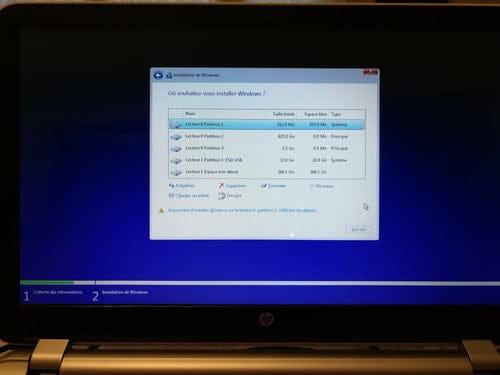


And finally, the BIOS configuration screenshots.


-
kaumuneeverything is indicated in the error messages
Disk in MBR instead of GPT, USB disk not allowed to install Windows and another disk formatted with Linux file system not compatible
I wonder what you can possibly do with Kali???
Thank the one who warmly advised you to use Linux instead of Windows... ;-) -
jojo010687 AuthorThank you, yes and no, because just giving me a link and not responding when there's a problem is useless!
Kallli was recommended to me on one of the forums. It would be better than Ubbbbuntu and its derivatives, which would be limited (according to what I've been told) in terms of updates and software. Kallli would be more complete.
I was advised to use this free system because it would prevent me from downloading pirated software like Microsoft Office, etc.
So now I prefer to use Windows for now and later invest in an upgradeable PC running Ubuntu using a USB bought from the Linux site. -
-
jojo010687 Authorha ok. ^_^
Well, I'm not an expert in IT by any means! What do I need to do? Kalli was recommended to me because it was perfect for office work and (free software) and was simpler and faster. A long time ago, I was advised to try Kaella Azur, but I couldn't find it on the internet. -
kaumune
What do I need to do?
First, know and say what you want... At first, you said you wanted to reinstall Windows
Kali is completely unsuitable for you and is used for everything except office work. That was very bad advice you were given, and it was a bad idea to install it.
Linux Mint is more than enough for office use
I think you should get assistance at home for the further restoration of your machine.
-
-
jeannets ContributorYour thing is twisted..!
1° I can’t read the text in your photos, nor enlarge it... Could you instead post them on the site "cjoint.com" and then paste the link to your photo here... the photos are much more usable there.
2° here is a link to read https://www.debian-fr.org/t/kvm-disabled-by-bios/57759/6 regarding virtualization settings in your BIOS... according to the black screen of Kali...
3° you are posting Windows installation screens here... so you must have a CD.. DVD.. USB..???
We’re off for a century of messages...
I also sometimes have posts that disappear... Mystery..??-
zipe31 ContributorHi,
Sometimes I also have posts that disappear... Mystery..??
It's normal, the Kali distribution and its peers are categorized as persona non grata¹ on CCM, and that's just as well since 99% of the so-called users have no understanding of Gnu/Linux systems ;-(
¹ Messages are therefore automatically moderated by the CCM bot. -
-
-
jeannets ContributorOK, I understand better why some messages were deleted... but a little email would help to know the reason and to avoid repeating the same mistakes...
So, it might be preferable to use a lighter version like Mint for example. https://linuxmint.com/edition.php?id=217 as @kaumune already mentioned.
-- I looked at your pictures, it's much better this way.
-- From what I see, your drive 0 is not empty... But we don't know exactly what it is formatted as..?
however, it clearly shows that it has been structured to receive Windows... it has three partitions, 512MB ... 925GB and 5.2GB... let's say that to install, this drive needs to be formatted to return to zero. and delete all partitions... or only make two ... the first being for installing windows.
That's why the upgrade is offered... But it isn't possible... You need to format to avoid that.
Picture 92834, it is well specified at the bottom "Impossible to install Windows on drive 0 partition 1" and next, show details... that, you could check.
But also, you have the "Format" option that is offered...
-- Then you try to install on drive 1... It's a USB drive, that's not possible... You can only install windows on the first partition of the internal drive of the PC... Moreover, this USB drive is in MBR which is not suitable for your Windows installation (10 I believe..??)
-- In my opinion, it would be better to not have a USB drive during the installation of windows... But only the main internal drive of your PC, intended to receive the operating system..
-- According to some error messages, I think I understand that a drive formatted in GPT is needed for it to work, as @kaumune mentioned
-- The preparation of the disk (in a single partition) and then the installation of Windows 10 are quite well explained on this site https://forums.cnetfrance.fr/microsoft-windows-10/506467-quels-partitions-pour-installer-windows-10
You can read it and also take inspiration from it...
-- There are manufacturer utilities for each brand of disk... You need to know the brand of yours.
-- And also to know on which medium your Windows 10 installation files are located..?? -
jeannets ContributorOK, partition N° 3 of drive 0 was probably the Recovery for your Windows. Unfortunately, based on the photos, I saw that it was empty; so it's impossible to recover it... HOWEVER... you could still try, it may be that the files are not visible.
-- Here is the procedure described for your PC model in a video in English https://www.youtube.com/watch?v=qTlHwkVuv5Q At the very beginning, just like entering the BIOS, you need to press F11 at the very start of the HP Logo and it will launch the menus just like in the video, watch the screens closely, they are the same.
-- If the files are still there, the miracle should happen.
-- If they are no longer there... I think you could go back to your "repairman" and ask him to restore the files he deleted... Or find a way to recover them... either from his suppliers or from another PC of the same family...
Here's an idea for now... in the meantime. -
jojo010687 AuthorI wanted to update you on the progress.
I have reverted to Windows. It is no longer 8.1 as it was in the beginning but Windows 10.
Everything seems to be working except for a few drivers that I’m trying to update. It detects Wi-Fi networks well but not mine! :-/ So I'm currently wired.
A HUGE thank you to all of you for your great help!!!
I will close the topic as soon as all the drivers are OK.
Thanks again to you all.-
jeannets ContributorOK, well, here's a good thing...!
Normally, drivers update via "Windows Update," but you can also detect your PC on the "Driverscloud" website https://www.driverscloud.com/fr/demarrer
and it will find all your drivers... 99% of the time. -
-
-
-
-
-
jojo010687 AuthorThanks Jeannets, that's what I did.
There’s a small problem with the wifi. I can see all the other networks around me but not mine. It's surprising because I currently have 2 computers and my phone connected. Do you have a solution?
P.S.: all the devices are fine.
image linkhttps://drive.google.com/file/d/1Rc0tPJdjsDJfBFnNzm-SWVmK9YPAaN0u/view
-
jeannets ContributorIn the menu of your Modem Router, you can read: "Community network inactive," so why is it inactive?? Did you stop it with the Wi-Fi button??
Is the Wi-Fi light on the front of your BOX on??
-- You can unplug your BOX from the power outlet for 3 minutes, then plug it back in
-- Set it to channel 11
-- WPA2-PSK AES
-- You can also try switching to 300Mbps instead of 144
What model of BOX is it??
Is the Wi-Fi only in 2.4gHz ... without having the 5 gHz band??
Are both connected computers connected to the SSID "panda" in 2.4gHz, and is this network visible on these computers??
Are there many other Wi-Fi networks coming from the neighborhood?? -
-
-
-
-
-
jojo010687 AuthorHello,
I made the following changes:
Changed to 300mbps instead of 144mbps. Only possible choice!
Transmission channel 11 instead of 12.
Everything is working perfectly now!
Thank you for your advice.
--
Posted from CCM Live forum for Android -
jojo010687 AuthorHello everyone,
After a few days, my computer is acting up.
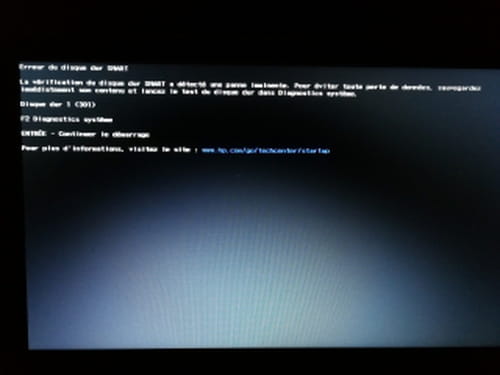
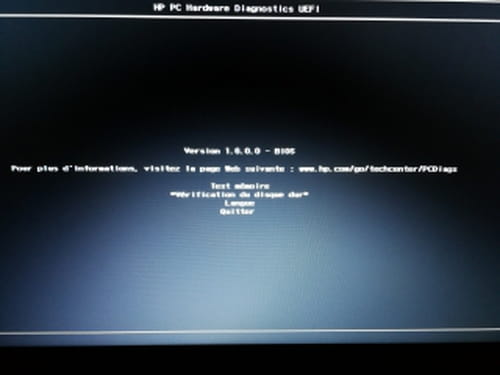
Here’s what I see when I try to turn it on:
Since I'm not very knowledgeable, I reinstalled Windows 10, but I still have the same problem.
Thank you.
-- -
jeannets ContributorHello,
The Google photos are readable, on CCM it's not really the case... and it's a bit blurry..
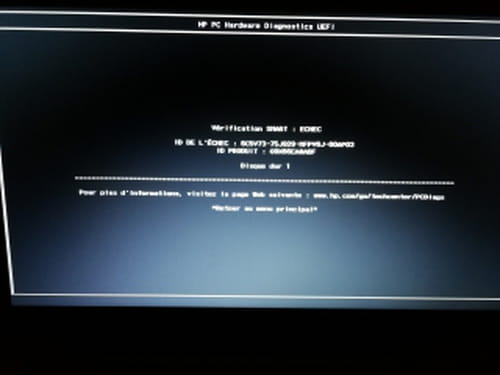
Anyway, you have a hard drive problem... or it’s coming soon.
A SMART table reserved for the manufacturer in the hard drive monitors several error criteria of the disk. Some errors are corrected, up to a certain limit... when the reserve becomes very small, there is an alert, which is what is happening to you.
Very often, these are bad sectors... reallocated to reserved areas... it's a bit like "a lifeboat"... when it's full, there's no more space... the others are doomed to sink with the ship (Titanic).. Not reassuring, but that’s what you risk with the contents of your disk...
It’s an HDD, we can read this table https://www.mesoutils.com/ordi/smart.php and you can use HD_Tune offered on the site ... Knowing the SMART table would be a plus, we would know what the defect is..
... In any case, you need to prepare to know the contents of your disk to back up the parts that are dear to you...! and if possible all the rest... The best being to have a new disk and clone the old one onto the new one... with a real cloning software like "Acronis True Image" or AOMEI https://www.ubackup.com/fr/windows-10/creer-disque-recuperation-windows-10.html check out this site, get yourself "trained" on the subject and prepare the CDlive that will save you..
If you can have a Tower (not too old) it would be best to install your two drives (the old and the new)
in addition to the system disk of this PC... you put your CD in the drive and Boot the PC from this CDlive... It’s with the menus of this CD that you can manage the cloning of your disk...
That's it, I don’t know if there is a major urgency or a minor urgency..? but I’m giving you the tools to prepare yourself.-
-
-
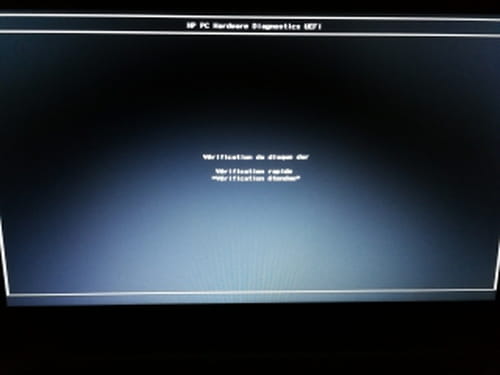
jeannets ContributorOK, your disk is dying.. the Benchmark is that of a cardiac patient in crisis... Your "Error Scan" is not significant because you checked the "Quick Scan" box, it's actually just a surface scan and not an analysis of each sector (needs to be redone without the Quick Scan)... and the Smart specifies that there have already been numerous reallocations and now you have overflowed by one sector that could not be relocated...
Your computer is still working, as long as the vital sectors are not affected... but if it starts on track Zero, you won't even be able to start your PC.
This is exactly what I announced in my previous post...
And given the state of the situation, in my opinion, you won't even be able to clone it because the disk is giving error messages... You can't clone a disk with errors.
So, for you, the most urgent thing is to save the personal files that are precious or dear to you.. and if possible to extract the Windows key, so that you can use it to activate your future reinstallation..
I don't have anything better to offer you... -
-
-