
Built-in speakers on my monitor not detected
floyd29
Posted messages
4
Status
Member
-
epango Posted messages 36739 Registration date Status Member Last intervention -
epango Posted messages 36739 Registration date Status Member Last intervention -
Hello! I am on Windows 10, my screen is a BenQ GW2760HL and my PC is an HP 570-p009.
I went to play with my audio drivers because the sound emitted by my screen (built-in speakers) was low. As a result, there's no sound at all now and my PC doesn’t seem to detect my speakers anymore. The small speaker icon in the bottom right of the screen now has a small red cross on it and indicates 'No speakers or headphones are plugged in'.
When I go to my sound settings, here’s what I see:

I am currently connected from my screen to my PC with an HDMI cable. When I go to the device settings for 'High Definition Audio', it tells me that it is properly installed:
However, when I go to 'Change settings' for this same device, it says 'The HDAUDIO... device requires installation to continue.':
I am stuck here... :/
Thank you very much in advance!!!
I went to play with my audio drivers because the sound emitted by my screen (built-in speakers) was low. As a result, there's no sound at all now and my PC doesn’t seem to detect my speakers anymore. The small speaker icon in the bottom right of the screen now has a small red cross on it and indicates 'No speakers or headphones are plugged in'.
When I go to my sound settings, here’s what I see:
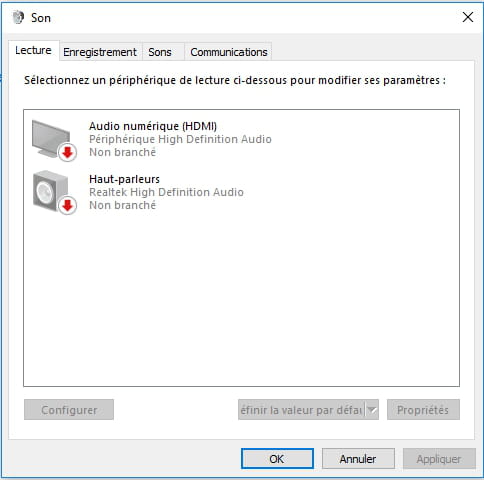
I am currently connected from my screen to my PC with an HDMI cable. When I go to the device settings for 'High Definition Audio', it tells me that it is properly installed:
However, when I go to 'Change settings' for this same device, it says 'The HDAUDIO... device requires installation to continue.':
I am stuck here... :/
Thank you very much in advance!!!
4 answers
-
If you want to use the built-in speakers in your monitor, it is your GPU (or your integrated graphics chipset in your case) that will be used as the sound card. In your first image, we can see that it is not selected as the playback device (it is not checked). So you need to do this:
Right-click on Digital Audio (HDMI). Then click on Set as Default Device.
Normally, if there are no other problems, you should hear sound in the speakers of your monitor connected via HDMI.
--
Naming things incorrectly adds to the misery of the world (Albert Camus)

