Heeeeelp ! exception de thread système non gérée / ntfs.sys
LiieTchie
-
Malekal_morte- Posted messages 178136 Registration date Status Moderator, Security Contributor Last intervention -
Malekal_morte- Posted messages 178136 Registration date Status Moderator, Security Contributor Last intervention -
Hello,
On Saturday night, I launched a Windows update on my computer. When I tried to use it today, it completely crashed.
I have a blue screen saying:
Your computer has encountered a problem and needs to restart. We will restart the computer for you.
Stop code: SYSTEM THREAD EXCEPTION NOT HANDLED
Failed element: Ntfs.sys
Then there is a black screen with the Asus logo, as if it is restarting normally, and a few minutes later, it says Preparing Automatic Repair...
Another black screen and then the blue screen again, and it goes on like this indefinitely!!!!
I am completely new to computers... I would at least like to recover my documents!!!
HEEEEEEELP!!!!!!
On Saturday night, I launched a Windows update on my computer. When I tried to use it today, it completely crashed.
I have a blue screen saying:
Your computer has encountered a problem and needs to restart. We will restart the computer for you.
Stop code: SYSTEM THREAD EXCEPTION NOT HANDLED
Failed element: Ntfs.sys
Then there is a black screen with the Asus logo, as if it is restarting normally, and a few minutes later, it says Preparing Automatic Repair...
Another black screen and then the blue screen again, and it goes on like this indefinitely!!!!
I am completely new to computers... I would at least like to recover my documents!!!
HEEEEEEELP!!!!!!
3 answers
-
Hello,
Blue screens or BSODs are crashes of Windows that can no longer continue to function.
These crashes can have several possible sources:
- software sources: crash of a device driver such as those for the graphics card, the antivirus that crashes, or any other software that can load "at a low level" on Windows.
- hardware sources: hardware problems on the hard drive, defective memory sticks or incompatibilities, etc.
You must look to see if these crashes occur at particular times; for example, if it happens when you launch a video on your internet browser or a game, there is a good chance it is the graphics card driver. You will then need to reinstall the graphics card drivers.
Also, disconnect any other devices except the keyboard/mouse (game controller, USB webcam, USB printer, etc.), if you have any of these devices, indicate it, it could be a source.
For more information on these blue screens, visit the following page: https://www.malekal.com/bsod-ecran-bleu-windows/
We can also use WhoCrashed to obtain information about these crashes.
Download and run WhoCrashed: Download WhoCrashed
=> WhoCrashed Tutorial
Copy/paste the content here as indicated in the tutorial.
~~
If the BSOD occurs instead of starting Windows 10, see if you can access recovery options.
From there, it is possible to go into safe mode with network support in advanced troubleshooting > Settings.
Otherwise, you can reset Windows 10.
If the recovery options are inaccessible, then you need to use a USB drive.
Here is the procedure to reset or reinstall Windows 10 from an installation media.
In both cases, you will not lose your user data, but applications will be removed.
Create the Windows 10 installation USB drive:
To do this if you don't have one.
From a functional computer:- Download the Windows 10 installation ISO: https://www.microsoft.com/fr-fr/software-download/windows10 (other download methods: https://www.malekal.com/telecharger-iso-windows/).
- Create the installation media with Media Creation Tool, more information: https://www.malekal.com/windows-10-media-creation-tool/
On the crashed computer, you need to boot from the Windows 10 installation USB drive to launch the installer, to do so:- Start on it by modifying the boot sequence and indicating the USB drive or DVD: How to boot the computer from USB drive
If the drive does not work, try recreating it with Rufus: how to download Rufus - see this tutorial for details: how to create a Windows installation USB drive
Method 1 - Reset Windows to fix issues:- Go to Repair the computer at the bottom left
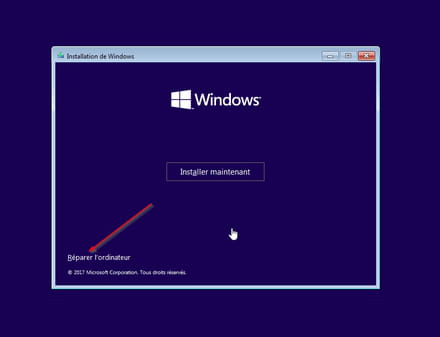
- Troubleshoot then reset the PC
Keep data, applications will be uninstalled.
Method 2 - Reinstall Windows 10 without formatting
If that doesn't work, restart the computer on the Windows 10 installation USB drive again.
Follow this tutorial that explains how to install Windows 10: how to install Windows 10.
All steps are provided from A to Z with tips at the end to secure Windows 10.- Let yourself be guided to install Windows 10.
- Choose customize (not upgrade)
- During the partitioning phase, select the main partition and click next.
- The installer will tell you that Windows is already present and suggest moving it.
- Follow the Windows installation procedure using the tutorial above.
Do not format at all.
~~
In both cases, user data will be copied into the Windows.old folder.
Once Windows is installed, I advise you to follow these tips to properly configure and use Windows: Tips after reinstalling Windows.
-
I think that according to the translation (UNMANIPULATED SYSTEM THREAD EXCEPTION) you have problems with the cable.
-
Hello,
I edited my first message to cover the case where BSOD occurs during Windows startup and access to the desktop is impossible.