Slow PC _ program not responding
mathieu_n
Posted messages
67
Status
Member
-
Malekal_morte- Posted messages 178136 Registration date Status Moderator, Security Contributor Last intervention -
Hello,
For a few weeks now, all my applications have been crashing for a few seconds and then resuming normally. But this phenomenon is becoming more frequent and it doesn’t seem to be getting better.
I have used several programs (Ccleaner, Malwarebytes...) to try to improve something but nothing works.
I am therefore seeking your help, hoping that you can spare some time for my problem...
Thank you ;-)
Configuration: Windows / Firefox 57.0
For a few weeks now, all my applications have been crashing for a few seconds and then resuming normally. But this phenomenon is becoming more frequent and it doesn’t seem to be getting better.
I have used several programs (Ccleaner, Malwarebytes...) to try to improve something but nothing works.
I am therefore seeking your help, hoping that you can spare some time for my problem...
Thank you ;-)
Configuration: Windows / Firefox 57.0
17 answers
It is possible that the problem is coming from an application that is running and consuming resources. Possibly a malware or other parasite.
It may be necessary to use the task manager to see what is blocking
Since the problem has appeared recently, I prioritize this over memory capacity
Here are a few links that may help as well
https://www.supergeek.fr/blog/comment-optimiser-son-pc-sous-windows/
https://www.supergeek.fr/blog/comment-nettoyer-son-pc/
It may be necessary to use the task manager to see what is blocking
Since the problem has appeared recently, I prioritize this over memory capacity
Here are a few links that may help as well
https://www.supergeek.fr/blog/comment-optimiser-son-pc-sous-windows/
https://www.supergeek.fr/blog/comment-nettoyer-son-pc/
Thank you for these explanations. Indeed, my PC is a bit slow, and I fully understand your explanations.
But the problem for the past few weeks is that very frequently (at least every 5 minutes), the program freezes for a few seconds (about 20-30 seconds) and the message "not responding" appears at the top of the window, then it goes back to normal.
I have this problem with all programs: internet browser, file explorer, Excel...
It's becoming unbearable!
But the problem for the past few weeks is that very frequently (at least every 5 minutes), the program freezes for a few seconds (about 20-30 seconds) and the message "not responding" appears at the top of the window, then it goes back to normal.
I have this problem with all programs: internet browser, file explorer, Excel...
It's becoming unbearable!
Hello,
Instead of cleaning with useless stuff like CCleaner, Wise, and the like for a status report:
Follow the FRST tutorial. ( take your time to read carefully - everything is well explained ).
Download and run the FRST scan,
Wait for the scan to finish, a message will indicate that the analysis is complete.
Three FRST reports will be generated:
Send these 3 reports to the site https://pjjoint.malekal.com/ to share them.
In return, provide the 3 pjjoint links that lead to the reports here in a new response so we can review them.
--
Please press any key to continue the disinfection...
Instead of cleaning with useless stuff like CCleaner, Wise, and the like for a status report:
Follow the FRST tutorial. ( take your time to read carefully - everything is well explained ).
Download and run the FRST scan,
Wait for the scan to finish, a message will indicate that the analysis is complete.
Three FRST reports will be generated:
- FRST.txt
- Shortcut.txt
- Additionnal.txt
Send these 3 reports to the site https://pjjoint.malekal.com/ to share them.
In return, provide the 3 pjjoint links that lead to the reports here in a new response so we can review them.
--
Please press any key to continue the disinfection...
Only install what you need, ask what type of software for what kind of use if you don't know... don't browse anywhere... don't install any software (even if advised) without checking online what people say about it... always use a safe site to download your software like this site: comment ça marche.
Don't hesitate to ask for help or watch tutorials to understand better...
But to really help you, here’s what seems to be the reality of PC usage for 99% of individuals. They use it to surf, or browse the internet... an antivirus like Avast with CCleaner, Auslogics Disk Defrag, Malwarebytes to complete security. With Firefox, LibreOffice, VLC, and Winamp if you need an audio player should simply allow you to fully enjoy your PC.
Afterwards, you can always make more personal choices, but always be careful about what you install.
Don't hesitate to ask for help or watch tutorials to understand better...
But to really help you, here’s what seems to be the reality of PC usage for 99% of individuals. They use it to surf, or browse the internet... an antivirus like Avast with CCleaner, Auslogics Disk Defrag, Malwarebytes to complete security. With Firefox, LibreOffice, VLC, and Winamp if you need an audio player should simply allow you to fully enjoy your PC.
Afterwards, you can always make more personal choices, but always be careful about what you install.
Hello
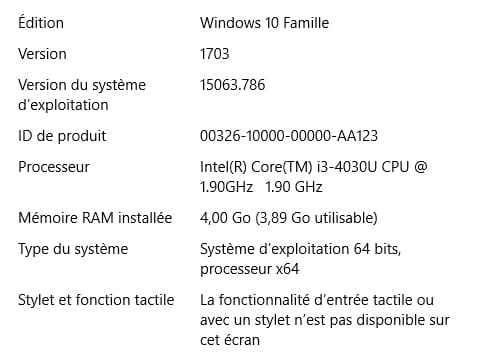
what is the PC configuration RAM memory
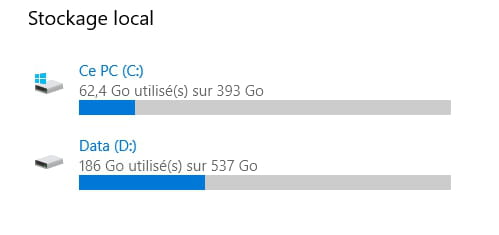
is the hard drive full?
we're not all geniuses but we're working on it
Google is your friend don't forget it!
what is the PC configuration RAM memory
is the hard drive full?
we're not all geniuses but we're working on it
Google is your friend don't forget it!
ok nothing unusual.
Have you done the update 1709?
=> https://forums.commentcamarche.net/forum/affich-35083447-pc-lent-programme-ne-repond-pas#24
It wouldn't be a bad idea to test by completely uninstalling Antivi to see if it's the culprit.
Have you done the update 1709?
=> https://forums.commentcamarche.net/forum/affich-35083447-pc-lent-programme-ne-repond-pas#24
It wouldn't be a bad idea to test by completely uninstalling Antivi to see if it's the culprit.
and the performance is indeed at maximum and the number of processors is not limited?
=> https://www.malekal.com/resoudre-lenteur-windows10/#Performances_Optimales
and:
Install "Real Temp" or "Coretemp" to monitor the temperature of the computer.
See how high the temperature of the computer rises during use. It should not exceed 60 degrees Celsius. If possible, attach a screenshot of the software to the message.
First check the hard drive: How to check the health of the hard drive
For example with CrystalDiskInfo.
=> https://www.malekal.com/resoudre-lenteur-windows10/#Performances_Optimales
and:
Install "Real Temp" or "Coretemp" to monitor the temperature of the computer.
See how high the temperature of the computer rises during use. It should not exceed 60 degrees Celsius. If possible, attach a screenshot of the software to the message.
First check the hard drive: How to check the health of the hard drive
For example with CrystalDiskInfo.
your processor is a bit slow
let me explain, I have an AMD dual-core PC at 1.75 MHz and 4GB of RAM. I upgraded it to Windows 10, the first version of 10 was fine, but after the first major update, it lagged so much that I reverted to the original Windows 8.1
my other PC, which was running on 7 but has an i5 at 3.3 MHz with 4GB, works better and is much faster now that I've added 4GB, making it 8GB, and it’s definitely smoother.
--
we're not all geniuses, but we're working on it
google is your friend, don't forget that!
let me explain, I have an AMD dual-core PC at 1.75 MHz and 4GB of RAM. I upgraded it to Windows 10, the first version of 10 was fine, but after the first major update, it lagged so much that I reverted to the original Windows 8.1
my other PC, which was running on 7 but has an i5 at 3.3 MHz with 4GB, works better and is much faster now that I've added 4GB, making it 8GB, and it’s definitely smoother.
--
we're not all geniuses, but we're working on it
google is your friend, don't forget that!
You have programs that were installed when you purchased the computer or later on that may not be useful.
They clutter Windows and can slow it down.
You can therefore uninstall them.
Go to the Control Panel
then Programs and Features.
Uninstall:
Avira Phantom VPN
Avira System Speedup
CCleaner
Intel Security True Key
Java
WinSnare <= if you encounter an error during uninstallation, forget it.
Wise Disk Cleaner
P.S.: CCleaner is not really useful, even though it is recommended everywhere.
Disable CCleaner's monitoring, unnecessary, it starts with Windows and slows it down with its incessant cleanings, see: https://www.malekal.com/supprimer-ccleaner-demarrage-windows/
~~
Given the configuration, you may wonder whether to completely uninstall Antivir to make room for Windows Defender, which is lighter.
~~
Reset/Repair the web browsers concerned by the issues:
Install uBlock on the browser you use to surf: https://www.malekal.com/ublock-bloquer-publicites-internet/
--
Please press a key to continue the disinfection...
They clutter Windows and can slow it down.
You can therefore uninstall them.
Go to the Control Panel
then Programs and Features.
Uninstall:
Avira Phantom VPN
Avira System Speedup
CCleaner
Intel Security True Key
Java
WinSnare <= if you encounter an error during uninstallation, forget it.
Wise Disk Cleaner
P.S.: CCleaner is not really useful, even though it is recommended everywhere.
Disable CCleaner's monitoring, unnecessary, it starts with Windows and slows it down with its incessant cleanings, see: https://www.malekal.com/supprimer-ccleaner-demarrage-windows/
~~
Given the configuration, you may wonder whether to completely uninstall Antivir to make room for Windows Defender, which is lighter.
~~
Reset/Repair the web browsers concerned by the issues:
- Repair Mozilla Firefox (first paragraph)
- Repair Google Chrome (only the first paragraph).
Install uBlock on the browser you use to surf: https://www.malekal.com/ublock-bloquer-publicites-internet/
--
Please press a key to continue the disinfection...
Install the Windows 10 Fall Creators Update 1709 manually, see:
- https://www.malekal.com/telecharger-installer-windows-10-fall-creators-update-version-1709/
- https://www.commentcamarche.net/faq/48417-windows-10-1709-installer-la-mise-a-jour-windows-10-fall-creators-update
- https://www.malekal.com/telecharger-installer-windows-10-fall-creators-update-version-1709/
- https://www.commentcamarche.net/faq/48417-windows-10-1709-installer-la-mise-a-jour-windows-10-fall-creators-update
Apparently, in this screenshot, it is not the antivirus that is occupying the processor. It's likely that by scrolling down the page, we can find the network host services again.
Compared to my previous post, there has been a notable change in my experience:
I started by checking if any malware had sneaked into my data and found BIOSAGENTPLUS_40.exe. After quarantining it, I restarted my PC and everything was back to normal.
Later, I changed the access configuration to my data by removing the password. After restarting, the same problem returned. I ran a full scan, including the registry, and there were no changes. The network service host occupies the processor at 30% and the service host system at 20%. In short, half of the computing potential is being consumed by this service that doesn't serve much purpose (in my case, but it can cause problems if disabled).
Eventually, I found an intermediate solution that can satisfy everyone. The steps are as follows:
1) Access the task manager (right-click on the taskbar, for example).
2) Locate the problematic network host service and right-click on the "resource consumer".
3) In the menu window, left-click on "go to details". This will take you to the services (last tab) and to the source of the problem: svchost 1... (something like a thousand) which is selected (at least, there's no need to search).
4) Right-click on svchost 1... and in the menu, choose "set priority" and left-click on "low".
Since then, I have not had any issues with the processor overheating.
Compared to my previous post, there has been a notable change in my experience:
I started by checking if any malware had sneaked into my data and found BIOSAGENTPLUS_40.exe. After quarantining it, I restarted my PC and everything was back to normal.
Later, I changed the access configuration to my data by removing the password. After restarting, the same problem returned. I ran a full scan, including the registry, and there were no changes. The network service host occupies the processor at 30% and the service host system at 20%. In short, half of the computing potential is being consumed by this service that doesn't serve much purpose (in my case, but it can cause problems if disabled).
Eventually, I found an intermediate solution that can satisfy everyone. The steps are as follows:
1) Access the task manager (right-click on the taskbar, for example).
2) Locate the problematic network host service and right-click on the "resource consumer".
3) In the menu window, left-click on "go to details". This will take you to the services (last tab) and to the source of the problem: svchost 1... (something like a thousand) which is selected (at least, there's no need to search).
4) Right-click on svchost 1... and in the menu, choose "set priority" and left-click on "low".
Since then, I have not had any issues with the processor overheating.
Hello,
Unfortunately, there are still no improvements to my problem... I would even say that it's getting worse, I have to wait at least 10 minutes at startup before I can do anything!
ok you have defective sectors, this can affect the stability of Windows..
Run a checkdisk from the command line.
You need to enter the following command in an elevated command prompt: https://www.malekal.com/ouvrir-invite-de-commandes-windows10/
then enter:
This will prompt you to perform the analysis on Windows startup, accept.
Run a checkdisk from the command line.
You need to enter the following command in an elevated command prompt: https://www.malekal.com/ouvrir-invite-de-commandes-windows10/
then enter:
chkdsk c: /R /F
This will prompt you to perform the analysis on Windows startup, accept.
It would have been simpler at the beginning to check the processes by pressing ctrl+alt+del
task manager then advanced to check if a process was crashing the whole PC
by wasting resources unnecessarily
when you have a rather weak PC, only the bare minimum should boot at startup: antivirus, .... we only install the bare minimum, we do cleaning with CCleaner, defrag once a week and especially we don’t install anything unnecessary.. to uninstall, Revo Uninstaller is very good
CCleaner allows you to manage the software that starts up
use an external hard drive to store your files.. or a USB stick.
it's an essential principle, the weaker the machine, the lighter and simpler its use should be.
CCleaner and Auslogics Disk Defrag are a sufficient solution for this type of PC
with VLC for everything, LibreOffice for documents and Firefox for the internet; you should have
everything a user typically looks for to navigate on their PC.
you can also install Malwarebytes but I advise against keeping it in the taskbar..
Avast, or another lighter free antivirus can protect your machine..
which should limit the problems you might encounter.
if your PC is infected you can also use online solutions.. if the problem persists, feel free to talk about it here.
Good luck
task manager then advanced to check if a process was crashing the whole PC
by wasting resources unnecessarily
when you have a rather weak PC, only the bare minimum should boot at startup: antivirus, .... we only install the bare minimum, we do cleaning with CCleaner, defrag once a week and especially we don’t install anything unnecessary.. to uninstall, Revo Uninstaller is very good
CCleaner allows you to manage the software that starts up
use an external hard drive to store your files.. or a USB stick.
it's an essential principle, the weaker the machine, the lighter and simpler its use should be.
CCleaner and Auslogics Disk Defrag are a sufficient solution for this type of PC
with VLC for everything, LibreOffice for documents and Firefox for the internet; you should have
everything a user typically looks for to navigate on their PC.
you can also install Malwarebytes but I advise against keeping it in the taskbar..
Avast, or another lighter free antivirus can protect your machine..
which should limit the problems you might encounter.
if your PC is infected you can also use online solutions.. if the problem persists, feel free to talk about it here.
Good luck


I have cleaned it several times using software like Ccleaner, Malwarebytes, Avira, Wise Disk Cleaner... but I can't solve the problem!
You don't need to buy them, you can just use the 30-day trial period.