Photothèque not found!!
JBEY16
-
Cintalka -
Cintalka -
Hello,
Cold sweat, I was about to add some photos to my photo library and when I opened the Photos app on my MACBOOKPRO, I read the following message: "Photos cannot find the system photo library." AAAAAAhhhhh!!!
I have ALL my photos from the past 6 years in this thing and I no longer have access to them!!
Do you have any idea of what to do? What could have happened? I haven't installed anything on my computer. There was a bug a few days ago but it didn't alarm me too much...
Thank you very much in advance!!
Julie
Configuration: Macintosh / Safari 9.1.2
Cold sweat, I was about to add some photos to my photo library and when I opened the Photos app on my MACBOOKPRO, I read the following message: "Photos cannot find the system photo library." AAAAAAhhhhh!!!
I have ALL my photos from the past 6 years in this thing and I no longer have access to them!!
Do you have any idea of what to do? What could have happened? I haven't installed anything on my computer. There was a bug a few days ago but it didn't alarm me too much...
Thank you very much in advance!!
Julie
Configuration: Macintosh / Safari 9.1.2
3 answers
-
Hello,
There may be several iPhoto or Photos libraries on a Mac. One of these libraries can be designated as the "system library", which will be used for syncing with iCloud. It seems that the message indicates that Photos cannot find the system library. But it is possible that your usual library is not the system library.
By default, iPhoto or Photos libraries are placed in the user's Images folder. (they may have been moved elsewhere as well).
So, go to your Images folder and check the existing photo libraries; the heaviest one in KB or GB should be yours, double-click on it to see...
Have a good continuation
--
Always indicate your system configuration in full - exact computer model, exact OS version. -
Thank you for your response!
Unfortunately, there is nothing in that location except for the new photo library I created this morning. All the photos and albums since 2012 are gone :(
I think that since 2012 I wasn't doing the right thing. When I downloaded my photos from my device, I would then click "import" via the photos app and create an album. Then I deleted the source files from my documents where I had initially imported them. Until now, I was always able to find my photos and was able to export them as well for printing... and this morning, cold shower, nothing left...
Please let me know if you have any other ideas for recovering these files! Thank you again
Julie -
I don't see any false manipulation in the way it's done... maybe the photo library was accidentally moved.
Download EasyFind here:
http://www.devontechnologies.com/products/freeware.html
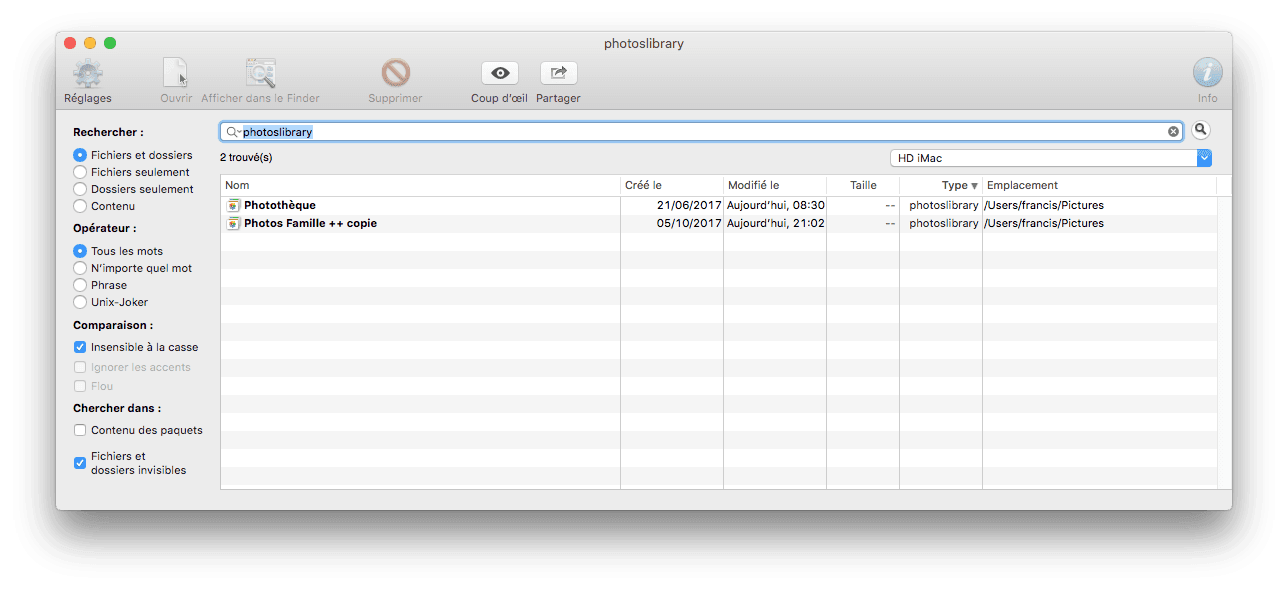
Then with EasyFind, search for the term photoslibrary which is the extension of Photos libraries, for example

--
Always indicate your system configuration in full - exact model of computer, exact OS version.