Unwanted sound notifications!!
Pascal22
Posted messages
836
Registration date
Status
Member
Last intervention
-
pistouri Posted messages 19010 Registration date Status Contributor Last intervention -
pistouri Posted messages 19010 Registration date Status Contributor Last intervention -
Hello everyone !!
Since yesterday, following the last update of Windows 10, I keep hearing the sound notifications from Windows every 10 to 15 seconds, even though I have NO notifications!!! I don't understand where this could be coming from??? Do you have any ideas on this issue that's really annoying!!!!!!
Thanks for your help because, as a result, I can't turn on my speakers with this constant noise!!
Since yesterday, following the last update of Windows 10, I keep hearing the sound notifications from Windows every 10 to 15 seconds, even though I have NO notifications!!! I don't understand where this could be coming from??? Do you have any ideas on this issue that's really annoying!!!!!!
Thanks for your help because, as a result, I can't turn on my speakers with this constant noise!!
2 answers
-
pistouri Posted messages 19010 Registration date Status Contributor Last intervention Ambassador 8 732
Hello,
Some notifications are called Normal
Like Security and maintenance to tell you for example to run an antivirus scan
What are the sound notifications displayed?
Click on the Notification icon next to the time and note the names of the applications or others
It can also come from the notifications of senders
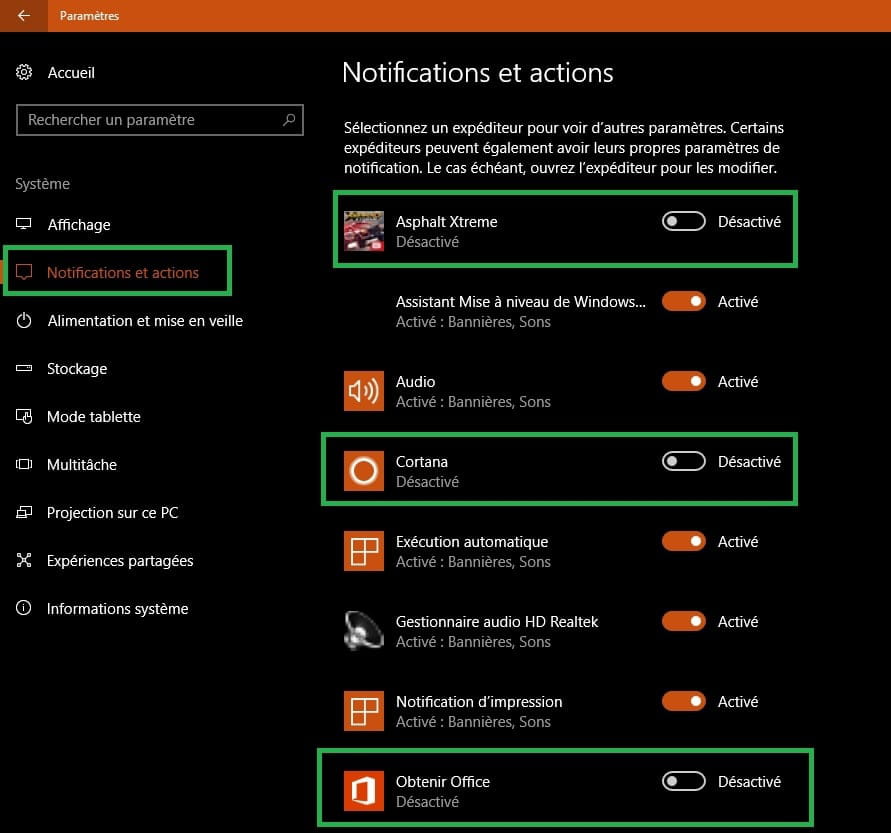
Click on the Notification icon next to the time
Click on → All settings
Click on the box → System
Click on the line → Notifications and Actions
Scroll down the page
You will find the sending applications (names of games if you have any installed...Windows store among others...)
just deactivate the box or boxes
Example in images:

scalpel