How to display the language bar in Windows 10?
mandorison
Posted messages
1
Registration date
Status
Member
Last intervention
-
pistouri Posted messages 19011 Registration date Status Contributor Last intervention -
pistouri Posted messages 19011 Registration date Status Contributor Last intervention -
Hello,
I can't get the language bar to display on Windows 10. I'm following the usual procedure: Settings -> System -> Notifications & actions -> Turn system icons on or off and enable the input indicator. But all I see is a blank space between the icons and the date (see image). Can anyone help me? Thanks in advance
Configuration: Windows / Firefox 54.0
I can't get the language bar to display on Windows 10. I'm following the usual procedure: Settings -> System -> Notifications & actions -> Turn system icons on or off and enable the input indicator. But all I see is a blank space between the icons and the date (see image). Can anyone help me? Thanks in advance
Configuration: Windows / Firefox 54.0
1 answer
-
pistouri Posted messages 19011 Registration date Status Contributor Last intervention Ambassadeur 8 723
Hello,
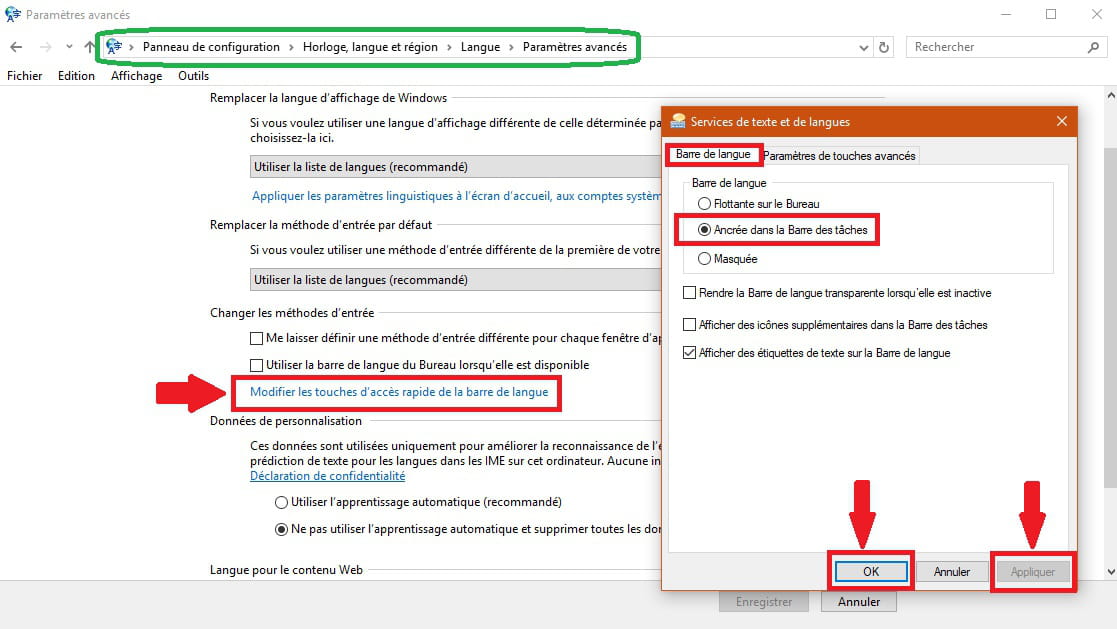
Right-click on the Start button
Control Panel
Clock, Language and Region
Language
In the left menu, choose Advanced settings
Under "Change input methods" or "Modify the language bar hotkeys"
Select the tab --► Language bar
Check the box --► Docked in the taskbar
Also check → Show text labels on the language bar
Finish by → applying → OK
The icon will then appear next to the time
Sometimes a PC restart is necessary
Image Advanced settings

Image Language Bar Settings

--
scalpel