
[Z5 Compact] Auto-input mode not found
ltdrope
Posted messages
4
Status
Member
-
mikaelac -
mikaelac -
Hello everyone,
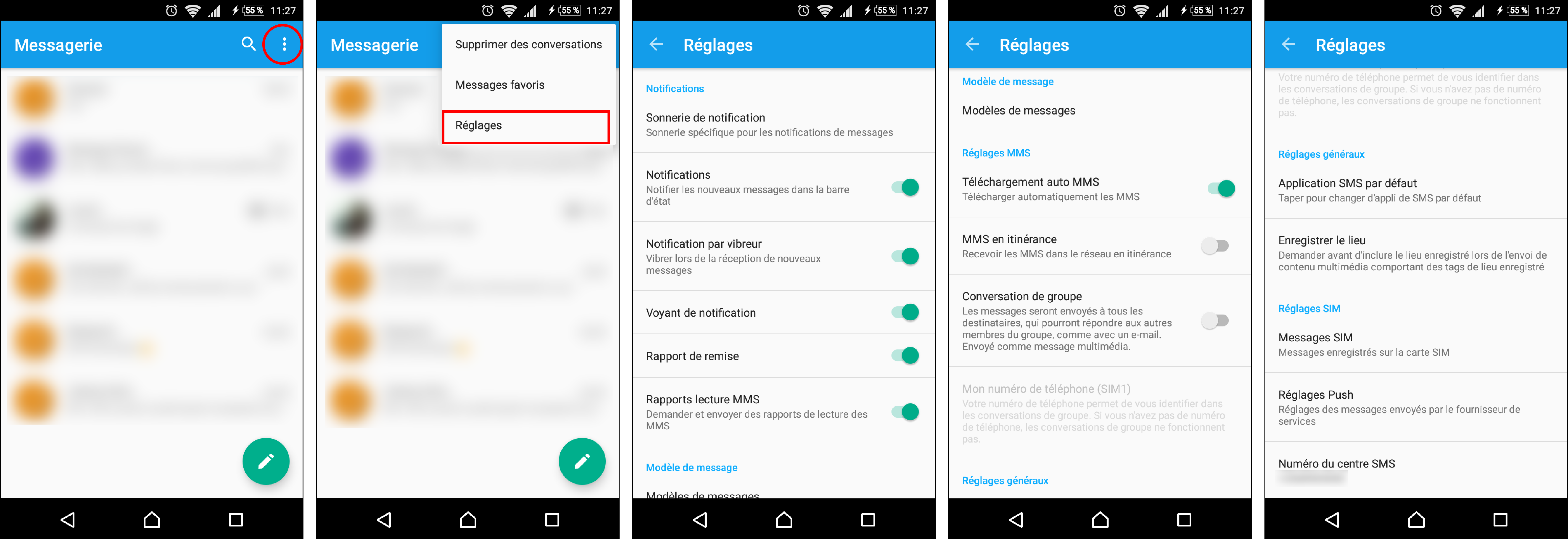
I noticed on my Xperia Z5 Compact that when I receive text messages containing certain emoticons, they appear as question marks. After some research (especially on CCM.net), it seems I need to change the "input method" by setting it to "automatic." The problem is, I can't seem to find that setting. I'm attaching a screenshot of my device, showing the path taken and all the available settings in the panel, because I am really stuck!
Thank you in advance.

I noticed on my Xperia Z5 Compact that when I receive text messages containing certain emoticons, they appear as question marks. After some research (especially on CCM.net), it seems I need to change the "input method" by setting it to "automatic." The problem is, I can't seem to find that setting. I'm attaching a screenshot of my device, showing the path taken and all the available settings in the panel, because I am really stuck!
Thank you in advance.
1 answer
-
Hello
You can adjust this by pressing the gear icon key on your keyboard. You'll see everything you can configure... So, you open, for example, the messaging app and if you want to send a text message, the keyboard appears and you press this gear icon... You can also do this by going to settings, then language and input, and you press the gear icon on the keyboard... And if you don't understand, read your manual here
http://www-support-downloads.sonymobile.com/e5803/userguide_EN_E5803-E5823_7_Android7.0.pdf