
Opposite Pages - the checkbox in Pages for Mac
Claire
-
dede74000 Posted messages 26996 Registration date Status Contributor Last intervention -
dede74000 Posted messages 26996 Registration date Status Contributor Last intervention -
Hello,
I am on a Mac and I am using Pages to prepare my book. I need the "Opposite Pages" checkbox in the inspector, but it doesn't exist in mine. I don't know why.
Does anyone know how I can install it?
Thank you!
Claire
Configuration: Mac OS X (10.12) / Safari 10.0
I am on a Mac and I am using Pages to prepare my book. I need the "Opposite Pages" checkbox in the inspector, but it doesn't exist in mine. I don't know why.
Does anyone know how I can install it?
Thank you!
Claire
Configuration: Mac OS X (10.12) / Safari 10.0
4 answers
-
Good evening,
Which version of Pages? You're on Sierra, but is it the original version or a recent update?
Maybe the version of Pages installed on your Mac needs an update; have you checked?
--
When it's urgent, it's already too late (Talleyrand)
When everything has failed, read the manual ;) -
As explained in the other message, where you asked the question, Francis, aka SansPseudo, provided the answer, which should look like this:
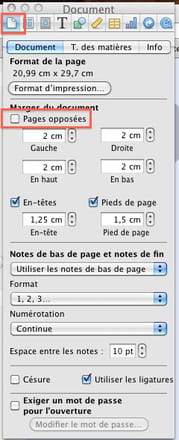
Your version must include this concept; my older version does.
When it's urgent, it's already too late (Talleyrand)
When everything has failed, read the manual ;) -
I'm putting in an extra layer, when you click on "inspector," then on the document icon, you get this window:
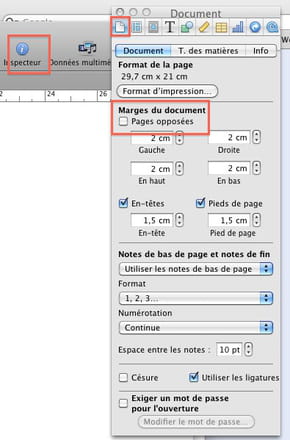
Is it better like this?
--
When it's urgent, it's already too late (Talleyrand)
When everything has failed, read the manual ;) -
Don't you have "document margins"? It's unusual or you just didn't find it, it should be there.
Are you following this path: ?
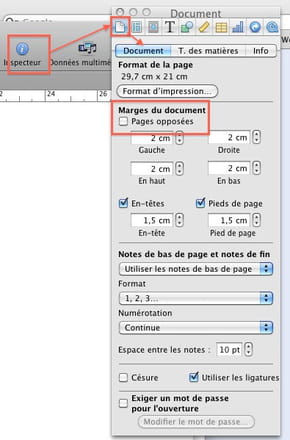
--
When it's urgent, it's already too late (Talleyrand)
When all else fails, read the manual ;)-
-
- Hello Claire,
You should go read the solution provided by Aliboron Martin in the other message:
https://forums.commentcamarche.net/forum/affich-18564713-fonction-livret-sur-mac#top
Best regards
-
