Gmail account setup issues
Solved
Liitch
Posted messages
78
Status
Member
-
kaumune Posted messages 22605 Registration date Status Contributor Last intervention -
kaumune Posted messages 22605 Registration date Status Contributor Last intervention -
Hello everyone!
After many and many attempts, I still haven't succeeded.
Despite my research on various forums (Outlook, Gmail, etc...)
I just joined a company that uses Outlook. On my PC, it’s version 2010.
After creating a Gmail address in my name, my colleagues advised me to use Outlook, as it is easier to use, allows creating numerous rules to filter my emails, and especially allows accessing multiple email accounts simultaneously.
Indeed, this way I can receive my emails from my Gmail account (emails concerning the sales department) as well as those from my Orange account (emails concerning the company's communication) to communicate with a communication agency.
Anyway, I’m digressing.
At first, I took advantage of an IT technician's visit to get everything sorted. (for the Gmail account)
He changed my settings on Gmail because Google blocks access to IMAP.
After that, my Gmail account was well configured on Outlook.
But my Orange account stopped working. So I did some research (POP3, IMAP, SMTP, incoming and outgoing servers, then the port)
I managed to configure it well, but then DISASTER, my Gmail account no longer worked on Outlook.
In a fit of rage and impatience, I deleted both accounts on Outlook and started over.
So, for my Gmail account, I set:
- Account type: IMAP
- Incoming mail server: imap.gmail.com
- Outgoing mail server (SMTP): smtp.gmail.com
Then in additional settings (Advanced Options):
- Incoming server (IMAP): 993
- Use the following type of encrypted connection: SSL
- Outgoing mail server (SMTP): 587
- Use the following type of encrypted connection: TLS
Then > OK > NEXT
When it performs the analysis to see if it works, it shows me:
- Connection to the incoming mail server (IMAP) Completed
- Sending test message from the mailbox Failed
It then displays this:
Sending test message from the mailbox: Unable to send the message. Check the email address in the account properties. Server response: 530 5.5.1 https://support.google.com/mail/answer/7126229?p=WantAuthError&visit_id=637167522309620976-443736447&rd=2#cantsignin q65sm2625382wmd.24 - gsmtp
So I thought that instead of using TLS for the Outgoing mail server (SMTP), I should use SSL and set it to 465.
But the error message is the same:
Sending test message from the mailbox: Unable to send the message. Check the email address in the account properties. Server response: 530 5.5.1 https://support.google.com/mail/answer/7126229?p=WantAuthError&visit_id=637167522309620976-443736447&rd=2#cantsignin 123sm2753748wmj.5 - gsmtp
I checked my email address, but everything is correct.
I am therefore reaching out to you to save me!
I hope I have been understandable enough, and if any information is missing, feel free to ask, thank you!
Configuration: Windows 7 / Chrome 52.0.2743.116
Bye bye
“Before dreaming, one must know.”
After many and many attempts, I still haven't succeeded.
Despite my research on various forums (Outlook, Gmail, etc...)
I just joined a company that uses Outlook. On my PC, it’s version 2010.
After creating a Gmail address in my name, my colleagues advised me to use Outlook, as it is easier to use, allows creating numerous rules to filter my emails, and especially allows accessing multiple email accounts simultaneously.
Indeed, this way I can receive my emails from my Gmail account (emails concerning the sales department) as well as those from my Orange account (emails concerning the company's communication) to communicate with a communication agency.
Anyway, I’m digressing.
At first, I took advantage of an IT technician's visit to get everything sorted. (for the Gmail account)
He changed my settings on Gmail because Google blocks access to IMAP.
After that, my Gmail account was well configured on Outlook.
But my Orange account stopped working. So I did some research (POP3, IMAP, SMTP, incoming and outgoing servers, then the port)
I managed to configure it well, but then DISASTER, my Gmail account no longer worked on Outlook.
In a fit of rage and impatience, I deleted both accounts on Outlook and started over.
So, for my Gmail account, I set:
- Account type: IMAP
- Incoming mail server: imap.gmail.com
- Outgoing mail server (SMTP): smtp.gmail.com
Then in additional settings (Advanced Options):
- Incoming server (IMAP): 993
- Use the following type of encrypted connection: SSL
- Outgoing mail server (SMTP): 587
- Use the following type of encrypted connection: TLS
Then > OK > NEXT
When it performs the analysis to see if it works, it shows me:
- Connection to the incoming mail server (IMAP) Completed
- Sending test message from the mailbox Failed
It then displays this:
Sending test message from the mailbox: Unable to send the message. Check the email address in the account properties. Server response: 530 5.5.1 https://support.google.com/mail/answer/7126229?p=WantAuthError&visit_id=637167522309620976-443736447&rd=2#cantsignin q65sm2625382wmd.24 - gsmtp
So I thought that instead of using TLS for the Outgoing mail server (SMTP), I should use SSL and set it to 465.
But the error message is the same:
Sending test message from the mailbox: Unable to send the message. Check the email address in the account properties. Server response: 530 5.5.1 https://support.google.com/mail/answer/7126229?p=WantAuthError&visit_id=637167522309620976-443736447&rd=2#cantsignin 123sm2753748wmj.5 - gsmtp
I checked my email address, but everything is correct.
I am therefore reaching out to you to save me!
I hope I have been understandable enough, and if any information is missing, feel free to ask, thank you!
Configuration: Windows 7 / Chrome 52.0.2743.116
Bye bye
“Before dreaming, one must know.”
1 answer
-
Hi
Gmail does not block IMAP; you just need to enable it in the account settings on Gmail
Don't forget to allow less secure apps
My Gmail settings (with Orange ISP)


-
I'm getting the same error code...
Yet I modified it and put the same as you did. (At least I think so)
https://www.zupimages.net/viewer.php?id=16/37/0m1t.png
https://www.zupimages.net/
https://www.zupimages.net/ -
1 - You're talking about IMAP and configuring in POP??
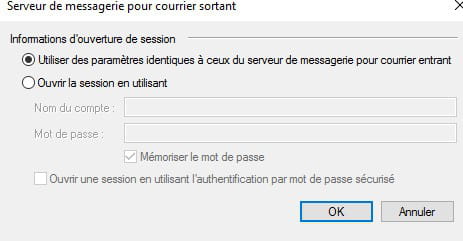
2 - The outgoing server authentication is poorly configured.
3 - We don't know if you've enabled IMAP in Gmail.
4 - We don't know if you've allowed less secure apps.
-