
Mac Pro octo-core processors (A1289) startup issues
kaliman2016
Posted messages
45
Status
Member
-
Superduc -
Superduc -
Hello,
My Mac won't turn on or it starts and then shuts down after a few minutes...
I've been told to change the motherboard because it's a recurring issue with these models:
Is this true? Or is there another possible solution? (power supply, etc.).
Thank you in advance for your help.
Configuration: Mac OS X Snow Leopard (10.6) / Firefox 45.0
My Mac won't turn on or it starts and then shuts down after a few minutes...
I've been told to change the motherboard because it's a recurring issue with these models:
Is this true? Or is there another possible solution? (power supply, etc.).
Thank you in advance for your help.
Configuration: Mac OS X Snow Leopard (10.6) / Firefox 45.0
25 answers
- 1
- 2
Next
-
Hello,
In the videos, we see a message indicating a date problem. This is characteristic of a dead battery. The PRAM is not saved.
We should start by fixing this issue, which means replacing the battery present on the motherboard.
(My old Mac LC475 would completely refuse to display or even start under these conditions).
See you later
Have a nice day :-) - Francis
Please always indicate your exact system configuration. -
Yes indeed, in the video more than an hour ^^
--
Sorry for my spelling :/
Certified technician Apple iOS/OSX -
Good evening,
I still have the diagnostic manual for the Mac Pro early 2009. I put it here: https://dl.dropboxusercontent.com/u/12602322/macpro_early2009.pdf
See if this manual can help you with a diagnosis. Pages 29, 30; 32 among others.
Have a great continuation
Have a nice day :-) - Francis
Please always indicate your exact system configuration. -
With the little information you provide, I come across machines from 2009 to 2012 ^^
but I believe that 2010 is the most likely, the motherboard ??? who said that? At first glance, I'm thinking of the GPU.
Is the machine all original?
--
Sorry for my spelling :/
Certified Apple iOS/OSX technician -
Hello Gab1,
Yes, the machines are from the same origin...
Actually, I have 2 Mac Pros that have the same symptom - here are the references:
Model No A1186
2.66QX /2x512/ 7300GT / 250/ SD
Model A1289
Mac Pro 2.26_8CX / 6x1G /GT120 /SD
The first one doesn't turn on at all, and the octo starts from time to time as you can see in this YouTube link:
https://www.youtube.com/watch?v=5a891DjzKwg
Then it's impossible to restart without waiting for hours or even days...
The strangest thing is that the Macs broke down around the same time! -
Yes, I saw that but I had the same problem long before this "error" appeared...
I will still change the BIOS battery to eliminate all possibilities and I'll keep you updated. -

and tell me the response of the lit LEDs?
--
sorry for my spelling :/
Apple IOS/OSX certified technician -
5V STBY?
OR 5V WITHOUT ANYTHING ,,
--
sorry for my spelling :/
Apple IOS/OSX certified technician -
-
-
I have LEDs that are lit up in red near the RAM, but I believe it’s been like this from the start... in any case, it lights up and without any error beeps (when it finally wants to turn on):
https://www.youtube.com/watch?v=XTwGRlqd3GU&feature=youtu.be -
Yes, that's normal, but I'm a bit lost. I’m using a Mac Pro from 2010, but you posted a photo of a Mac Pro older than 2010. I need more information: if you have a problem, send me the serial number in private here.
-
-
Thank you, so we are talking about a Mac Pro early 2009, a product classified as vintage by Apple. Can you provide me with the LOGS reports?
Launch the console => click on all messages => and type "previous"
Sorry for my spelling :/
Certified Apple iOS/OSX technician -
I confirm that it's accessible the path is Tondisquedur / library / logs / DiagnosticReports take a screenshot of what is in the folder, it's not exactly what I wanted but I'll try to be content with it.
--
sorry for my spelling :/
certified technician Apple IOS/OSX-
-
-
This is what I just saw, I don't have a Kernel panic, I have nothing, when you press the power button nothing happens. What I'm proposing is a test in minimum configuration.
You remove the hard drives, the graphics card and other PCI-connected devices, you remove the non-original Apple RAM and you test. -
Hello!
I have removed all the peripherals, but no boot:
Flashing of the red LED (normal) - 2 or 3 clicking sounds from the power supply - brief flickering of the light at the power button and then nothing :(
I noticed that the octo did not have original Apple RAM (Hynix) but I have some on the quad (S/AP-MACPRO4GVO _4GB x2) but it runs at 667MHz and not 1033 like for the octo...
I did the same test for the quad, but no reaction either.
Could the power supplies of both Macs be responsible for these almost simultaneous failures?
I found this on MacBidouille (see at the end "skol"):
https://forum.macbidouille.com/index.php?showtopic=389374
-
-
I inquired, and I was told that the most common issue is that this part or one of the two CPUs is faulty

Can you remove this part and reinstall it?
--
Sorry for my spelling :/
Certified Apple IOS/OSX technician-
Yes, I also read about this solution (dismantling the proc and reassembling it to ensure better tension) but I believe a special thermal paste (arctic silver 5) is required.
I will try to find some and do the manipulation...
But is it possible that my 2 Macs (of different designs) suffered from the same problem at the same time, considering that one is older by 18 months (between the two purchases)?
-
-
Did you have a power outage?
--
sorry for my spelling :/
Apple iOS/OSX certified technician-
-
re,
I found the same problem as mine on this forum (in Casablanca):
https://forum.macbidouille.com/index.php?showtopic=364491
And even after the motherboard was changed by an Apple technician - the problem returned! (but it disappeared at first...)
Strange... did you say Strange... It's so Strange!
-
-
Hello everyone :)
I have successfully disassembled the processors and I'm trying the minimum configuration - I'm at the testing phase with the power on with the processor board (but without the processors) and without the memory sticks:
It is not mentioned whether I should reconnect the cables at this stage (which I have done, except for Bluetooth and the internal speaker). I had the orange LED (5V STBY) and the red LED on the processor board.
But I can't get the Mac to start with the recommended manipulation:
"Jump the SYS_PWR solder pads to turn on the Mac Pro"
I used a paperclip to connect the two solder pads (in red in the picture) but I'm not getting any response...
Do you know where to "short-circuit"?
Thank you :)-
-
-
Hello,
if we closely follow the chronology indicated on pages 28 to 31, I would say no. We do not remove the other cables and the front panel.
However, at the bottom of page 30, it says this:
At this point, if the Mac Pro powers ON using a known good front panel board, power button, and cable, make your testing easier by using it instead of jumpering SYS_PWR solder pads.
In short, it is recommended to perform these tests with the front panel in wired mode, but only if the whole setup, front panel, cable, button... is considered reliable...
-
-
Good evening everyone,
I have completed the recommended tests but I didn't need to 'short-circuit' the "SYS Power" soldering for the Mac to start - fan and red LED at the processor board - by the way, the 'short-circuit' gave me no results but:
I did get the green LEDs for 'GPU OK' and 'EFI DONE'
The amber LED (5V STBY)
But NOT the green LED for 'PSU PWROK'.

1/ Does this imply that the power supply has a problem and rules out the motherboard issue?
2/ Is the power supply repairable if I find a competent technician to investigate the source of the switch noise when connected to the mains?
(see YouTube link - PSU noise)
https://www.youtube.com/watch?v=EifI9-BN7KI&feature=youtu.be
I am also including a link for the video version of the LED test.
(LED test Mac Pro)
https://www.youtube.com/watch?v=T2-kSV2hlgk&feature=youtu.be
Thank you in advance for your advice :) -
Hello
The relay noise seems to come from a "faulty" relay. But I might be wrong.
The absence of the LED on the PSU PWROK does indicate an anomaly. The power supply may be faulty.
On some older Mac models, power supply units can suffer from capacitor aging. (Just like some capacitors found on the motherboards of older iMac G5s. These capacitors swell slightly, which helps to identify the defective ones.)
Why not ask for advice from a local Apple service center?
Check this page to find the nearest one:
https://locate.apple.com/fr/fr/
If you encounter a nice technician and explain the situation, they might guide you towards a probable solution, even without necessarily leaving the equipment for an estimate...
--
Have a nice day :-) - Francis
Please always specify your exact system configuration.-
Hello Francis,
Does PSU PWROK only indicate an issue with the power supply?
I'm going to try at one of the Apple service centers, but here in Casablanca, replacing parts is often (always) proposed and done (see above, the Macbidouille link and the troubles of this internet user with the oldest and most reputable Apple center!).
A good electrician should be able to test the capacitors and replace them...
To go back to these two nearly simultaneous failures (on my two Mac Pros), did the power supplies have the same issue?
Would having current 'leaks' explain this mystery?
(even though my laptops - 2 MacBooks and 1 HP - are working without issues)... -
What is possible when 2 devices fail at the same time is a sudden voltage surge in the mains, (thunderstorm or something like that), especially when the devices are not connected to a quality grounding.
Moreover, plugging a desktop computer into an ungrounded outlet is a mistake that can be fatal for all electronic components, particularly the RAM sticks. I never connect a desktop computer to an ungrounded outlet, even if it means running a separate cable for it.
On the other hand, laptops are connected to the mains, (when they are), via a transformer-isolator. This explains why they do not need grounding. Additionally, the voltage is regulated after leaving the transformer before reaching the electronic components and the battery charge. This means that in the event of a voltage surge or other electrical phenomenon, laptops are not affected.
Desktop computers also have regulated power supplies, but after the power supply unit. Therefore, in the event of a power anomaly, laptops are not affected, but desktops are, primarily on their power supply units.
I had a power anomaly at home, instead of the normal 230-240 volts between phase and neutral, I had 215 volts, but 15 volts between neutral and ground. This is abnormal. I had to insist heavily for EDF to come and fix this issue, which was not at my place, but at the neighborhood transformer. This kind of thing can also have a harmful effect on electronic devices, especially their power supply units.
It’s difficult to test a capacitor, especially when these capacitors are old. Usually, just seeing their ends bulging is enough to understand. Replacing a capacitor seems simple, except that one must respect the specifications of the capacitors and the solder wire, and that in some cases, the material must be of professional quality. I have already tried to replace all the capacitors on the motherboard of an iMac G5 with a "normal" soldering iron... impossible. A Weller-type soldering station is required at minimum. Although it’s probably easier in the power supply unit than on an Apple motherboard, I haven’t done that manipulation yet.
-
-
Good evening Francis,
Thank you for your clarifications :)
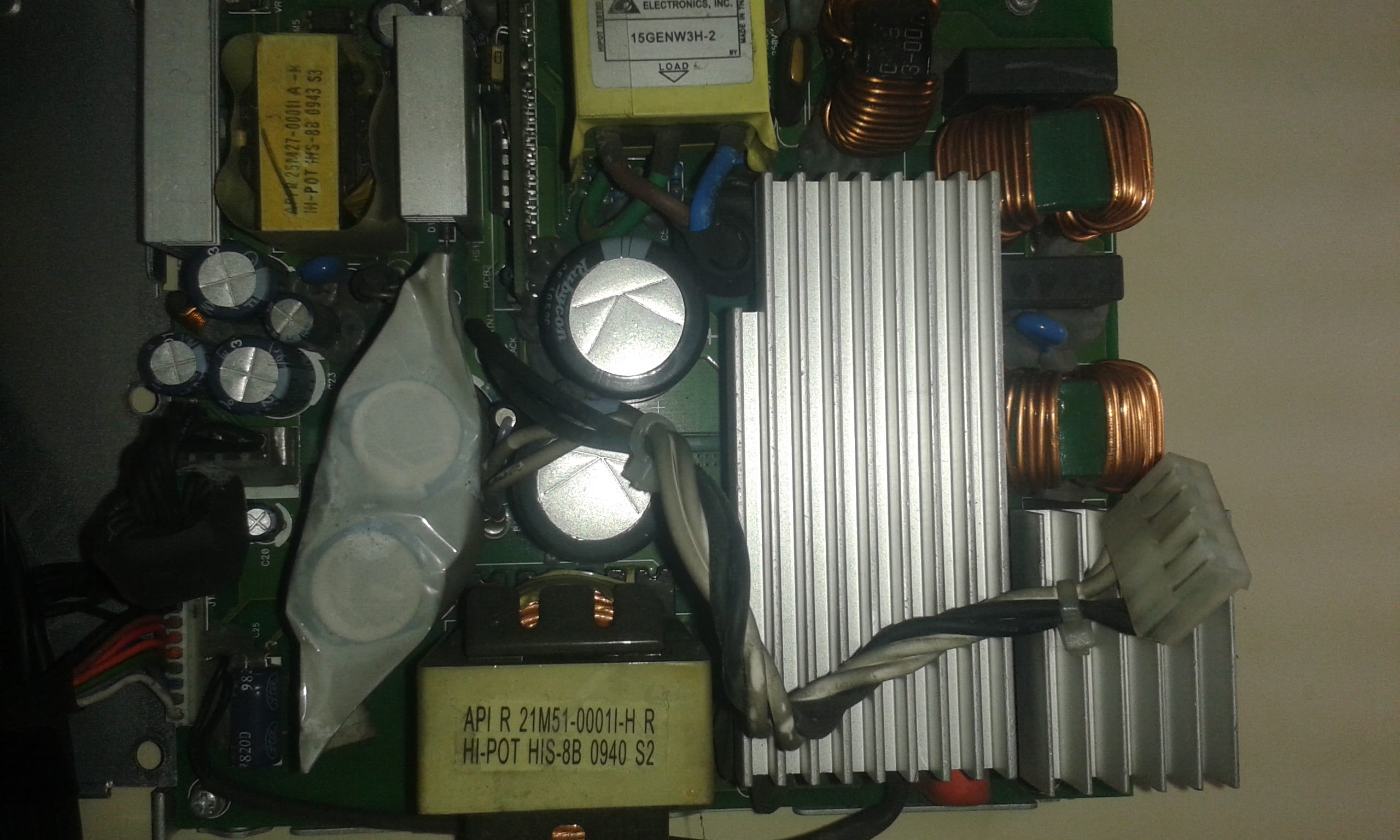
I inspected the power supply without seeing any obvious defects (bulging capacitors).
I noticed a suspicious area, but I think it's the side where the power supply fan blows and collects dirt (see photo).
I couldn't get any information over the phone, but I will go to the Apple service center on Thursday to gather information about the noises from the Mac Pro power supply.
Regarding the electric current and its leaks, I don't have a solution:
The electrician who came to my place when I moved in told me that it was the building that was like that, and that his attempts to curb the current leaks would only cause the circuit breaker to trip continuously...
I tried to find tricks for this "earth issue" (like connecting the Mac to a plumbing or radiator pipe), but nothing was really satisfactory :( An uninterruptible power supply is not a solution, nor is a surge protector...
Finally, could it be that the power supplies are fine but shut themselves off - for safety?
(by the way, I haven't tried plugging the Mac elsewhere than at my place)
Have a good evening. -
It is not possible to give an opinion on the photo, too risky to say something silly.
Regarding the power supply without ground;
using a plumbing pipe is an old trick, not really recommended, as it cannot provide real protection against surges or voltage anomalies between neutral and ground. It's just a more or less effective protection against the risks of individual electrocution. This method has been prohibited for a long time. When intervening on an existing installation, there is an obligation to modify the installation if it does not meet standards.
Plugging the Mac into another source in its current state will not solve anything if the problem comes from there; this is because you cannot reverse this type of damage if any has occurred. A damaged circuit remains damaged, even if you connect an electronic device to a correct source afterwards.
Computers of this age, and even most recent ones, do not have the protection that would shield them from this type of power fault. So, unfortunately, there is no automatic safety shutoff.
In the past, the very first user guides for Macs included a prominently displayed warning that clearly stated it was imperative to plug the Mac into an outlet with a valid ground. (the same goes for all computers). Today, this warning is not as prominently highlighted because all current electrical installations are supposed to have been brought up to standard. Unfortunately, this is not always the case. I have seen quite a few "strange" installations in certain countries (Vietnam, Iraq, Syria, etc.), which I understand well given the history of these countries, but which must have been fatal to many electronic devices.
--
Have a good day :-) - Francis
Please always indicate your exact system configuration. -
Here are other photos of the suspicious area:


And the capacitors that seem okay:






- 1
- 2
Next