
Unable to boot from USB stick on ASUS P6T motherboard.
sawcisset
Posted messages
4
Status
Member
-
sawcisset Posted messages 4 Status Member -
sawcisset Posted messages 4 Status Member -
Hello everyone,
After exhausting all solutions, I'm reaching out to someone more experienced than me.
To keep it simple, I would like to boot from a Windows 7 USB drive that I have prepared beforehand, as I usually do with Windows 7 USB Tool to reinstall a clean system.
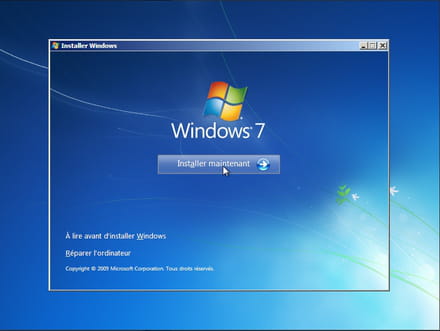
I can boot from the USB drive, but the "Install Windows" window doesn't appear (unlike the image below). Basically, I only get a blue background screen and can't do anything (the Install Windows window isn't there):
I have tested with both USB 2.0 and 3.0 drives, but the same problem persists.
I tried changing the USB port (using the ones directly on the motherboard instead of the front ones...) still the same issue.
I thought it might be a USB issue, so I burned a bootable DVD. Same problem.
Then I thought it might be an ISO issue... same problem.
I considered that it could be a Windows 7 problem, so I tried to boot using one of my old original Vista 64 DVDs (the original system I got with the PCs)... same problem.
I tested it on another PC (I have an Acer Revo). Miracle, it works without any issues! Likewise, it works on another one of my Asus laptops!
I also tested it on another desktop computer: indeed I have two identical PCs (same configuration except for the graphics cards, one PC has an SLI of GTX 670 and the other an SLI of GTX 970, etc.) I tested it and... the problem is the same!
So I think this display issue is certainly due to the motherboard. Note that I also tested with another configuration having an Asus P5B motherboard and... same problem!
I try to boot Linux and it works... It's really this Install Windows window that doesn't appear.
I'm thinking there might be a major bug with Asus.
So I attempted to flash the BIOS to the latest version provided by Asus... without any success.
I've run out of solutions. It makes you wonder how Windows could have been installed on these PCs! I'm calling on the community to see if you have any other avenues to explore or if anyone has encountered a similar problem.
Thanks in advance to the community. This is the first time I've posted since CCM started; I've always found a solution thanks to you, but now... I'm completely stuck...
After exhausting all solutions, I'm reaching out to someone more experienced than me.
To keep it simple, I would like to boot from a Windows 7 USB drive that I have prepared beforehand, as I usually do with Windows 7 USB Tool to reinstall a clean system.
I can boot from the USB drive, but the "Install Windows" window doesn't appear (unlike the image below). Basically, I only get a blue background screen and can't do anything (the Install Windows window isn't there):

I have tested with both USB 2.0 and 3.0 drives, but the same problem persists.
I tried changing the USB port (using the ones directly on the motherboard instead of the front ones...) still the same issue.
I thought it might be a USB issue, so I burned a bootable DVD. Same problem.
Then I thought it might be an ISO issue... same problem.
I considered that it could be a Windows 7 problem, so I tried to boot using one of my old original Vista 64 DVDs (the original system I got with the PCs)... same problem.
I tested it on another PC (I have an Acer Revo). Miracle, it works without any issues! Likewise, it works on another one of my Asus laptops!
I also tested it on another desktop computer: indeed I have two identical PCs (same configuration except for the graphics cards, one PC has an SLI of GTX 670 and the other an SLI of GTX 970, etc.) I tested it and... the problem is the same!
So I think this display issue is certainly due to the motherboard. Note that I also tested with another configuration having an Asus P5B motherboard and... same problem!
I try to boot Linux and it works... It's really this Install Windows window that doesn't appear.
I'm thinking there might be a major bug with Asus.
So I attempted to flash the BIOS to the latest version provided by Asus... without any success.
I've run out of solutions. It makes you wonder how Windows could have been installed on these PCs! I'm calling on the community to see if you have any other avenues to explore or if anyone has encountered a similar problem.
Thanks in advance to the community. This is the first time I've posted since CCM started; I've always found a solution thanks to you, but now... I'm completely stuck...
4 answers
-
Hi
I admit that you've covered quite a few options, and I myself don't see many solutions, apart from replacing the motherboard, or maybe checking if the virtualization settings in the BIOS are active!
Otherwise, set up a Windows 7 virtual machine on the PC in question, create a clone, and inject the clone into your HDD. With the VM, you can retrieve the PC's settings (drivers, etc.).
I hope this helps you, good luck!!
Keep us updated! -
Hello,
Personally, I have never encountered this issue on Asus motherboards, especially on a P5B. Check in the Bios / UEFI if any feature is blocking the system installation, such as secure boot (and secure boot keys) or CSM (compatibility mode). -
-
Hello everyone,
I'm back to tell you that I finally found a workaround to update Windows.
I had to downgrade from Win 7 Enterprise to Win 7 Pro (I had a valid license key left) using this method: https://les2t.fr/windows-passer-dune-version-entreprise-a-une-version-professional/
Then I inserted my bootable USB drive under Windows and reinstalled it directly by launching it from Windows, and voila... it worked!!! I was able to upgrade to Windows 10 :)
Thanks again for the tips.
