
Read mp3 file list from a USB drive
Solved
Raymonde57
Posted messages
229
Registration date
Status
Member
Last intervention
-
Raymonde57 Posted messages 229 Registration date Status Member Last intervention -
Raymonde57 Posted messages 229 Registration date Status Member Last intervention -
Hello,
I recently got a new car, and to my surprise, it doesn’t have a CD player! However, the seller told me that I could save my music onto a USB stick and listen to it through the designated port.
I’ve saved my favorite songs onto a USB stick, but when I test it on Windows Media Player, it only plays the first track!
What should I do to create a playlist that plays continuously?
Is it possible to create multiple files for different playlists?
Thank you in advance for your help.
Configuration: Windows XP SP3
IE 8
OE 6
I recently got a new car, and to my surprise, it doesn’t have a CD player! However, the seller told me that I could save my music onto a USB stick and listen to it through the designated port.
I’ve saved my favorite songs onto a USB stick, but when I test it on Windows Media Player, it only plays the first track!
What should I do to create a playlist that plays continuously?
Is it possible to create multiple files for different playlists?
Thank you in advance for your help.
Configuration: Windows XP SP3
IE 8
OE 6
4 answers
-
Good evening,
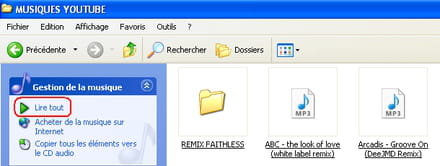
On this USB drive, did you create folders with the MP3 files in them or did you put the MP3 files directly on the drive without making folders?
When you play on WMP, how do you proceed? I suppose that when you are on the drive, you click on "Play all"
--
--> NO PROBLEMS, ONLY...SOLUTIONS <--
Alcohol doesn't solve anything, that said, neither does water or milk ;-) -
You just have to convert the files to mp3 using Windows Media Player and it works very well on the car's USB port.
I think I have solved my problem.
Thank you very much for your advice which always helps me move forward. -
Hi,
You need to check the description of the car radio to see how to use a USB key to listen to mp3s. -
Hi,
It is just said that it is preferable to have mp3 files and to format the USB stick in fat 32; which I have done.
In the worst case, I will see tomorrow morning, but I think something is needed for the songs to play continuously!-
For continuous reading, it depends on the type of player installed in the car, or there may be a setting to adjust, but this should be indicated in the car's manual.
If it's a factory-installed player, its technical specifications and usage are indicated in the car's manual.
Otherwise, you could go to the dealership and ask them for clarification on this famous player.
That said, you didn't tell me how you were reading the files with Windows Media Player?
Best regards ;-)
-


