Display internet speed continuously?
Solved
Hello,
The question is in the title:
Is it possible in Windows 10 to display the bandwidth on the desktop or taskbar?
Or by installing software?
Thank you in advance
Configuration: CONFIG PC
OS: Windows 10 family
Motherboard: ASUS P5Q PRO Turbo
Processor: Intel Pentium 3 Xeon,
3066 MHz (7 x 438)
Memory: DDR2 3328 Mo
Video Card: ATI Radeon HD 4800 - 1024 Mo.
HDD: Maxtor 298 Go + Maxtor 500 Go
Audio Card: AUREONXFIRE 8.0 HD
--
AirLibre - Freedom is only wasted when you do not use it.... (Le Canard Enchaîné)
The question is in the title:
Is it possible in Windows 10 to display the bandwidth on the desktop or taskbar?
Or by installing software?
Thank you in advance
Configuration: CONFIG PC
OS: Windows 10 family
Motherboard: ASUS P5Q PRO Turbo
Processor: Intel Pentium 3 Xeon,
3066 MHz (7 x 438)
Memory: DDR2 3328 Mo
Video Card: ATI Radeon HD 4800 - 1024 Mo.
HDD: Maxtor 298 Go + Maxtor 500 Go
Audio Card: AUREONXFIRE 8.0 HD
--
AirLibre - Freedom is only wasted when you do not use it.... (Le Canard Enchaîné)
5 answers
-
ContributorHello,
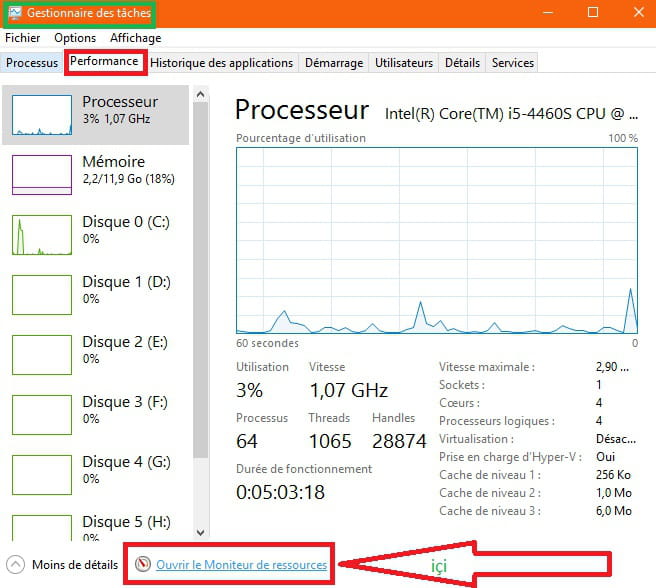
Right-click on the taskbar
Task Manager
Performance tab
Scroll all the way down, you have the line: Open Resource Monitor
PS: If the task manager is empty (all white)
Click on more details
You can also use Networx offered by CCM
Correction:
- the software is indeed in French
- Works also with Windows 10
Once installed, it will be next to the time or in show hidden icons
Right-click on the icon to choose an action, same to close it--> right-click
then exit
PS: Open the Start button
Go to the letter N
Expand the little arrow
Select Networx
Right-click on Networx
More
Pin to the taskbar
--> If you prefer a shortcut on the Desktop
Same method--> Select Networx--> Right-click on Networx--> more
File location
Networx is highlighted
Right-click --> send to Desktop (Create a shortcut)
jackknife