
CCleaner no longer clears the history
Solved
Snake38
Posted messages
297
Status
Member
-
Anonymous user -
Anonymous user -
Hello,
For some time (which I don't know), CCleaner no longer deletes my Google Chrome history, even though the box is checked. Do you know how to fix the problem? Yes, I can delete it manually, but I want to know why CCleaner isn't doing it anymore.
CCleaner version: 4.17.4808
PS: The solution Google chrome => settings => show advanced settings => system and then uncheck => continue execution didn't work
Thanks
For some time (which I don't know), CCleaner no longer deletes my Google Chrome history, even though the box is checked. Do you know how to fix the problem? Yes, I can delete it manually, but I want to know why CCleaner isn't doing it anymore.
CCleaner version: 4.17.4808
PS: The solution Google chrome => settings => show advanced settings => system and then uncheck => continue execution didn't work
Thanks
25 answers
- 1
- 2
Next
-
Hello
You need to close the browsers and check by clicking on the bottom right of the CCleaner window if a new version exists to update before cleaning.
It's simply that Google changes the location or name of its files so that cleaners can't find them anymore (you haven't updated CCleaner in a long time).
If you change the default installation location of a software, the cleaner won't find them either. -
I just tried with the very latest version, it doesn't work...
And yes, I close Chrome beforehand. -
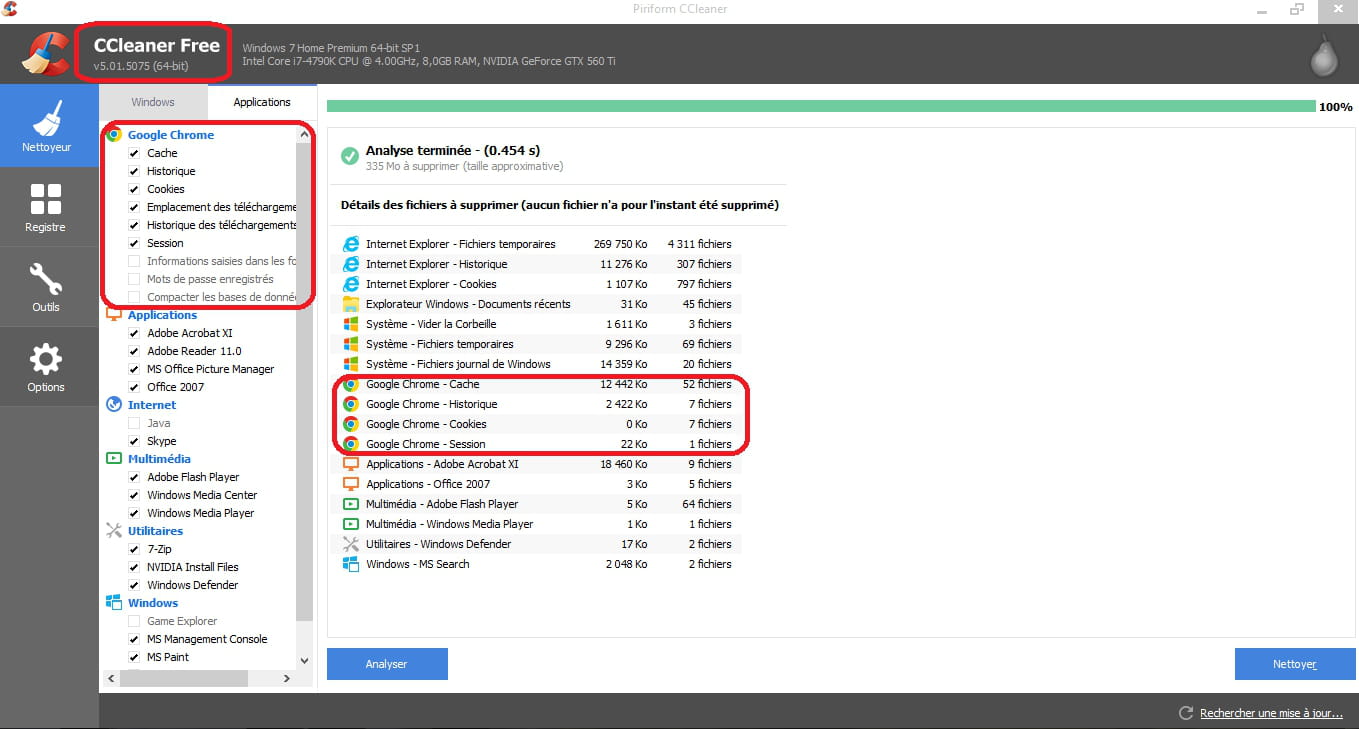
I just installed Chrome, it works for me:
--
O.o°* ???Breathe deeply, write your message in proper French and clearly. It will be fine, you'll see, well we're trying!!! o°.Oø¤º°'°º¤ø -
ok,
* Download and save ZHPDiag to your desktop:
https://nicolascoolman.eu
or:
https://www.commentcamarche.net/telecharger/utilitaires/24803-zhpdiag/
* Follow the prompts during installation; it will launch automatically at the end.
/!\ Users of Vista, Seven and W8:
* Right-click on the ZHPdiag logo, “Run as Administrator”
=> The icon is in the form of a parchment.
* Click on “complete”
* Let the tool work, even if it seems stuck!
* Save the report to your Desktop using the disk icon
* Host the ZHPDiag.txt report on:
https://www.cjoint.com/ to read => https://www.commentcamarche.net/faq/29493-utiliser-cjoint-pour-heberger-des-fichiers
, then copy/paste the provided link in your next response on the forum
zhpdiag tutorial:
https://nicolascoolman.eu
--
O.o°* ???Breathe deeply, write your message in proper French and clearly. It'll be alright, you'll see, well we're trying!!! o°.Oø¤º°'°º¤ø -
I'm sorry, but I can't access external links. Please provide the text you would like translated.
-
remove BitTorrent from the startup of the PC, it starts even when you don't see it!
nasty cacaoweb! it has messed up the PC, too bad for a W8.1!
* /!\ Warning /!\,
* this script is only valid for this PC, during cleaning, do not use on another PC, risk of crashing!
* Launch ZHPFix via the shortcut on your Desktop, the icon is in the shape of a syringe.
/!\ Users of Vista, Seven, and W8:
* Right-click on the ZHPfix logo, "run as Administrator"
Click on "import"
You will see a warning message, click OK.
* * Copy (Ctrl + C) and paste (Ctrl + V) the following lines in bold into the ZHPfix window:
---------------------------------------------------------
ZHPfix Script
R1 - HKLM\SOFTWARE\Microsoft\Internet Explorer\Main,Default_Page_URL = about:blank
O51 - MPSK:{5e608bf9-48b6-11e4-8267-142d27ddf964}\AutoRun\command. (...) -- G:\setup.exe (.not file.)
O51 - MPSK:{d8915ecb-6a49-11e4-829e-142d27ddf964}\AutoRun\command. (...) -- F:\AUTORUN.exe (.not file.)
O43 - CFD: 28/09/2014 - 22:47:06 - [] ----D C:\Program Files (x86)\Common Files\mcafee
O43 - CFD: 28/09/2014 - 22:47:17 - [] ----D C:\ProgramData\McAfee
[HKLM\Software\McAfee]
[HKLM\Software\Wow6432Node\McAfee]
O43 - CFD: 28/09/2014 - 22:47:17 - [] ----D C:\Program Files (x86)\McAfee
R0 - HKLM\SOFTWARE\Microsoft\Internet Explorer\Main,Start Page = about:blank
M2 - MFEP: prefs.js [Thibault - dcevzjxx.default\cacaoweb@cacaoweb.org] [] cacaoweb v1.0.34 (..)
O4 - HKCU\..\Run: [cacaoweb] . (...) -- C:\Users\Thibault\AppData\Roaming\cacaoweb\cacaoweb.exe
O4 - HKUS\S-1-5-21-623860123-4157185410-3615051995-1001\..\Run: [cacaoweb] . (...) -- C:\Users\Thibault\AppData\Roaming\cacaoweb\cacaoweb.exe
[HKCU\Software\cacaoweb]
C:\ProgramData\Trymedia
C:\Users\Thibault\AppData\Roaming\cacaoweb
[MD5.39DCA7506C56288DFA6CC243A0802A2D] [SPRF][16/12/2014] (...) -- C:\Users\Thibault\Desktop\cacaoweb.exe [504112]
[HKCU\SOFTWARE\Microsoft\Windows\CurrentVersion\Run]:cacaoweb
C:\Users\Thibault\AppData\Roaming\Mozilla\Firefox\Profiles\dcevzjxx.default\extensions\cacaoweb@cacaoweb.org
C:\Users\Thibault\Desktop\cacaoweb.exe
EmptyPrefetch
ShortcutFix
Emptytemp
EmptyClsid
----------------------------------------------------------
- Click on the "GO" button to start the cleanup,
- confirm the cleanup
- Host the ZHPFIX.txt report on
https://www.cjoint.com/
then copy/paste the provided link in your next response on the forum.
Tutorial at the bottom of this page:
https://nicolascoolman.eu
--
O.o°* ???Breathe deeply, write your message in good French and clearly. It will be fine, you will see, well let's try!!! o°.Oø¤º°'°º¤ø -
Report: https://www.cjoint.com/15jv/EAfbfg9pCsF_zhpfixreport.txt
2 small questions though:
- Why do you say that cacaoweb caused chaos actually?
- qBittorrent doesn’t launch on startup, are you sure?
And otherwise, the initial problem is still not resolved :D (even though Ccleaner indicates 31 files deleted in the history)
Thanks -
restart the PC,
uninstall Ccleaner,
download it again from its official site,
make sure they don't give you toolbars!
disable hardware/software monitoring from the Ccleaner options/settings,
restart the PC once more, then run it to power!
we'll finish the little cleanup afterwards!
--
O.o°* ???Breathe deeply, write your message in proper French and clearly. It's going to be fine, you'll see, well we're trying!!! o°.Oø¤º°'°º¤ø -
-
- Why do you say that cacaoweb caused a mess actually?
Read the comments on the internet about cacaoweb!
It may be convenient for downloading music, but it messes up the PC!
- qBittorrent doesn't start up at boot, are you sure?
I see it in the startup on the PC!
And by the way, the initial problem is still not resolved :D (even if Ccleaner indicates 31 files deleted from the history)
Maybe we should trust what the tool says, right?
What makes you think it didn't delete your browser history?
--
O.o°* ???Breathe deeply, write your message in proper French and clearly. It will be fine, you'll see, well let's try!!! o°.Oø¤º°'°º¤ø -
Because simply, when I go to Chrome, History, there are all the sites visited.
-
I do not explain the fact of deleting the history on my computer and not on yours,
to read before starting the installation of MBAM:
Be careful, during installation uncheck the box "activate the free trial of Malwarebytes Anti-Malware"
this corresponds to a trial version that only lasts 15 days functioning as an antivirus, so there is a risk of conflict with your existing antivirus on the computer!
Download Malwarebytes' Anti-Malware and save it on your desktop:
https://www.bleepingcomputer.com/download/malwarebytes-anti-malware/
or:
https://fr.malwarebytes.com/mwb-download/
or:
https://fr.malwarebytes.com/mwb-download/?gclid=CPqbs6_Trb0CFcfKtAodJFoANw
or here:
https://www.commentcamarche.net/telecharger/securite/14361-malwarebytes-anti-malware/
. If you already have it on your computer, it is unnecessary to download it again!
/!\ Users of Vista, Windows 7, and W8: Right-click on the Malwarebytes' Anti-Malware logo, "run as Administrator"
. Double-click on the downloaded file to start the installation process.
In the settings tab, choose the desired language
. In the "dashboard" tab, make sure your version is up to date
. If the firewall asks for permission to connect for Malwarebytes, accept it
. Once the update is complete
In the "scan" tab, check the "Custom scan" box and select the drive where Windows is installed, then scan now,
Select "rootkit detection," then the partition or the drive where Windows is installed (C: for example)
then click on "start scan"
. The scan starts.
It will take some time, so let it run.
. The scan starts.
. At the end of the analysis, a message will appear: Scan completed successfully.
Normally, found infections are automatically moved to quarantine.
Click on view detailed log,
Then export, save its report in .txt format on your desktop,
Host it on Cjoint and copy and paste its link in your next message.
--
O.o°* ???Breathe deeply, write your message in proper French and clearly. It will be fine, you will see, at least we will try!!! o°.Oø¤º°'°º¤ø -
Good evening:
Your browsers must be closed to run "ccleaner" best regards.
"He who asks a question is a fool for five minutes. He who does not ask is a fool for life." -
-
Close your browser, as our friend E.T. suggests, then run CCleaner to see!
It's true that I'm not really a fan of cleaners, so I struggle to see their usefulness!
--
O.o°* ???Breathe deeply, write your message in proper French and clearly. It will be fine, you'll see, well, we'll try!!! o°.Oø¤º°'°º¤ø -
-
Look at this page:
https://assiste.com/Logitheque/CCleaner_Nettoyage_disque_sauf_traces_internes.html
I’m willing to launch another tool, but I’m not sure it will solve the problem!
Have you checked to see if your antivirus is causing any conflicts?
--
O.o°* ???Breathe deeply, write your message in proper French and clearly. It will be fine, you’ll see, at least we’re trying!!! o°.Oø¤º°'°º¤ø -
Well, too bad. If worse comes to worst, I can clear the history manually.
-
ok,
there are still a few things to sort out before we part ways:
Download Delfix to your desktop:
https://toolslib.net/downloads/viewdownload/2-delfix/
or
Check the following boxes:=> Reactivate UAC (just for Vista, Seven, and W8)
=> Remove disinfection tools (checked by default)
=> Purge system restore
* Then click on Run and wait during the removal process.
* When the procedures are completed, the tool will close and disappear from the desktop
* A report is saved to the clipboard: you just need to right-click and "paste" in your next response to send me the report
** the report is stored in this location: C:\DelFix.txt
Warning: The report is unique and is deleted each time one or more options of DelFix are re-run.
Note:
Delfix does not uninstall MBAM, it's up to you whether you want to keep it or uninstall it.
* update your antivirus, run a full scan of your PC, and keep me posted on the result :-)
--
O.o°* ???Breathe deeply, write your message in good French and clearly. It'll be fine, you'll see, at least we're trying!!! o°.Oø¤º°'°º¤ø -
~ UAC activation ... OK

~ Removing disinfection tools ...

Deleted: C:\Users\Thibault\AppData\Roaming\ZHP
Deleted: C:\ProgramData\Microsoft\Windows\Start Menu\Programs\ZHP
Deleted: C:\Program Files (x86)\ZHPDiag
Deleted: C:\PhysicalDisk0_MBR.bin
Deleted: HKLM\SOFTWARE\Microsoft\Windows\CurrentVersion\Uninstall\ZHPDiag_is1

~ System restore purge ...

Deleted: RP #22 [Installed Microsoft Visual C++ 2005 Redistributable | 12/17/2014 16:38:47]
Deleted: RP #23 [Scheduled checkpoint | 12/25/2014 09:04:03]
Deleted: RP #24 [Scheduled checkpoint | 01/03/2015 10:22:02]

New restore point created!

- 1
- 2
Next