Illustrator and Background Transparency
Anonymous user
-
Gambit -
Gambit -
Hello everyone, I have a big issue regarding Illustrator, let me explain:
I have T-Shirts to print with a white logo, the printer wants the file of this logo in .AI
Originally, I had a white logo on a black background that was not vectorized.
I automatically vectorized it in Illustrator using the automatic function, and the result was perfect, I then saved it in .ai and opened it in Photoshop.
In Photoshop, I removed the black background that I didn't want, and I made some modifications to the logo.
The black background no longer exists, it is transparent and there is only the white logo left.
I save it in .tif format so I can open it in Illustrator while keeping the transparency of the background, but now I have to vectorize it again before I can save it in .ai.
The problem is this: When I do the automatic vectorization, the transparent background disappears and turns white, so the image becomes one since the logo is also white.
My question is: How can I vectorize only this logo, without adding the white background underneath, which then gives me a completely white image?
Thank you very much in advance.
I have T-Shirts to print with a white logo, the printer wants the file of this logo in .AI
Originally, I had a white logo on a black background that was not vectorized.
I automatically vectorized it in Illustrator using the automatic function, and the result was perfect, I then saved it in .ai and opened it in Photoshop.
In Photoshop, I removed the black background that I didn't want, and I made some modifications to the logo.
The black background no longer exists, it is transparent and there is only the white logo left.
I save it in .tif format so I can open it in Illustrator while keeping the transparency of the background, but now I have to vectorize it again before I can save it in .ai.
The problem is this: When I do the automatic vectorization, the transparent background disappears and turns white, so the image becomes one since the logo is also white.
My question is: How can I vectorize only this logo, without adding the white background underneath, which then gives me a completely white image?
Thank you very much in advance.
7 answers
-
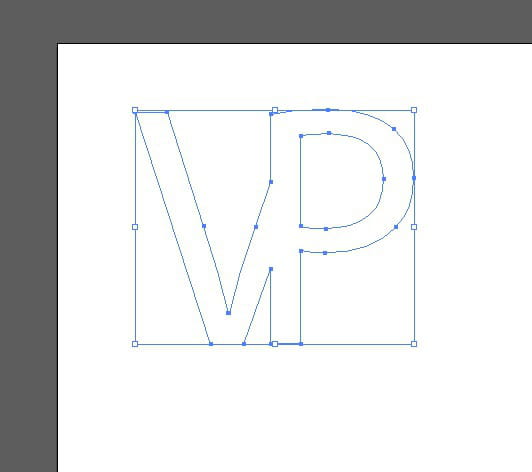
- open the document to the size you want
- type your two letters, separately, in black for temporary visualization, resize them as needed
- arrange them
- vectorize them
- break them down
- select the V and cut it so that it does not overflow from the P
- select your two objects and merge them with the pathfinder
- fill them with white
and you will get this:
save in Ai, your logo is indeed on alpha
check in Photoshop