
Installation issues with a GTX750 Ti OC 2GDD5
Solved
xylandermike
Posted messages
14
Status
Member
-
romain -
romain -
Hello,
For the past 2 days I've been trying to change my graphics card but it’s causing me a problem,
I will try to explain my issue as much as possible.
On Friday I uninstalled my GeForce 620 and then installed my GeForce GTX 750 Ti OC 2GDD5, so far so good, I turn on the PC and the first image displays correctly (with the computer brand, and a phrase at the bottom saying press DEL for the BIOS and press F12 for the BOOT menu). This image disappears and then, a black screen with a white blinking cursor appears in the top left corner of the screen and it can last for hours. When I try to access the BIOS or the boot menu, I get a completely black screen without the little cursor and nothing happens.
I had a 300-watt power supply that I replaced with an ANTEC 620-watt but the problem persists. However, when I reinstall my GT620, my PC starts up directly without any issues... I thought it might be my BIOS since I can’t access it with my GTX750, so I updated my BIOS and still have the same problem.
I need your help and expertise.
Thank you in advance for your responses.
Here is my current configuration:
Operating System
Windows 7 Home Premium Edition (X64) Service Pack 1
Processor
Intel Core i5 3450 Clocked at 3.10 GHz
Number of cores: 4 physical, 4 logical
Socket: Socket 1155 LGA
Motherboard
Acer Aspire M3985
BIOS version: P01-A2
Chipset
North Bridge: Intel Ivy Bridge
Revision ID: 09
South Bridge: Intel P75/B75
Revision ID: 04
Memory
8 GB of total DDR3 memory
Memory timings: 9.0 clocks-9 clocks-9 clocks-24 clocks-1 TT
4 GB stick
Maximum frequency: 667 MHz
Bandwidth: PC3-10700
4 GB stick
Maximum frequency: 667 MHz
Bandwidth: PC3-10700
Graphics Card
NVIDIA GeForce GT 620
Installed DirectX version: 11.0
GPU frequency: 270 MHz
GPU shader frequency: 540 MHz
GPU memory frequency: 405 MHz
EZ Display
For the past 2 days I've been trying to change my graphics card but it’s causing me a problem,
I will try to explain my issue as much as possible.
On Friday I uninstalled my GeForce 620 and then installed my GeForce GTX 750 Ti OC 2GDD5, so far so good, I turn on the PC and the first image displays correctly (with the computer brand, and a phrase at the bottom saying press DEL for the BIOS and press F12 for the BOOT menu). This image disappears and then, a black screen with a white blinking cursor appears in the top left corner of the screen and it can last for hours. When I try to access the BIOS or the boot menu, I get a completely black screen without the little cursor and nothing happens.
I had a 300-watt power supply that I replaced with an ANTEC 620-watt but the problem persists. However, when I reinstall my GT620, my PC starts up directly without any issues... I thought it might be my BIOS since I can’t access it with my GTX750, so I updated my BIOS and still have the same problem.
I need your help and expertise.
Thank you in advance for your responses.
Here is my current configuration:
Operating System
Windows 7 Home Premium Edition (X64) Service Pack 1
Processor
Intel Core i5 3450 Clocked at 3.10 GHz
Number of cores: 4 physical, 4 logical
Socket: Socket 1155 LGA
Motherboard
Acer Aspire M3985
BIOS version: P01-A2
Chipset
North Bridge: Intel Ivy Bridge
Revision ID: 09
South Bridge: Intel P75/B75
Revision ID: 04
Memory
8 GB of total DDR3 memory
Memory timings: 9.0 clocks-9 clocks-9 clocks-24 clocks-1 TT
4 GB stick
Maximum frequency: 667 MHz
Bandwidth: PC3-10700
4 GB stick
Maximum frequency: 667 MHz
Bandwidth: PC3-10700
Graphics Card
NVIDIA GeForce GT 620
Installed DirectX version: 11.0
GPU frequency: 270 MHz
GPU shader frequency: 540 MHz
GPU memory frequency: 405 MHz
EZ Display
8 answers
-
Are you sure you don't have to connect 2 6-pin connectors for the power supply to your board?
Is this the right board or not?

I5 3570K OC at 4.3GHz / MSI GTX 770 Twin Frozr Gaming 2GB
16GB RAM / Corsair Hydro H60 -
Hi
She might need a direct connection to the power supply via a cable with a 6-pin connector, is it properly plugged in?
Have you tried all the video outputs for the screen? (DVI, VGA, etc.??) -
Hi
So how did you proceed in detail?
To change the graphics card: turn off the PC, unplug your card, turn on the PC with the screen connected to the motherboard, remove the drivers, use Ccleaner to completely clean up the remnants of the drivers, turn off the PC, connect your card without plugging the screen into it, install the driver through "all-drivers.com" (only install certified drivers, no beta).
Turn off the PC, connect your screen to your card, and start the PC.
--
I5 3570K OC at 4.3GHz / MSI GTX 770 Twin frozr gaming 2GB
16GB RAM / Corsair Hydro H60 -
If the card doesn't display the BIOS correctly, it's no longer a software issue but a hardware one, because no drivers come into play when the BIOS loads or at the very beginning of the boot process. I advise you to test your new card on another PC to see if it's the same issue. If it is, return it and get another one.
--
The gods will not do for us what we do not do for ourselves!!! -
Hello,
I just went to replace my graphics card thinking it was more of an issue with the card itself, so I tried to install my new card and it's still the same problem. Could it be that there's an incompatibility between my graphics card and my motherboard?? Knowing that I shouldn't have any issues, especially after updating my BIOS.
@Flogger
It's a card equipped with Maxwell architecture, so it is very energy-efficient and is powered only by the PCI slot.
@Le_vilain
I proceeded as you described, with a proper installation...-
Could it be a compatibility issue between my graphics card and my motherboard?
It's very rare, but possible with OEM motherboards from brands like Acer or Dell, etc.
In fact, this seems to be the case here..........
It may also be related to the motherboard's BIOS if it is UEFI; sometimes the secure boot feature prevents startup when changing the graphics card.
This is explained in this HP note (which I have on hand, but it's the same issue with other manufacturers).
So you should try disabling it to see if that's simply the problem (whether it's Windows 8 or 7, it’s the same in this specific case).
http://h10025.www1.hp.com/ewfrf/wc/document?cc=fr&lc=fr&dlc=fr&docname=c03665917 -
-
-
-
@Flogger
I just tried your solution, I looked through my BIOS but there's no blocking security in my BIOS... I really believed it :'(
@Le_Vilain
It's an ASUS Geforce GTX750 Ti -
The architecture doesn't mean that it doesn't have an additional power connector; it's just that it isn't optimized like an MSI GTX 750 Ti.
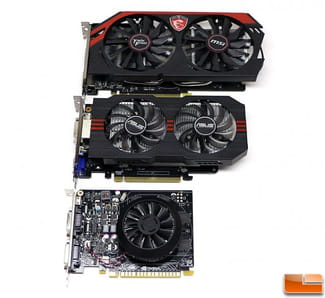
--
I5 3570K OC at 4.3GHz / MSI GTX 770 Twin Frozr Gaming 2GB
16GB RAM / Corsair Hydro H60 -
UP !
I did a lot of research regarding "secure boot" that could block my new graphics card. I found the method to disable it on Windows 8, but I am using Windows 7, and I haven't found how to disable "secure boot" in my BIOS. I searched my BIOS thoroughly and found nothing.
Any solution ??-
-
-
It was the second point to check in the UEFI.
Unfortunately, I didn't have the time to develop my analysis properly, too much external interference.
But the UEFI is indeed the problem, on branded PCs it's becoming increasingly frequent; thanks to these options, they control hardware changes, making it difficult if not impossible for average users to change internal peripherals. -
I have exactly the same problem... I just bought an Asus GTX 750 TI OC graphics card and the only result I get when I start up after installing it properly is a beep and the "HP" boot image; Windows refuses to launch...
Anyway... I would simply like to know how you changed your Quiet Boot... I've searched for hours and can't find a way...
(Otherwise, maybe I should update my BIOS, but from what I saw, there is no update available...) -
-


