Forgot guest password mac
Solved/Closed
Hello,
I had created a password for the guest user, and I can no longer open the session.
How do I reset the password?
Configuration: Mac OS X Mountain Lion (10.8.5) / Chrome 30.0.1599.101
I had created a password for the guest user, and I can no longer open the session.
How do I reset the password?
Configuration: Mac OS X Mountain Lion (10.8.5) / Chrome 30.0.1599.101
7 answers
-
Hello,
Create a password for the Guest user??
This is normally not possible. By definition, a Guest has no password, since they are in Guest status.
You can enable or disable the Guest user, but you cannot create a password for them. Or am I missing something... ?
--
Have a good day, or good night..:).
Francis-
-
-
You cannot create a password for a Guest session.
If you are asked for a password, it is not for a Guest session, but for something else. You can enable or disable the Guest account.
http://support.apple.com/kb/PH4345?viewlocale=en_US
and the Help in Mac OS will tell you this:Setting Up Guest Users
If you want to allow others to temporarily use your computer without having to add them as users, you can enable guest users. You have the option to specify whether they can access your shared folders or log on to your computer. You can also set up parental controls for these users to limit how they can use your computer. For example, you can restrict the apps that a guest user can access or filter Internet content.
Guests can log on without entering a password, but they cannot change user settings or computer settings. They also cannot log in remotely when remote login is enabled in Sharing preferences.
Allowing guests to log in enables iCloud's Find My Mac service to locate your computer when someone finds it, logs in as a guest, and uses Safari to access the Internet. You must enable the Find My Mac service before your computer is lost.
When FileVault is enabled, guest users can only log in and use Safari. They cannot access your FileVault encrypted disk or create files and must log in and use Safari from your computer's built-in recovery disk. To learn more about FileVault, see the following help article:
-
-
Hello,
Next and final update: I managed to eliminate my problem (after asking at the Genius Bar).
1 - I deleted the macOS partition (starting from a bootable USB drive, I erased, deleted the partition, ...) and then I reinstalled Mavericks
2 - I did not restore the settings or the "other files and folders," but only the user data and applications.
I don't know if it was the two actions or just one of them, but the problem is resolved. I also have more space on the disk :-).
I have also eliminated the anomalies (not serious according to Apple online support) displayed in Keychain First Aid. In short, everything is perfect like on the first day.
Thank you for the various tips and good luck with your restorations and reinstallations. -
Hi,
I confirm, I have the same issue (Maverick and MBA) and I've been searching for hours.
I start my guest session as usual and now it's asking me for a password, with no hint, while in admin mode, no password reset is possible... It smells like a little bug.
Best regards,
PEB-
Personally, I didn't find a solution to access my guest session, but I created a new session. This way, my relatives can log in to my computer without going through my admin session and without me having to worry about finding the guest password. Now, if you have important files in your guest session, that's another matter...
Best regards -
Well, I eventually found a "degraded" solution:
- I created a main password (in the user and group preferences, the little gear),
- logged out of my admin session
- then I tried to open with the guest user account until it asked me if I wanted to reset.
There, okay, then I entered my main password (different from the admin) and left the "new" guest password blank.
Thus, from the startup screen, when prompted for the guest user password, just hit "enter."
However, there’s no way to directly switch to the user session from the user menu at the top right, from another session.
I suspect that the appearance of a password on the guest session comes from a security flaw (apparently, a recent update was made to the user session. Maybe the update generated a little problem)
Best regards,
PEB
-
-
Good evening,
This way my relatives can connect to my computer without going through my admin session and without me having to hassle to find the guest password. Now if you have important files in your guest session that's another thing ...
You can't have important files in a guest session. All files created in the Guest session are deleted as soon as you leave the session.
I haven't tested this feature under Mavericks, to see if there's a bug under Mavericks, but under 10.8, it's as always. No password, and no files retained

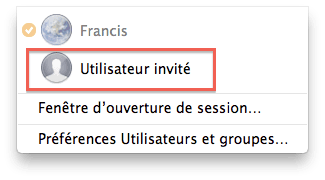
To enter a guest session, (without a password), after enabling fast user switching if you are already in a "normal" session, it is from the menu bar, screenshot under OS X 10.8 still:

During the next restart of the Mac, I'll take a photo showing access in guest mode after startup....
--
Have a good day, or Good Night..:).
Francis -
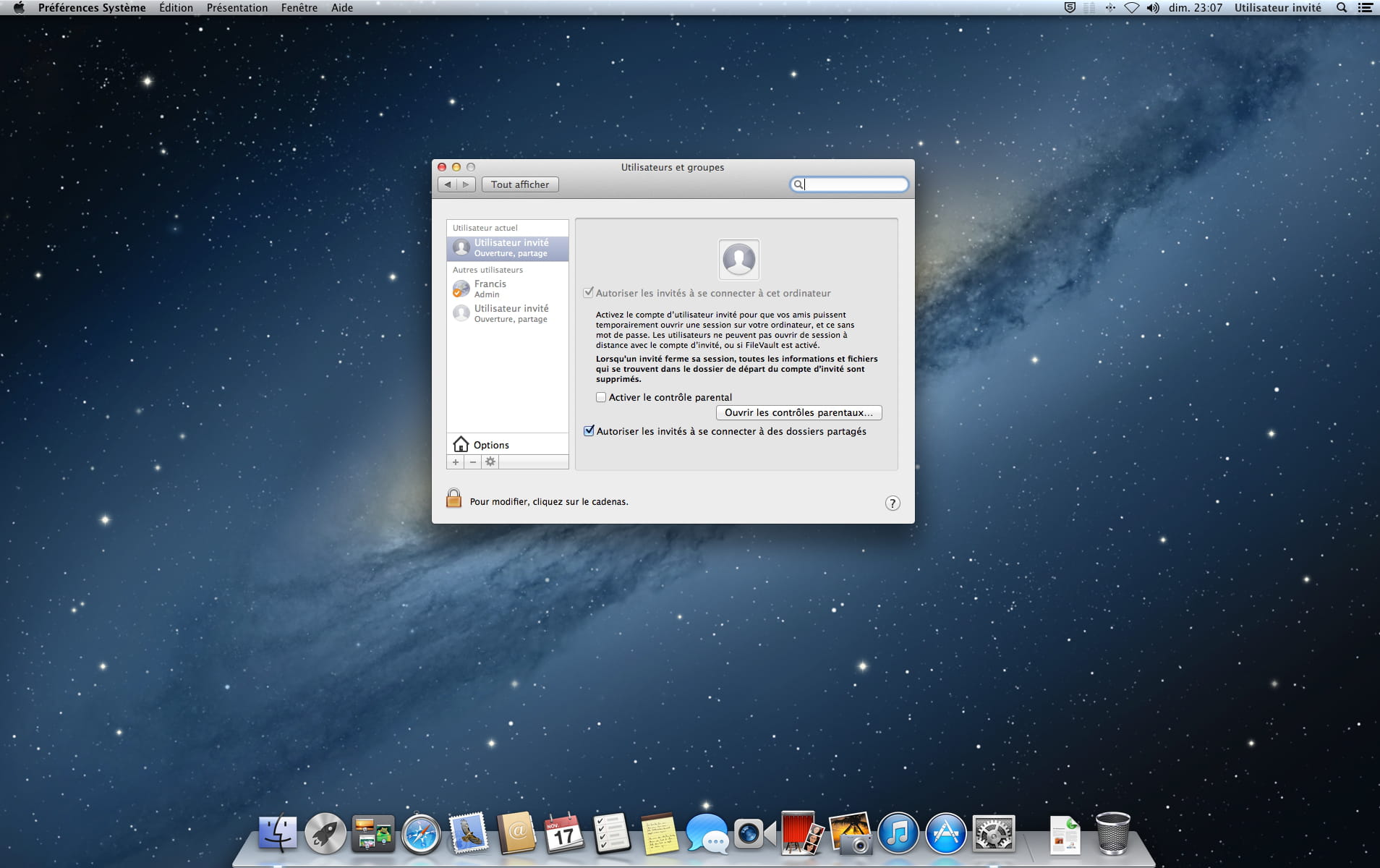
I just logged into my guest session from the menu bar, without a password of course. Here’s a screenshot taken from this Guest session

Another one:

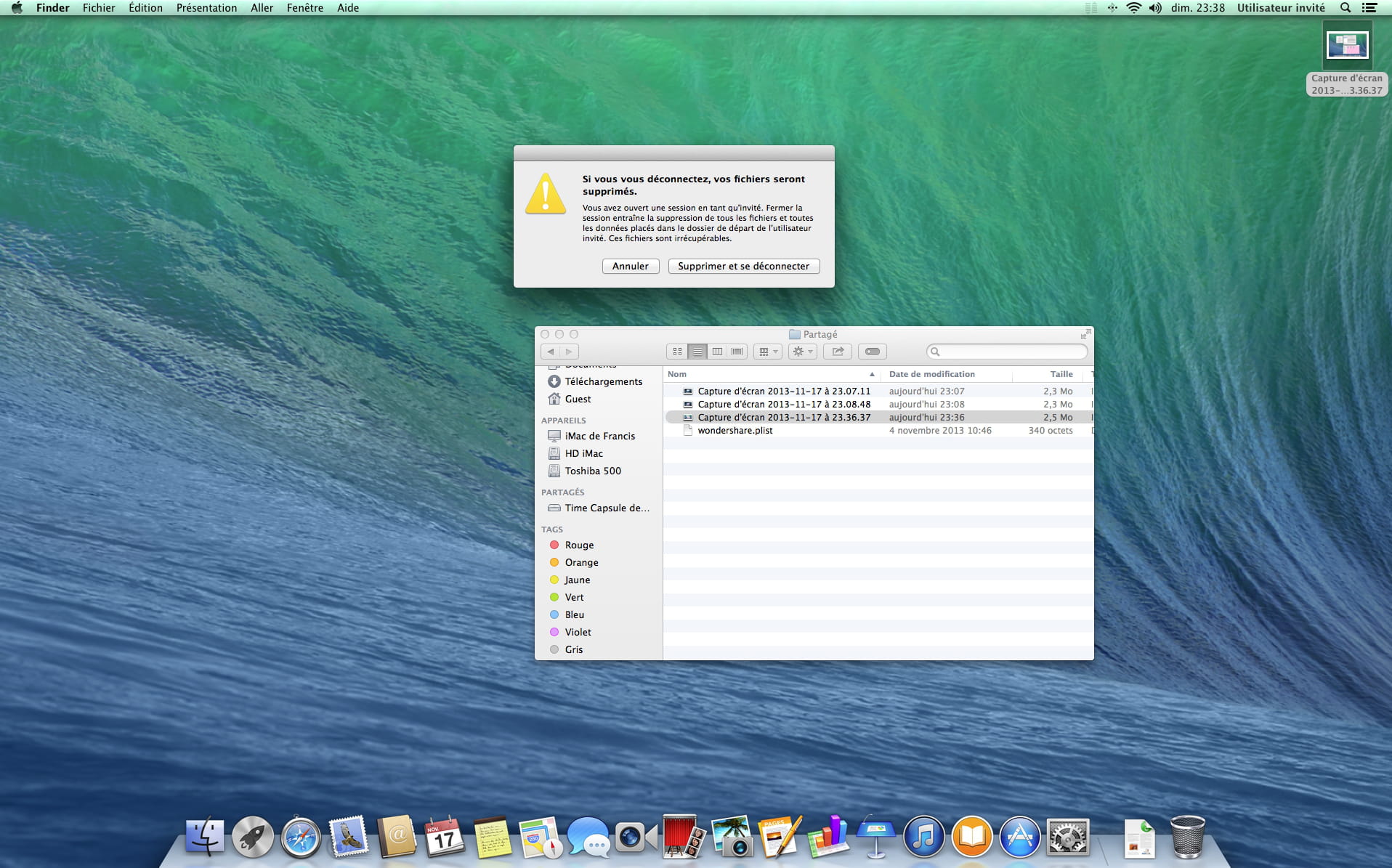
And here’s a photo taken with a camera of the screen that warns we will lose everything when leaving the Guest session:

Have a good day, or Good Night..:).
Francis -
I'm now on Mavericks, it's exactly the same. No password, and no files saved.


What else to add?
--
Have a good day, or good night..:).
Francis -
Hello,
Additional clarification:
When you want to directly enter a "Guest" session right at the startup of the Mac, (that is to say, other than switching users from the menu bar on the right), there are options available:
- you can ask in System Preferences for the Mac to automatically start in a Guest session.
But also in a more sensible way as follows:
- in the fields where you normally enter your name and password, you simply enter the word "guest" in the name field and confirm.
The cursor will then move to the password field, you confirm again without entering a password, and the Guest session will start.
One could argue that the French version could have accepted the name "Invité" instead of "guest", but it's not a big deal...
--
Have a good day, or good night..:).
Francis-
Thank you for all this information, but I think my case is somewhat different.
Attached is a screenshot when I switch from my session to the guest user session. You can see that a password is being requested... hoping that my image insertion works :-).
[Image:http://imageshack.com/a/img844/9053/oexi.jpg]
Good night or good day to you too. -
I see.
I haven't encountered this window in my trials and don't understand its presence. Or rather, when I switch to the "guest" session, I get a similar window for a few moments but without the password entry field, then the system "spins" for a moment before switching to the Guest session.
But if I reason by analogy;
After starting up the Mac when I type "guest" in the "Name" field, there is also a field for "Password" (since the system initially expects some user), and there I don't type anything, I just press the "Enter" key.
So, if you do the same, that is, press the Enter key without filling in the password field... what happens? -
Good evening.
When I press the Enter key, it goes through (after the guest password reset operation from the guest session with the main password...)
I ended up running disk checks via the utility (and I found plenty of errors).
- So I wiped everything and reinstalled OSX. Now, there's no more password prompt to open the guest user session.
- After restoring my data, I have the problem again...
I will continue my investigations and keep you updated.
PE -
-
-