SAMSUNG CLX-3175FW
Solved
jmg
-
iron75018 Posted messages 1 Status Member -
iron75018 Posted messages 1 Status Member -
Hello,
I have a Samsung CLX-3175 FW printer for 18 months. It just broke down. I read on the screen "BOURRAGE 01".
The sheet of paper remains in the fuser about two-thirds of the way.
Can someone help me?
Thank you
Configuration: Windows Vista / Internet Explorer 8.0
I have a Samsung CLX-3175 FW printer for 18 months. It just broke down. I read on the screen "BOURRAGE 01".
The sheet of paper remains in the fuser about two-thirds of the way.
Can someone help me?
Thank you
Configuration: Windows Vista / Internet Explorer 8.0
7 answers
-
Hello, have you found a solution, because I have exactly the same problem. Constant paper jam at 2/3 of the page, 20 months after purchasing this printer... Thank you
-
I had the same problem, I managed to get the sheet out once, but not the second time...
to be able to troubleshoot, you must not try to cut the sheet with a utility knife or any other object. you risk destroying the rollers in the oven...
(replacement part between €100 and €200)
to dismantle the oven,
open the back door, unscrew the 4 mounting screws of the oven.
do not try to remove it now, it is connected to the electronic boards located on the right side of the printer.
to open this cover, remove the screw next to the 220v outlet, then the screw located at the top right of the toner compartment.
unclip the cover, 1 clip at the hinge of the scanner cover, 2 clips under the printer.
disconnect the 2 control cables of the oven. extract the oven.
on the oven module, there are two screws that allow it to be opened.
you access your sheet, beware the coating of the rollers, extremely fragile!!!
to reassemble, do it in reverse order.
good luck-
-
Hello,
I also have a problem with this printer model. It makes an awful noise for some time now (gear noise) and now there is almost systematic paper jam.
I’m trying to disassemble it according to these instructions to clean it, but I’m stuck trying to remove the cover!
I can’t find “the clip at the hinge of the scanner lid, and the two clips under the printer”
Could you help me please? maybe by sending photos?
Thanks in advance -
-
-
-
I have the same problem with a Samsung CLX-3185
I don’t know what I can do. The sheet is truly jammed in the printer and I can’t pull it out. Cause: I put photo paper inside! and when I tried again with a normal sheet it got jammed!!
SOS it’s new -
Hello, I bought mine yesterday, and after using glossy photo paper, which did nothing, I immediately had two jams in the printer, one after the other, with ordinary paper. After struggling to remove the first sheet, I realized that to remove the second sheet I had much less trouble (and less time) by pulling it downward, of course, but also by pulling it as far as possible toward the inside of the machine, not toward the outside. It seems like the roller “moves inward” a bit, and the paper is less gripping. But still, the paper comes out very slowly, millimeter by millimeter, and you have to be patient, and resist the temptation to pull harder and risk tearing the paper. In short, it took me less than 5 minutes to unstuck the sheet with this method (versus over an hour the first time!). So try this before taking everything apart.
-
Hello,
https://forum.hardware.fr/hfr/HardwarePeripheriques/Imprimante/sansung-3175fn-resolu-sujet_52387_1.htm
It turns out to be the paper exit sensor of the oven that is responsible. It is located at the back of the printer, but it is difficult to disassemble: you have to try to detach the left side and the right side of the part by any means. To buy it, you will find the Burostore store in Limoges. The part has the reference 0604-001095. I hope you have success. Goodbye -
Hello,
I had a paper jam issue on the Samsung CLX 3300.
I managed to remove part of the paper by opening the back cover...
But I still had the error so I went to see how to remove the rest of the paper...
I got a bit stressed when I read "to disassemble the oven"
pretty stressed when I looked at how to do it
and a lot when I had started to realize the difficulty of this task with a screwdriver in hand in front of the open printer here and there.
However, after watching a few videos on the web, after those that stressed me even more, I found this one:
https://www.youtube.com/watch?v=Un_sSGNsV0Q&noredirect=1
Around the 18th second of the video
I realized that you could open the lid where the scanner is located.
Here I am in front of the printer, lifted a bit,
and I have access to the sheet that caused the jam :)
So if you’re lucky, just open the top of the printer where the scanner is and easily remove the paper causing the jam.
Easy.
Otherwise good luck :)-
Hello, for me the page wound completely around the oven and it's smoking!!!! ... it's quite strange, especially since I had just printed a page without any issue!! how did you manage to unscrew the little screw under the scanner hood? it's the step I'm missing to be able to completely remove the oven! thank you very much for your help
-
-
 Hello everyone
,
I’m stopping by to share my experience today:
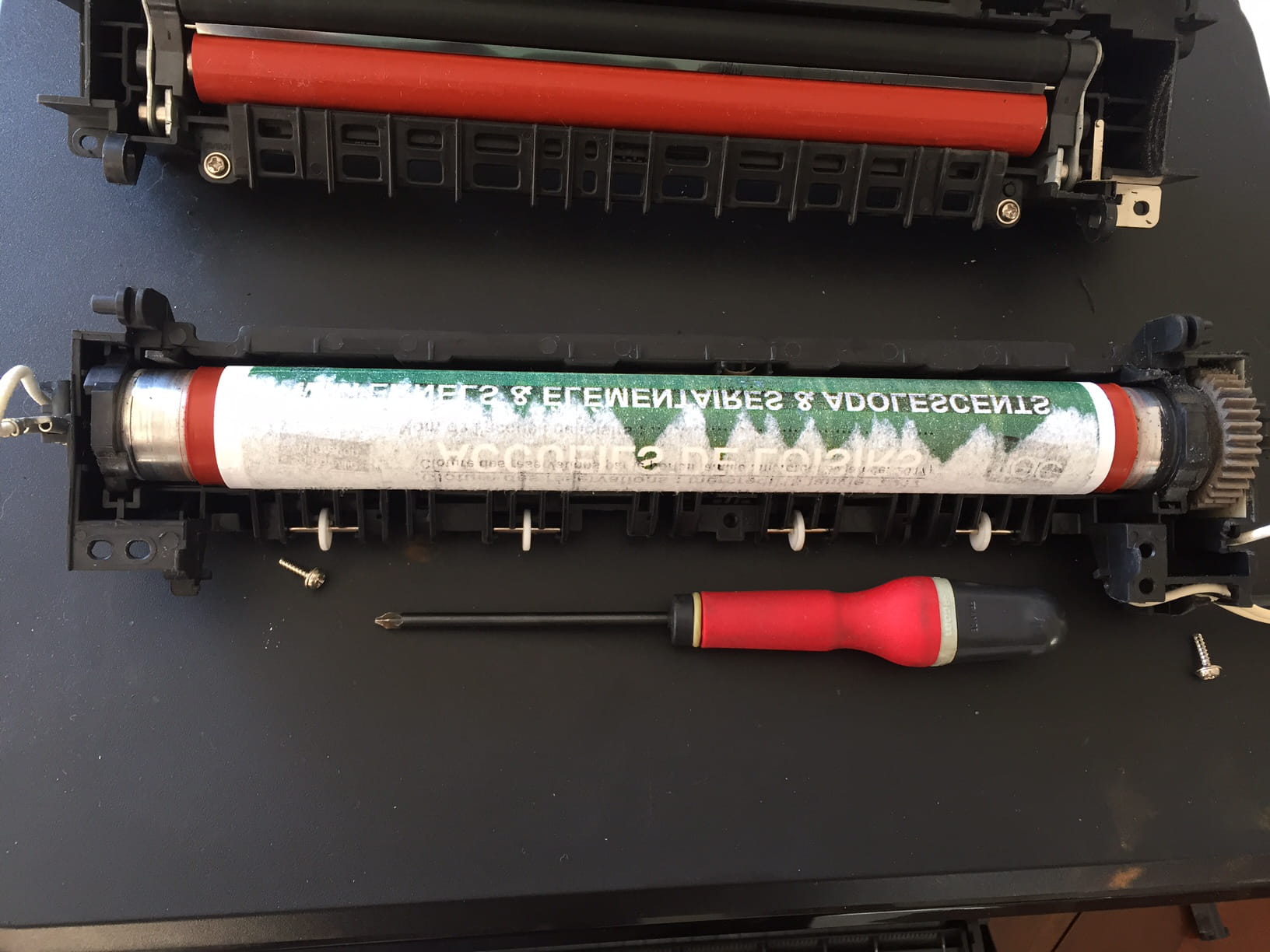
paper jam, apparently a regular sheet stuck on the oven roll (the orange one, you can smell it getting hot).
operation disassembly as described earlier.
I remove the oven and open it to access the roll in question.
the sheet is very well stuck to itself but not to the roll.
I carefully make a cut with a cutter and then tear the paper stuck, centimeter by centimeter.
attention, the roll is made of very soft rubber, you can damage it just with a fingernail.
reassembly, test, it works again
two caveats: the cap on the printer side is hard to remove, I broke a bit of plastic on its top (I go a bit heavy-handed when it doesn’t come off on the first try)
I had to put my fingers on delicate areas because after test prints, I notice marks that could correspond to my fingerprints.
The operation took me about an hour, fiddling and looking for advice on the internet
I should note that I used regular paper and printed a standard color document, I use compatible cartridges bought on Amaz.. cheaply. It’s likely the problem will recur later.
I’ll try to post 2 small photos if it works.
Have a good day everyone!