Epibrowser
Bonjour,
au démarrage de ma cession, j'ai toujours le meme message qui s'affiche : W ne trouve pas epibrowser.exe. vérifier que vous avez entrer le nom correst et réessayer.
que puis je faire ?
merci d'avance
3 réponses
-
Bonjour,
Epibrowser est un malware. La solution est sur ce lien trouvé sur CCM... https://forums.commentcamarche.net/forum/affich-38180100-epibrowser-exe-pose-problemes-desinstaller-impossible
-
Zabou isa
12:47 (il y a 5 minutes)
À answer

bonjourvoici les 2 lien obtenus
https://pjjoint.malekal.com/files.php?read=20261104_e6f0f61e1803499a
https://pjjoint.malekal.com/files.php?read=FRST_20261104_53cd0c9576d2a6c5
merci
-
Modérateur
Bonjour .
Tu installes un peu tout et n'importe quoi. ;)
Procédure à faire dans l'ordre indiqué :
En premier désinstalle avec le logiciel de désinstallation UninstalR les logiciels qui suivent.
- Avast Secure Browser (adware inutile).
- TotalAV
- WebAdvisor par McAfee (adware inutile)
En deuxième fait la correction FRST qui suit.
1- Ouvre FRST en tant qu'administrateur pour cela clique avec le bouton droit de ta souris sur FRST et choisis exécuter en tant qu'administrateur
2 - Copie l'intégralité du script qui est dans l'encadré qui suit :Start:: CreateRestorePoint: CloseProcesses: Task: {DBF87A6E-68D3-4345-B524-31E1E48FB881} - System32\Tasks\EpiBrowserStartup-S-1-5-21-3430795458-2454005854-1878120078-1001 => C:\WINDOWS\system32\cmd.exe [344064 2026-11-04] (Microsoft Windows -> Microsoft Corporation) -> /C "START /MIN /D "%LOCALAPPDATA%\EPISoftware\EpiBrowser\Application" epibrowser.exe --from-task-scheduler" 2026-11-04 04:02 - 2026-11-04 09:57 - 000002906 _____ C:\WINDOWS\system32\Tasks\EpiBrowserStartup-S-1-5-21-3430795458-2454005854-1878120078-1001 C:\Users\zabou\AppData\Local\EPISoftware HKLM\SOFTWARE\Microsoft\Windows Defender: [DisableAntiSpyware] Restriction HKLM\SOFTWARE\Microsoft\Windows Defender: [DisableAntiVirus] Restriction HKLM\SOFTWARE\Policies\Mozilla\Firefox: Restriction S1 webshieldfilter; C:\WINDOWS\System32\drivers\webshieldfilter.sys [96264 2022-09-27] (Microsoft Windows Hardware Compatibility Publisher -> Windows (R) Win 7 DDK provider) AV: PC Protect (Disabled - Out of date) {0567E33F-93C9-11B5-891D-90A37AEB2766} Task: {08C5A9CC-FD2C-4366-B296-DBF14547D97E} - System32\Tasks\Lenovo\Vantage\Schedule\NotificationCenter => C:\Program Files (x86)\Lenovo\VantageService\3.13.72.0\ScheduleEventAction.exe NotificationCenter (Pas de fichier) Task: {B76DABF5-DF46-42D7-A287-1389E88D1392} - System32\Tasks\Lenovo\Vantage\StartupFixPlan => C:\Program Files (x86)\Lenovo\VantageService\4.2.24.0\\uninstall.exe /repair (Pas de fichier) Task: {077BA067-7C15-40F0-B22E-C9DC2A54B4A2} - System32\Tasks\Microsoft\Windows\Location\Notifications => %windir%\System32\LocationNotificationWindows.exe (Pas de fichier) Task: {CCDFC0B8-01A3-4E74-A820-4F13F51D269E} - System32\Tasks\Microsoft\Windows\Mobile Broadband Accounts\MNO Metadata Parser => %SystemRoot%\System32\MbaeParserTask.exe (Pas de fichier) Task: {0BB36A32-0D9E-4297-AFD7-6BD7B5DB4C9B} - System32\Tasks\Microsoft\Windows\UNP\RunUpdateNotificationMgr => %windir%\System32\UNP\UpdateNotificationMgr.exe (Pas de fichier) Task: {2A83D9E9-6D1D-4820-A12B-70820D601A46} - System32\Tasks\Microsoft\Windows\UpdateOrchestrator\MusUx_LogonUpdateResults => %systemroot%\system32\MusNotification.exe LogonUpdateResults (Pas de fichier) Task: {9ADF15F8-B3DF-402F-B355-04D15DEAC578} - System32\Tasks\Microsoft\Windows\UpdateOrchestrator\Reboot_AC => %systemroot%\system32\MusNotification.exe /RunOnAC ReadyToReboot (Pas de fichier) Task: {3179943C-24C6-4F91-A4C3-C4B58F4BA686} - System32\Tasks\Microsoft\Windows\UpdateOrchestrator\Reboot_Battery => %systemroot%\system32\MusNotification.exe /RunOnBattery ReadyToReboot (Pas de fichier) Task: {F3E6E7ED-A196-4E44-8803-55FAB3AD4E29} - System32\Tasks\Microsoft\Windows\UpdateOrchestrator\USO_UxBroker => %systemroot%\system32\MusNotification.exe (Pas de fichier) U3 Avast Business Console Client Antivirus Service; pas de ImagePath CustomCLSID: HKU\S-1-5-21-3430795458-2454005854-1878120078-1001_Classes\CLSID\{51694bf6-7178-71ba-ba8c-cd64aadfc7f1}\localserver32 -> "C:\ProgramData\Lenovo\Udc\Hosts\24.10.0.10\x64\MessagingPlugin.exe" -ToastActivated => Pas de fichier CustomCLSID: HKU\S-1-5-21-3430795458-2454005854-1878120078-1001_Classes\CLSID\{A2C6CB58-C076-425C-ACB7-6D19D64428CD}\localserver32 -> "C:\Users\zabou\AppData\Local\EPISoftware\EpiBrowser\Application\130.0.6723.147\notification_helper.exe" => Pas de fichier CustomCLSID: HKU\S-1-5-21-3430795458-2454005854-1878120078-1005_Classes\CLSID\{51694bf6-7178-71ba-ba8c-cd64aadfc7f1}\localserver32 -> "C:\ProgramData\Lenovo\Udc\Hosts\24.10.0.10\x64\MessagingPlugin.exe" -ToastActivated => Pas de fichier SearchScopes: HKU\S-1-5-21-3430795458-2454005854-1878120078-1001 -> DefaultScope {27E1C57B-9296-4FD5-BDE4-CA6AE1DF47B7} URL = SearchScopes: HKU\S-1-5-21-3430795458-2454005854-1878120078-1001 -> {27E1C57B-9296-4FD5-BDE4-CA6AE1DF47B7} URL = cmd: netsh advfirewall reset End::3- Une fois le script copié clique sur Corriger, FRST prend automatiquement le script qui est dans le presse-papier.
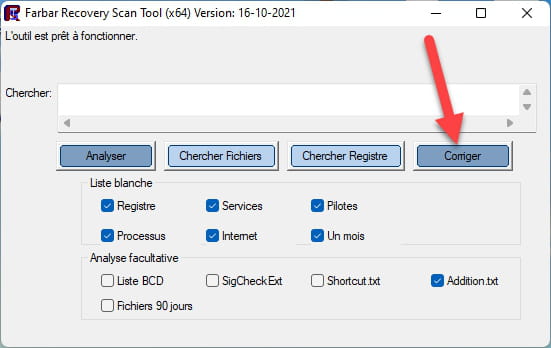

Laisse la correction se faire une fois qu'elle est terminée il te sera demandé de redémarrer ton pc, fait-le dès que cela te sera demandé, voir ci-dessous.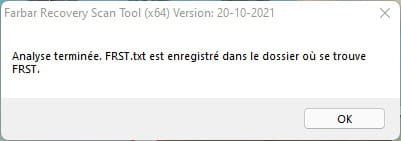
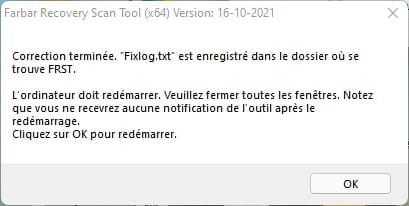

Puis une fois ton ordinateur redémarré :
4- Tu auras un fichier Fixlog sur ton bureau ensuite envoie ce rapport fixlog sur https://pjjoint.malekal.com/ .Puis donne le lien généré par https://pjjoint.malekal.com/ dans ta réponse.
5- VÉRIFIE ET DIS-MOI SI TON PROBLÈME EST TOUJOURS PRÉSENT.