Epibrowser
ResueltoHola,
al iniciar mi sesión, siempre aparece el mismo mensaje: W no encuentra epibrowser.exe. Verifique que ha introducido el nombre correcto y vuelva a intentarlo.
¿Qué puedo hacer?
Gracias de antemano.
5 respuestas
-
Moderador
Hola .
Estás instalando un poco de todo y de nada. ;)
Procedimiento a seguir en el orden indicado:
Primero desinstala con el software de desinstalación UninstalR los siguientes programas.
- Avast Secure Browser (adware innecesario).
- TotalAV
- WebAdvisor de McAfee (adware innecesario)
En segundo lugar, realiza la corrección FRST que sigue.
1- Abre FRST como administrador, para ello haz clic derecho sobre FRST y elige ejecutar como administrador
2 - Copia todo el script que está en el cuadro que sigue:Start:: CreateRestorePoint: CloseProcesses: Task: {DBF87A6E-68D3-4345-B524-31E1E48FB881} - System32\Tasks\EpiBrowserStartup-S-1-5-21-3430795458-2454005854-1878120078-1001 => C:\WINDOWS\system32\cmd.exe [344064 2026-11-04] (Microsoft Windows -> Microsoft Corporation) -> /C "START /MIN /D "%LOCALAPPDATA%\EPISoftware\EpiBrowser\Application" epibrowser.exe --from-task-scheduler" 2026-11-04 04:02 - 2026-11-04 09:57 - 000002906 _____ C:\WINDOWS\system32\Tasks\EpiBrowserStartup-S-1-5-21-3430795458-2454005854-1878120078-1001 C:\Users\zabou\AppData\Local\EPISoftware HKLM\SOFTWARE\Microsoft\Windows Defender: [DisableAntiSpyware] Restriction HKLM\SOFTWARE\Microsoft\Windows Defender: [DisableAntiVirus] Restriction HKLM\SOFTWARE\Policies\Mozilla\Firefox: Restriction S1 webshieldfilter; C:\WINDOWS\System32\drivers\webshieldfilter.sys [96264 2022-09-27] (Microsoft Windows Hardware Compatibility Publisher -> Windows (R) Win 7 DDK provider) AV: PC Protect (Disabled - Out of date) {0567E33F-93C9-11B5-891D-90A37AEB2766} Task: {08C5A9CC-FD2C-4366-B296-DBF14547D97E} - System32\Tasks\Lenovo\Vantage\Schedule\NotificationCenter => C:\Program Files (x86)\Lenovo\VantageService\3.13.72.0\ScheduleEventAction.exe NotificationCenter (No archivo) Task: {B76DABF5-DF46-42D7-A287-1389E88D1392} - System32\Tasks\Lenovo\Vantage\StartupFixPlan => C:\Program Files (x86)\Lenovo\VantageService\4.2.24.0\\uninstall.exe /repair (No archivo) Task: {077BA067-7C15-40F0-B22E-C9DC2A54B4A2} - System32\Tasks\Microsoft\Windows\Location\Notifications => %windir%\System32\LocationNotificationWindows.exe (No archivo) Task: {CCDFC0B8-01A3-4E74-A820-4F13F51D269E} - System32\Tasks\Microsoft\Windows\Mobile Broadband Accounts\MNO Metadata Parser => %SystemRoot%\System32\MbaeParserTask.exe (No archivo) Task: {0BB36A32-0D9E-4297-AFD7-6BD7B5DB4C9B} - System32\Tasks\Microsoft\Windows\UNP\RunUpdateNotificationMgr => %windir%\System32\UNP\UpdateNotificationMgr.exe (No archivo) Task: {2A83D9E9-6D1D-4820-A12B-70820D601A46} - System32\Tasks\Microsoft\Windows\UpdateOrchestrator\MusUx_LogonUpdateResults => %systemroot%\system32\MusNotification.exe LogonUpdateResults (No archivo) Task: {9ADF15F8-B3DF-402F-B355-04D15DEAC578} - System32\Tasks\Microsoft\Windows\UpdateOrchestrator\Reboot_AC => %systemroot%\system32\MusNotification.exe /RunOnAC ReadyToReboot (No archivo) Task: {3179943C-24C6-4F91-A4C3-C4B58F4BA686} - System32\Tasks\Microsoft\Windows\UpdateOrchestrator\Reboot_Battery => %systemroot%\system32\MusNotification.exe /RunOnBattery ReadyToReboot (No archivo) Task: {F3E6E7ED-A196-4E44-8803-55FAB3AD4E29} - System32\Tasks\Microsoft\Windows\UpdateOrchestrator\USO_UxBroker => %systemroot%\system32\MusNotification.exe (No archivo) U3 Avast Business Console Client Antivirus Service; sin ImagePath CustomCLSID: HKU\S-1-5-21-3430795458-2454005854-1878120078-1001_Classes\CLSID\{51694bf6-7178-71ba-ba8c-cd64aadfc7f1}\localserver32 -> "C:\ProgramData\Lenovo\Udc\Hosts\24.10.0.10\x64\MessagingPlugin.exe" -ToastActivated => No archivo CustomCLSID: HKU\S-1-5-21-3430795458-2454005854-1878120078-1001_Classes\CLSID\{A2C6CB58-C076-425C-ACB7-6D19D64428CD}\localserver32 -> "C:\Users\zabou\AppData\Local\EPISoftware\EpiBrowser\Application\130.0.6723.147\notification_helper.exe" => No archivo CustomCLSID: HKU\S-1-5-21-3430795458-2454005854-1878120078-1005_Classes\CLSID\{51694bf6-7178-71ba-ba8c-cd64aadfc7f1}\localserver32 -> "C:\ProgramData\Lenovo\Udc\Hosts\24.10.0.10\x64\MessagingPlugin.exe" -ToastActivated => No archivo SearchScopes: HKU\S-1-5-21-3430795458-2454005854-1878120078-1001 -> DefaultScope {27E1C57B-9296-4FD5-BDE4-CA6AE1DF47B7} URL = SearchScopes: HKU\S-1-5-21-3430795458-2454005854-1878120078-1001 -> {27E1C57B-9296-4FD5-BDE4-CA6AE1DF47B7} URL = cmd: netsh advfirewall reset End::3- Una vez copiado el script haz clic en Corregir, FRST tomará automáticamente el script que está en el portapapeles.
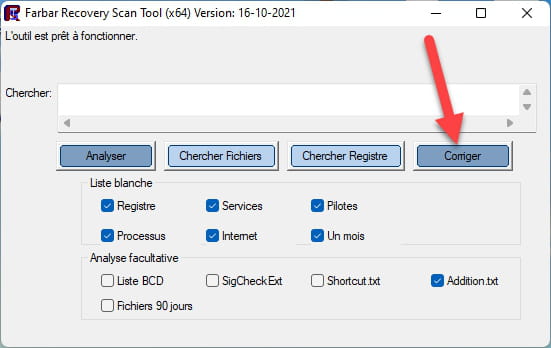

Deja que la corrección se realice; una vez que haya terminado, se te pedirá reiniciar tu PC, hazlo tan pronto como se te solicite, ver más abajo.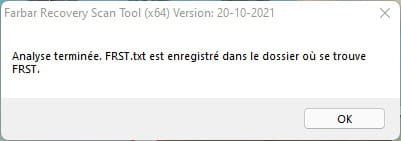
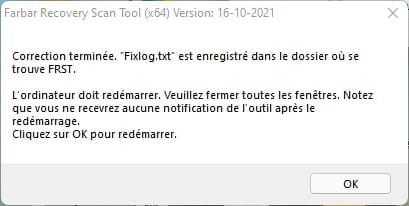

Y una vez que tu computadora se haya reiniciado:
4- Tendrás un archivo Fixlog en tu escritorio; luego envía este informe fixlog a .Luego da el enlace generado por en tu respuesta.
5- VERIFICA Y DIME SI TU PROBLEMA SIGUE PRESENTE.
bazfile
Moderador/Colaborador de seguridad.
un saludo, una respuesta, un gracias siempre son bien recibidos. -
Moderador
.
Tienes Avast Antivirus Gratis instalado en tu PC, es él quien te envía estos popups para que compres la versión de pago, desinstala Avast Antivirus Gratis con ve , el antivirus de Windows tomará automáticamente el relevo, es gratis y se activa automáticamente en cuanto no hay ningún otro antivirus activo en el PC.
Me acabo de dar cuenta de que tienes motores de búsqueda no deseados en Google Chrome, para eliminarlos ejecuta la corrección FRST que sigue, haz como antes pero con este nuevo script:
Start:: CreateRestorePoint: CloseProcesses: CHR HKLM-x32\...\Chrome\Extension: [fheoggkfdfchfphceeifdbepaooicaho] CHR StartupUrls: Default -> "hxxp://search.conduit.com/?ctid=CT3242339&SearchSource=48","hxxp://search.iminent.com/?appId=65C03A5C-AD6F-4271-9886-5DB627E90E48","hxxp://feed.snap.do/?publisher=QuickOB&dpid=QuickOB&co=FR&userid=e1f0f373-4d6e-4787-b9ca-9c8288e0533a&searchtype=hp&installDate=01/01/1970","hxxp://astromenda.com/?f=7&a=ast_clickconnect_14_45_ff&cd=2XzuyEtN2Y1L1Qzu0CyEtCyB0F0E0D0Azz0AyByE0D0EyB0EtN0D0Tzu0StCtDtAzztN1L2XzutAtFyCtFtDtFtAtN1L1CzutCyEtBzytDyD1V1TtN1L1G1B1V1N2Y1L1Qzu2SyD0B0FtD0B0EtA0BtGzzyByD0DtGzzzztA0DtG0CtDtByDtGtB0AyB0CyEyCtDtByDzytAyE2QtN1M1F1B2Z1V1N2Y1L1Qzu2S0DzyyCtB0FtBtCtAtG0E0FyD0BtGyEtB0ByCtG0BtC0E0DtGtA0CyE0CtB0AzztByCtDtD0E2Q&cr=1263362797&ir=","hxxp://www.awesomehp.com/?type=hp&ts=1393794165&from=amt&uid=HitachiXHTS545032B9A300_100214PBPC061DC8AA4LX","hxxps://www.bing.com/?PC=OSJ5" CHR DefaultSearchURL: Default -> hxxps://search-sprint.com/search?iid=e8b16c0e-0f0a-400a-802f-740313d49ae0&src=chrome&q={searchTerms} CHR DefaultSearchKeyword: Default -> chromesearch CHR DefaultNewTabURL: Default -> hxxps://digihack.net CHR DefaultSuggestURL: Default -> hxxp://api.bing.com/osjson.aspx?query={searchTerms} End::
bazfile
Moderador/Contribuidor de seguridad.
un saludo, una respuesta, un gracias siempre son agradables. -
Hola,
Epibrowser es un malware. La solución está en este enlace encontrado en CCM... https://forums.commentcamarche.net/forum/affich-38180100-epibrowser-exe-pose-problemes-desinstaller-impossible
-
Zabou isa
12:47 (hace 5 minutos)
A respuesta
hola, aquí están los 2 enlaces obtenidos
gracias
-
hola
aquí está el informe
el problema parece estar resuelto. gracias
sin embargo, también tengo ventanas emergentes de antivirus que se abren aunque creo que ya no tengo un antivirus actualizado. ¿qué antivirus gratuito me recomiendas?
saludos