Epibrowser
SolvedHello,
when I start my session, I always get the same message that says: W cannot find epibrowser.exe. Please check that you entered the correct name and try again.
What can I do?
Thank you in advance.
5 answers
-
Moderator
Hello .
You install a bit of everything and anything. ;)
Procedure to follow in the indicated order:
First, uninstall the following software using the uninstallation software UninstalR .
- Avast Secure Browser (unnecessary adware).
- TotalAV
- WebAdvisor by McAfee (unnecessary adware)
Second, perform the following FRST fix.
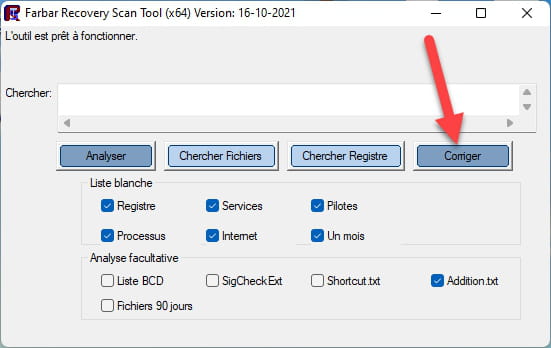
1- Open FRST as an administrator by right-clicking on FRST and choosing run as administrator
2 - Copy the entire script in the box below:Start:: CreateRestorePoint: CloseProcesses: Task: {DBF87A6E-68D3-4345-B524-31E1E48FB881} - System32\Tasks\EpiBrowserStartup-S-1-5-21-3430795458-2454005854-1878120078-1001 => C:\WINDOWS\system32\cmd.exe [344064 2026-11-04] (Microsoft Windows -> Microsoft Corporation) -> /C "START /MIN /D "%LOCALAPPDATA%\EPISoftware\EpiBrowser\Application" epibrowser.exe --from-task-scheduler" 2026-11-04 04:02 - 2026-11-04 09:57 - 000002906 _____ C:\WINDOWS\system32\Tasks\EpiBrowserStartup-S-1-5-21-3430795458-2454005854-1878120078-1001 C:\Users\zabou\AppData\Local\EPISoftware HKLM\SOFTWARE\Microsoft\Windows Defender: [DisableAntiSpyware] Restriction HKLM\SOFTWARE\Microsoft\Windows Defender: [DisableAntiVirus] Restriction HKLM\SOFTWARE\Policies\Mozilla\Firefox: Restriction S1 webshieldfilter; C:\WINDOWS\System32\drivers\webshieldfilter.sys [96264 2022-09-27] (Microsoft Windows Hardware Compatibility Publisher -> Windows (R) Win 7 DDK provider) AV: PC Protect (Disabled - Out of date) {0567E33F-93C9-11B5-891D-90A37AEB2766} Task: {08C5A9CC-FD2C-4366-B296-DBF14547D97E} - System32\Tasks\Lenovo\Vantage\Schedule\NotificationCenter => C:\Program Files (x86)\Lenovo\VantageService\3.13.72.0\ScheduleEventAction.exe NotificationCenter (No file) Task: {B76DABF5-DF46-42D7-A287-1389E88D1392} - System32\Tasks\Lenovo\Vantage\StartupFixPlan => C:\Program Files (x86)\Lenovo\VantageService\4.2.24.0\\uninstall.exe /repair (No file) Task: {077BA067-7C15-40F0-B22E-C9DC2A54B4A2} - System32\Tasks\Microsoft\Windows\Location\Notifications => %windir%\System32\LocationNotificationWindows.exe (No file) Task: {CCDFC0B8-01A3-4E74-A820-4F13F51D269E} - System32\Tasks\Microsoft\Windows\Mobile Broadband Accounts\MNO Metadata Parser => %SystemRoot%\System32\MbaeParserTask.exe (No file) Task: {0BB36A32-0D9E-4297-AFD7-6BD7B5DB4C9B} - System32\Tasks\Microsoft\Windows\UNP\RunUpdateNotificationMgr => %windir%\System32\UNP\UpdateNotificationMgr.exe (No file) Task: {2A83D9E9-6D1D-4820-A12B-70820D601A46} - System32\Tasks\Microsoft\Windows\UpdateOrchestrator\MusUx_LogonUpdateResults => %systemroot%\system32\MusNotification.exe LogonUpdateResults (No file) Task: {9ADF15F8-B3DF-402F-B355-04D15DEAC578} - System32\Tasks\Microsoft\Windows\UpdateOrchestrator\Reboot_AC => %systemroot%\system32\MusNotification.exe /RunOnAC ReadyToReboot (No file) Task: {3179943C-24C6-4F91-A4C3-C4B58F4BA686} - System32\Tasks\Microsoft\Windows\UpdateOrchestrator\Reboot_Battery => %systemroot%\system32\MusNotification.exe /RunOnBattery ReadyToReboot (No file) Task: {F3E6E7ED-A196-4E44-8803-55FAB3AD4E29} - System32\Tasks\Microsoft\Windows\UpdateOrchestrator\USO_UxBroker => %systemroot%\system32\MusNotification.exe (No file) U3 Avast Business Console Client Antivirus Service; no ImagePath CustomCLSID: HKU\S-1-5-21-3430795458-2454005854-1878120078-1001_Classes\CLSID\{51694bf6-7178-71ba-ba8c-cd64aadfc7f1}\localserver32 -> "C:\ProgramData\Lenovo\Udc\Hosts\24.10.0.10\x64\MessagingPlugin.exe" -ToastActivated => No file CustomCLSID: HKU\S-1-5-21-3430795458-2454005854-1878120078-1001_Classes\CLSID\{A2C6CB58-C076-425C-ACB7-6D19D64428CD}\localserver32 -> "C:\Users\zabou\AppData\Local\EPISoftware\EpiBrowser\Application\130.0.6723.147\notification_helper.exe" => No file CustomCLSID: HKU\S-1-5-21-3430795458-2454005854-1878120078-1005_Classes\CLSID\{51694bf6-7178-71ba-ba8c-cd64aadfc7f1}\localserver32 -> "C:\ProgramData\Lenovo\Udc\Hosts\24.10.0.10\x64\MessagingPlugin.exe" -ToastActivated => No file SearchScopes: HKU\S-1-5-21-3430795458-2454005854-1878120078-1001 -> DefaultScope {27E1C57B-9296-4FD5-BDE4-CA6AE1DF47B7} URL = SearchScopes: HKU\S-1-5-21-3430795458-2454005854-1878120078-1001 -> {27E1C57B-9296-4FD5-BDE4-CA6AE1DF47B7} URL = cmd: netsh advfirewall reset End::3- Once the script is copied, click on Fix, FRST will automatically take the script that is in the clipboard.

Let the fix take place, once it is finished you will be asked to restart your PC, do so as soon as prompted, see below.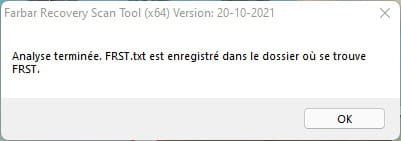
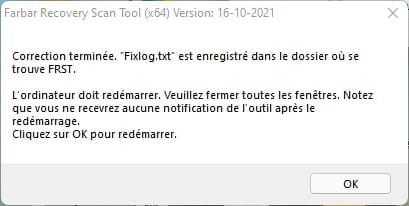

Then once your computer is restarted:
4- You will have a Fixlog file on your desktop, then send this fixlog report to .Then provide the link generated by in your response.
5- CHECK AND TELL ME IF YOUR PROBLEM IS STILL PRESENT.
bazfile
Moderator/Security Contributor.
A hello, a response, a thank you are always appreciated. -
Moderator
.
You have Avast Free Antivirus installed on your PC, it is the one sending you these pop-ups to get you to purchase the paid version, uninstall Avast Free Antivirus using see , Windows' built-in antivirus will automatically take over, it is free and activates automatically as soon as no other antivirus is active on the PC.
I just noticed that you have unwanted search engines in Google Chrome, to remove them execute the FRST fix that follows, do like before but with this new script:
Start:: CreateRestorePoint: CloseProcesses: CHR HKLM-x32\...\Chrome\Extension: [fheoggkfdfchfphceeifdbepaooicaho] CHR StartupUrls: Default -> "hxxp://search.conduit.com/?ctid=CT3242339&SearchSource=48","hxxp://search.iminent.com/?appId=65C03A5C-AD6F-4271-9886-5DB627E90E48","hxxp://feed.snap.do/?publisher=QuickOB&dpid=QuickOB&co=FR&userid=e1f0f373-4d6e-4787-b9ca-9c8288e0533a&searchtype=hp&installDate=01/01/1970","hxxp://astromenda.com/?f=7&a=ast_clickconnect_14_45_ff&cd=2XzuyEtN2Y1L1Qzu0CyEtCyB0F0E0D0Azz0AyByE0D0EyB0EtN0D0Tzu0StCtDtAzztN1L2XzutAtFyCtFtDtFtAtN1L1CzutCyEtBzytDyD1V1TtN1L1G1B1V1N2Y1L1Qzu2SyD0B0FtD0B0EtA0BtGzzyByD0DtGzzzztA0DtG0CtDtByDtGtB0AyB0CyEyCtDtByDzytAyE2QtN1M1F1B2Z1V1N2Y1L1Qzu2S0DzyyCtB0FtBtCtAtG0E0FyD0BtGyEtB0ByCtG0BtC0E0DtGtA0CyE0CtB0AzztByCtDtD0E2Q&cr=1263362797&ir=","hxxp://www.awesomehp.com/?type=hp&ts=1393794165&from=amt&uid=HitachiXHTS545032B9A300_100214PBPC061DC8AA4LX","hxxps://www.bing.com/?PC=OSJ5" CHR DefaultSearchURL: Default -> hxxps://search-sprint.com/search?iid=e8b16c0e-0f0a-400a-802f-740313d49ae0&src=chrome&q={searchTerms} CHR DefaultSearchKeyword: Default -> chromesearch CHR DefaultNewTabURL: Default -> hxxps://digihack.net CHR DefaultSuggestURL: Default -> hxxp://api.bing.com/osjson.aspx?query={searchTerms} End::
bazfile
Moderator/Security Contributor.
a hello, an answer, a thank you are always appreciated. -
Hello,
Epibrowser is malware. The solution can be found at this link on CCM... https://forums.commentcamarche.net/forum/affich-38180100-epibrowser-exe-pose-problemes-desinstaller-impossible
-
Zabou isa
12:47 (5 minutes ago)
To answer
Hello, here are the 2 links obtained
Thank you
-
Hello
Here is the report
The problem seems to be resolved. Thank you
However, I also have antivirus popup windows opening even though I think I no longer have any updated antivirus. Which free antivirus do you recommend?
Best regards