
Creating labels in LibreOffice Calc
Achille.Talon -
Hello,
I would like to create address labels for a mailing.
I have a spreadsheet file containing the title/last name/first name/address/postal code/city.
I created the database: File -> Assistant -> Address Data Source.
I have 150 rows, 150 addresses to print on adhesive label sheets, 2 columns and 8 rows = 16 labels per page.
On the first page, I correctly get labels 1 to 16, but on the second page, I have addresses 18 to 33, and so on.
Between each page, one label disappears.
Have you ever experienced this problem? How did you resolve it?
Thank you for your help
6 answers
-
Hello,
Tags corresponding to multiple records
Written for macOS. Windows users will remove fn to access function keys and replace cmd⌘ with Ctrl.
Once the label template is defined and saved:
- Open the label template (with the Sync content option enabled);
- Edit menu > Change database (for verification purposes);
- fn+F4 to call databases > choose the database;
- Choose a recipient (the row turns blue reverse video);
- Click on Data in fields.
All labels contain the same recipient;
- Click at the end of the last field of the first label;
- cmd⌘+fnF2 > Field Window > Database tab > Next record > Choose the database > Insert > Close;
- Click on Sync labels;
- In the database, choose recipients > Data in fields;
The first page of labels (the only one visible) is filled with the names of the first recipients;
- cmd⌘+A (2 or 3 times) to select the sheet that turns blue reverse video;
- cmd⌘+C to copy;
- cmd⌘+V (paste) as many times as necessary to increase the number of pages where all labels corresponding to the recipients will be visible;
- Click on Data in fields to see all labels with the names of all the recipients.
MBP + macOS Ventura
OpenOffice, LibreOffice -
Hello
In Writer
maybe at the end of the first page
insert a "Next Record" field
Insert > Field > Other: database tab
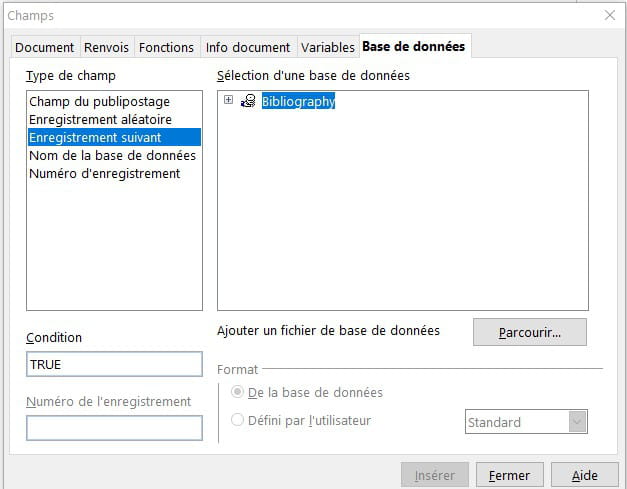
-
In the "labels" assistant, we indicate the label page model:
For example Brand = Avery A4; type = C2160
Page format A4, 3x7 labels (6.35x3.81 cm)
We indicate the content of the label (title First Name Last Name,...) When we validate, an A4 page is generated with the number of labels (here 21 labels)
Next, we proceed with the merge with the database, and the 100 or 150 labels are created.
If 147 labels are to be created, it generates 7 complete pages (or it should:) 7x21
In my case (sheets of 2x7), it correctly prints the first 14 on the first page, then on the next page it prints starting from the 16th label. The 15th has disappeared.
We do not have the option to modify the page before merging, other than the font, centering, .. (the layout of the labels)
It automatically moves to the next fields for the next label.
-
Try printing to PDF to see if it does the same thing
-
The labels are generated as a LibreOffice Writer document. I notice the disappearance of the 15th label before printing, whether directly to the printer or as a .pdf.
-
Good evening,
I solved my problem. My labels are all printing correctly. Without being sure, the issue was with the "synchronize" option. I was modifying the first label to my liking and then copying and pasting it onto all the other labels.
Thank you CommentCaMarche!

