Copy/paste scanned text JPEG format
extempor Posted messages 2168 Registration date Status Member Last intervention -
Hello,
I scanned some sheets with my scanner and I would like to extract the text.
I tried the JPEG/Word conversion but I cannot enter the document.
I had downloaded a software following a reply on this forum on a somewhat different topic but I lost it; I think it "did the job."
Could you help me?
Thank you.
4 answers
-
Hello,
JPG is an image and DOCX is text, so it is impossible to do without going through OCR (optical character recognition), with free or paid software having varying degrees of success.
A search for "convert JPG to DOCX" yields a number of online sites that, in fact, perform this OCR themselves, to be tested with no guaranteed success.
It is obviously easier if we scan not to JPG but to PDF, and where, although it is more difficult from a scanned PDF itself, we can to some extent perhaps not open and edit the PDF directly in Word but copy-paste excerpts of the "text" from the "image" obtained. -
You can import your images into an AI (ChatGPT for example) and ask it to convert them into text that can be recovered in Word.
It is possible that the free version limits the number of pages, but you may be able to do it in several rounds.-
- As has been noted, the difficulty lies in editing jpg images or even scanned PDFs. We can save time by using non-scanned files. The challenge this time is to determine the necessary level; the basic grammar of elementary courses is not that of the aggregate and surely overlooks, for example, the subtleties of using a given tense depending on the circumstances or the imperfect subjunctive. Resources exist, including at the university level, but then more readily in the form of courses rather than sheets. Elementary and middle school levels have multiple resources, with formats that are also varied (pdf, html…) and even, life is beautiful, sometimes directly in docx format: http://grozouland.free.fr/GRAMMAIRE/43Listedesfichesdegrammaire.html In the others, if html you can copy-paste; if pdf the difficulty this time lies in a general presentation including tables: you will need to open the document in Word and inevitably modify some layout elements and avoid sites where these sheets consist only of tables. See for example: https://moodle.utc.fr/mod/folder/view.php?id=13927 https://lyc-cdg-poissy.ac-versailles.fr/spip.php?article388 https://www.professeurphifix.net/grammaire_impression/sommaire_grammaire_impression.html
-
-
Hello,
What exactly do you want to do?
Is it about digitizing the records into an editable format? (You mentioned Word).
Or do you simply want to extract the text?It would be nice if you could show one of the records in its current format (jpg) and explain what you want to do. (Unless it is confidential or personal).
I think the suggestion of contrariness goes in the right direction.
Without using an AI program, you can use a simple smartphone to retrieve the text. Those who are not too old have this capability built into the camera app.
Obviously, you lose all formatting.
What is well designed is clearly phrased,
And the words to say it come easily.
(Boileau)-
Hello,
I simply want to extract the text from grammar sheets to present it differently.
I can’t attach the file.
Thank you.
Hello,
"I can't attach the file."
-
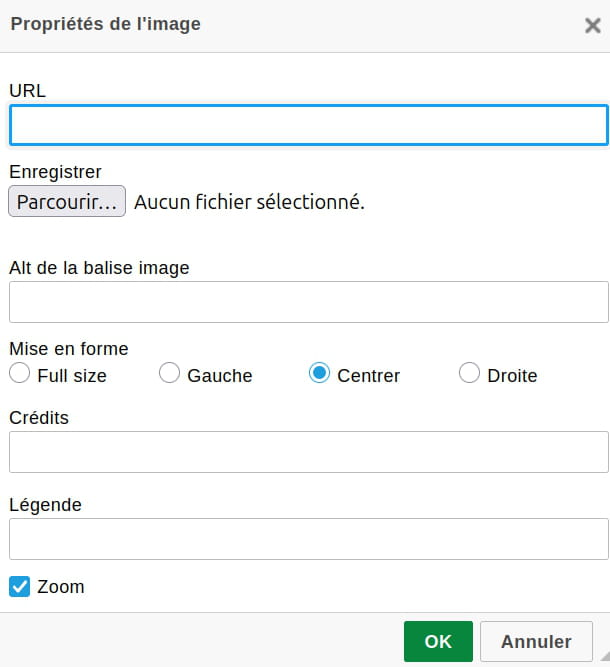
Use this icon if available:

Next, Browse to retrieve your file .(Do not touch the other settings).
Click OK.

-
The image should appear in your new message.
To attach an image, you click on the icon I’ve framed, when you are in the reply window.
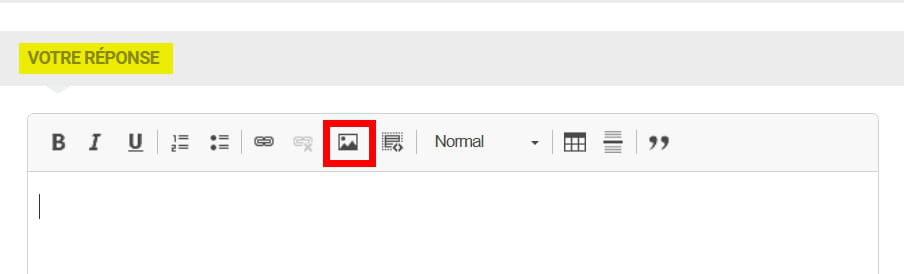
You then click on Choose a file, which opens the file explorer.
You choose the image. and you finish by clicking OK.
What is well conceived can be expressed clearly,
And the words to say it come easily.
(Boileau)
-