
Reinstallation of W11 impossible after PC crash...
Solved
fabul Posted messages 42132 Registration date Status Moderator Last intervention -
Hello everyone,
My Asus laptop played a nasty trick on me Friday morning at startup... it was completely frozen for a reason I totally don't understand, especially since the night before I turned it off normally, without any issues...
Since then, I've been trying to reinstall W11, but to no avail.
The laptop accepts my boot USB key with W11, but after a few prompts during the installation, I get the following message:
"Windows 11 configuration
An error occurred while selecting this
partition for installation. Select another partition
or refresh the selections."
I tried everything at this point, whether it's installing on one drive or the second one.
For your information, I can start the laptop in safe mode, access drives and files, etc... except for carrying out the daily Windows updates, or updating my antivirus.
I'm turning to your knowledge and experiences to see if you have any solutions if possible.
Looking forward to hearing from you, thank you all for your contributions to my problem which is unsolvable for me.
5 answers
-
Hello,
In safe mode, try to perform a system restore.
-
Hello,
If Windows manages to start somewhat (during the boot phase...) check with the recovery console. In this console, first, you can try using the advanced options and see the system restore tool first, and then consider, for example, system restore or others...
Use a hard shutdown as a last resort
If Windows is stuck without displaying a message, it may be necessary to intentionally force a hard shutdown to trigger the recovery environment.
- Turn on the PC
- Wait for Windows to start loading
- Turn off the PC before the desktop appears
- Repeat the process until Windows offers repair options
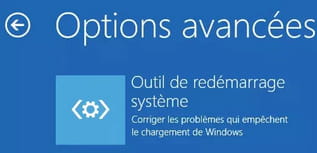
Start on Windows 11/10 Recovery Options (Advanced Startup / WinRE) - malekal.com
See also the following chapter:
Reset this PC
https://www.malekal.com/windows10-11-options-recuperation-systeme/#Reinitialiser_ce_PC
Also, see the various links at the bottom of the page on the above link.
https://forums.commentcamarche.net/forum/affich-38230618-clavier-bloquer
-
Hello and thank you MPMP10,
I have already tried all the recovery options offered by Windows, to no avail. The same goes for the recovery or WINRE.
When I format the USB stick to install RUFUS, I request formatting in FAT32, but when it comes to saving W11 H25 on the stick, RUFUS only offers NTFS.
The same happens if I install W11 via MEDIA CREATION TOOL...
I just performed an SFC /Scannow as "administrator," just to be safe, and everything seems normal.
I have already backed up all my files other than Windows on an external drive, so I can reinstall W11 on the PC without worrying about data loss, but it doesn't work.
For your information, I have already tried the procedures from the great Malekal, but they don't work either.
I will try one more time, just in case.
-
Have you been able to access the recovery console after the two forced shutdowns or not, to be sure?
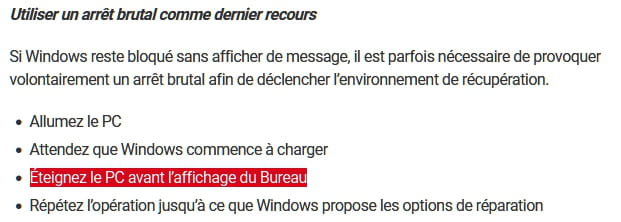
Note that the forced shutdown must be done before the Windows logo appears.
I can therefore reinstall W11After reinstalling Windows 11.
Why create a system image of your computer? The answer is simple: with a simple file backup, you are only backing up your personal files. With a system image, you back up both your personal files and Windows, the software you have installed, as well as all the settings you have configured since installing Windows!https://lecrabeinfo.net/tutoriels/creer-image-systeme-windows/
yes, but the advanced options in Windows get blocked during the processes.
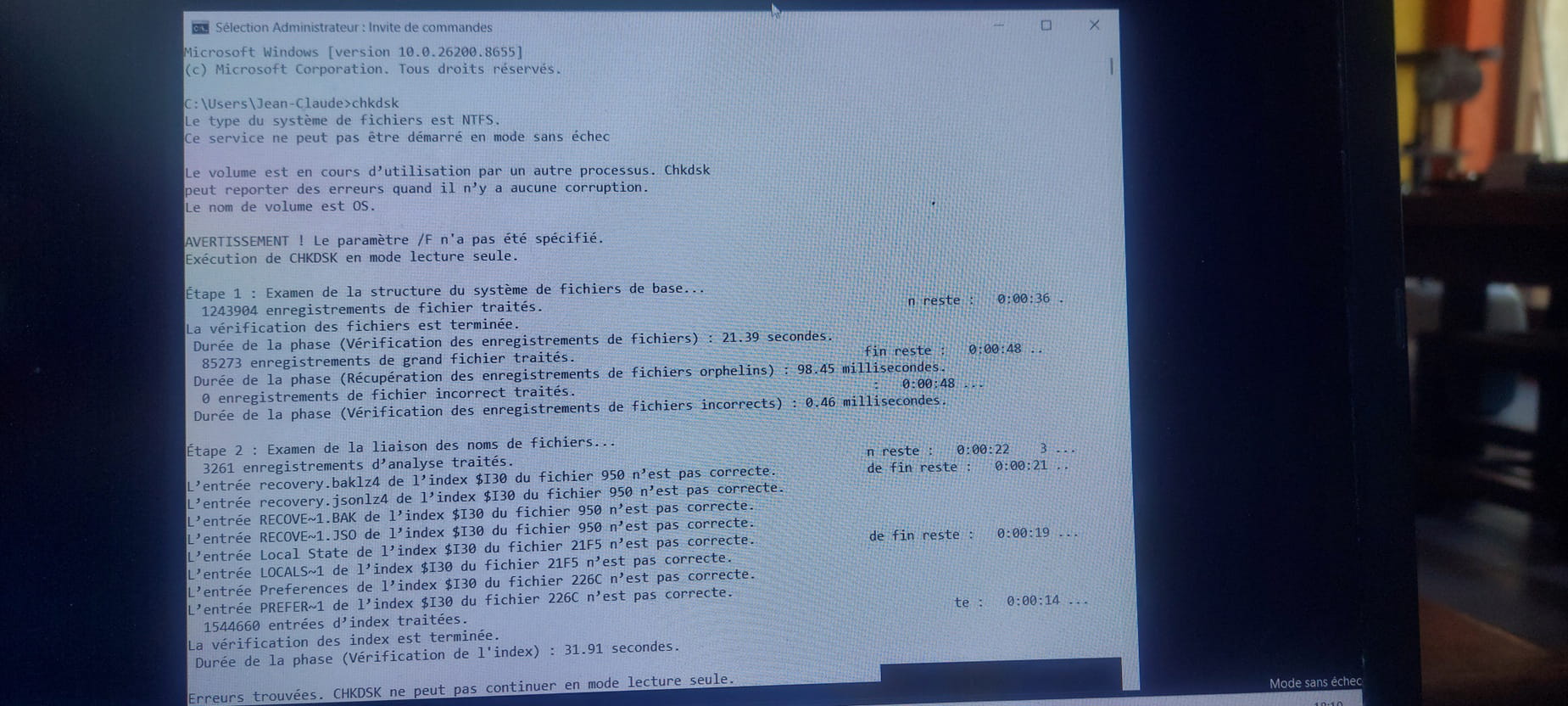
I just ran a chkdsk, and here are the results. (I hope the picture will be visible?)
Good evening,
You can try to recover data with Hiren's Boot CD PE on a Rufus or Ventoy USB drive, using Ventoy to place the Windows ISO on the same drive as the Hiren's ISO if it can hold enough and you don't have 2 drives available.
Have you attempted to delete all the system partitions to create a new one?
Normally, when I do a fresh install, I erase these partitions and create a new one rather than trying to install on a partition that existed before.-
Hello,
We do not know the organization of the whole system, the screenshot in <12> shows at least 4 disks with (for now) a Windows reserved partition on at least 2 of them and a recovery partition on disk 4, whose purpose is unclear without seeing any other elements.
It is therefore difficult to determine what needs to be formatted or not.
This organization across multiple disks does not tell us where the boot sector is in case of multiboot; it may actually prevent the reinstallation of Windows if we do not disconnect the other disks.
This formatting means that we would back up the data from the disk to another location starting from safe mode, which seems to be working (and suggests more of a driver issue rather than Windows corruption per se).
As far as I remember, unless using Ventoy, the ISO is not copied raw to the installation key (which then forbids FAT32), but the files are extracted, which does not prohibit FAT32 as long as the key is less than 64 GB, which seems to be a good recommendation for installation keys anyway.
It's hard to comment further without knowing the organization of all the disks, what is on them, their nature and number, and the type of connections that could cause a conflict on the ports. -
Hello,
Yes, it might be useful to keep only the disk containing the Windows 11 system to see. (since it starts well in safe mode).
Disconnect non-essential peripherals for startup.
Check in the BIOS to boot from the correct disk.
Or perhaps a damaged NTUSER.DAT profile.
In safe mode, try creating a new administrator account and restart in this new session.
Or possibly UEFI boot to repair.
-
-
For Brucine,
I tried to merge the D drive with the C drive, but in safe mode, it's not possible.
I also attempted with the EaseUS Partition Master software, but in safe mode, the merge was denied...
For your information, since I installed Ventoy, in the disk manager, there are not 4 but 6 drives in the PC.
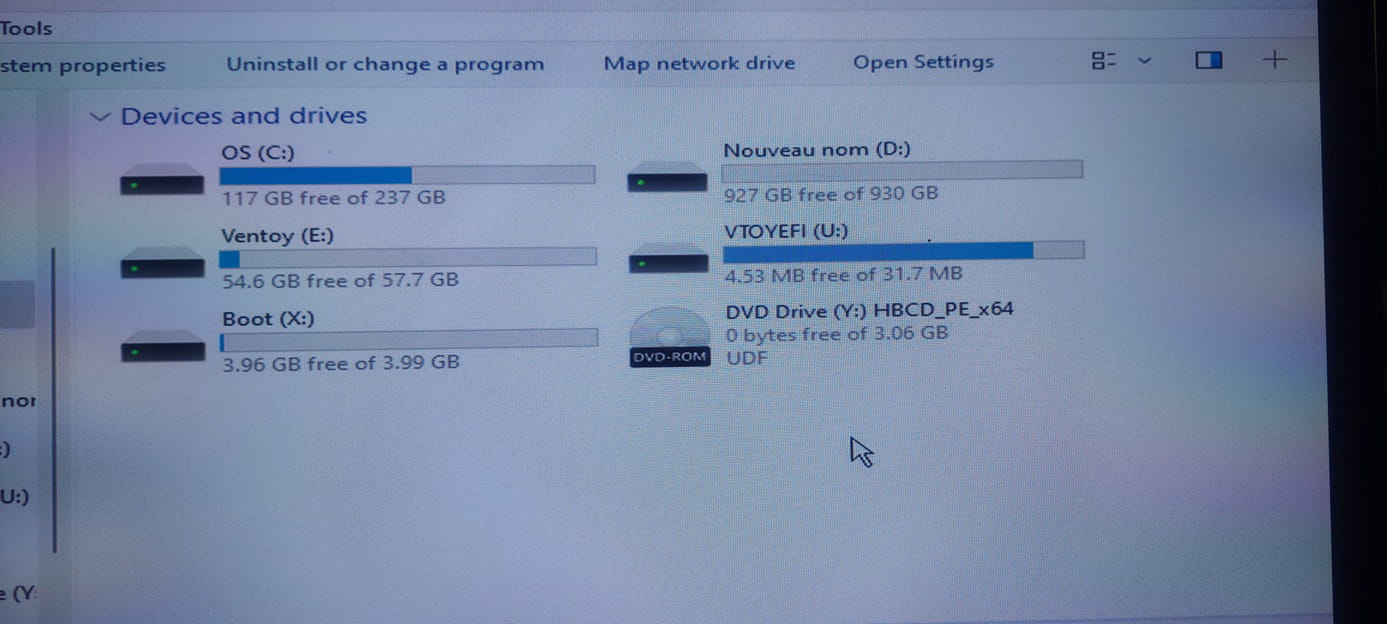
When I look at the installed drives on the PC, I only find two. C + D
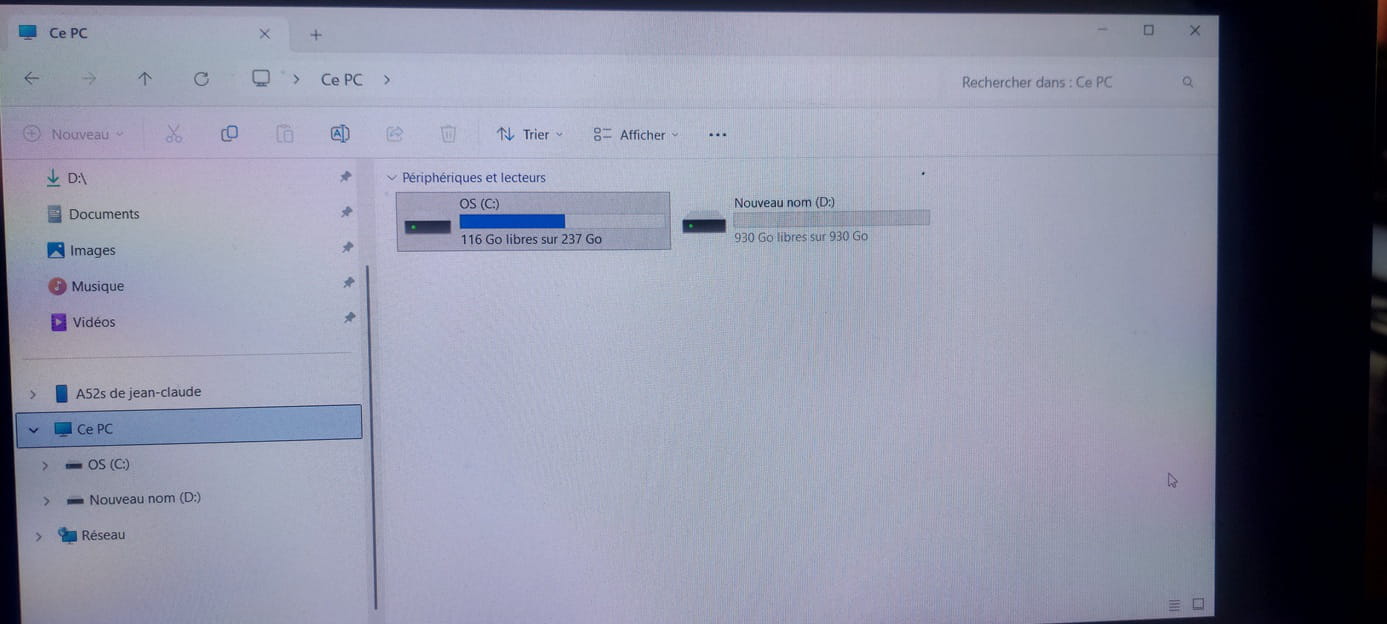
Here is the current situation.
But I'm making progress, gradually eliminating the possibilities of reinstalling W11.
Your capture in <12> mentions at least 4 disks; I don't know what it was done with, Windows installation key? If so, that would be 4 partitions, not disks.
There are indeed only 2 in your second capture above; it appears to be a classic setup with a 128 Go SSD and a 1 To hard drive, and we obviously cannot merge two different physical disks.
The first capture is obscure; it was done with what, we don't know if E, X, and U are partitions or external devices, although 31.7 Mo for an external device makes no sense, and its name leans more towards a boot partition as suggested by the EFI name, but in that case, it has no reason to be lettered.
I don't know what Ventoy is doing in this story unless it's the connected installation key (and in that case 64 Go has no chance of being FAT32 unless you used third-party software).
The nature of X Boot remains a mystery; what is its role?
The whole thing is curious because, with Windows installed, we should have at least 3 system partitions that are not found in your capture and which are all visible including in the Windows disk manager except for the 16 Mo reserved partition.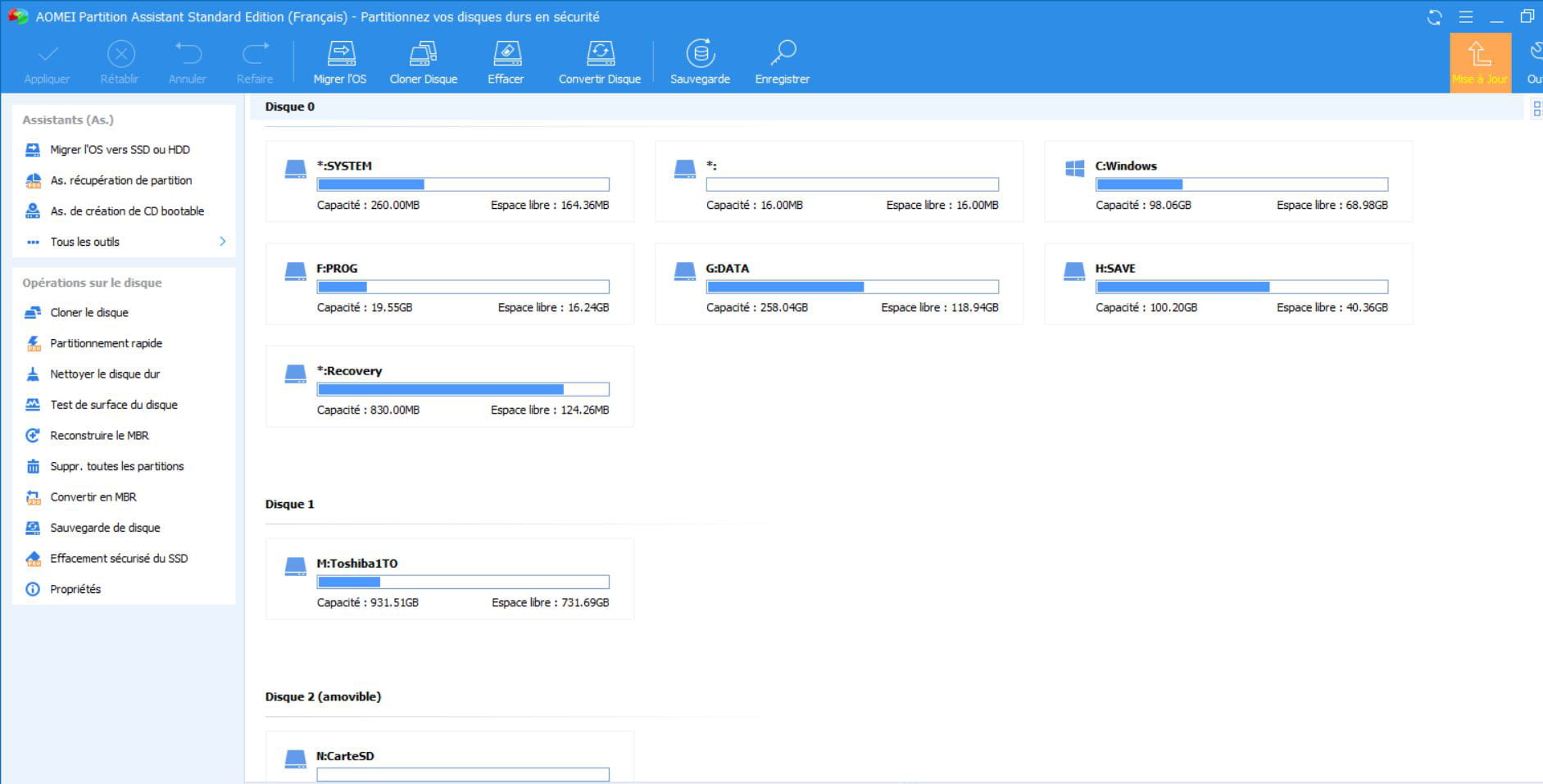
Depending on their utility, I would start by backing up the data that needs saving on D, then formatting in Windows if possible for U and X (assuming E is the external key), otherwise using a utility like Aomei or Easeus, or more easily formatting C, U, and X with the installation key and reinstalling Windows in the corresponding space.
Hello again,
Boot from the Ventoy USB drive, then from the Windows ISO that is on it by using the Boot Menu key on the PCYou can search on Google "[Brand Model] Boot Menu Key"
Click (if offered): Previous version of the configuration
Select "Custom installation" (not upgrade)
Delete all system partitions and create a new one (this deletes the data).
-
Hello everyone!
today, I have some good news...
W11 is reinstalled on the old PC!
The question... how did I do it?
To be honest, a bit by testing the possibilities that you all presented to me.
The version was installed with Ventoy after several attempts, by modifying a few parameters in the UEFI. And at one point, I was able to format the disks during this Ventoy procedure, except the C drive.
The first installation was therefore on the second disk (D), which is an HDD, because I was not allowed to format the C drive, the original SSD.
W11 was installed on disk D, I was able to restart the installation of W11 after formatting C in File Explorer, and then in Ventoy, I formatted disk D again so as not to cause confusion at the moment of installing W11...
Thank you very much to all of you, because without you, I would never have been able to solve my problem!!!!!
( Small anecdote, now I have a spare PC since I just bought a new one, given my distress these past days (laugh))
Hello,
In safe mode,
1- run a check on your C drive (right click: properties --> Tools)
2- restore your system to a previous point if available (settings --> system --> system information --> system protection)
-
Hello Thev,
Thank you for your suggestions.
For the first one, I don't have that option in "tools".
As for the second one, restoring the system to an earlier point does not work in safe mode. At least, that's the message I'm getting.
Hello,
I saw that you had backed up all your data on an external drive.
To reinstall a fresh W11 without any issues using the Rufus USB key, the easiest way is to reset the physical disk where your C drive is located. That means deleting all the partitions present on it using the Windows installation program. You will then have a blank disk that you can select for the installation, which will then proceed without any problems.
Latest Discussions -
Xiaomi redmi note 13 pro+ 5g disable ads?
at 06:41 -
Missing photo library
at 05:07 -
Tiktok limits suggestive content to 18+ users
at 00:40 -
Self-invoking js function
at 00:19 -
Unable to open xsl and xslx files
on 6 Jul -
Copy from excel into google sheets
on 6 Jul -
Invisible text boxes or word forms on pdf
on 6 Jul -
Display issue in google
on 6 Jul -
Use your holiday vouchers to pay tolls for free
on 6 Jul -
Transfer data to a new pc
on 6 Jul
Other languages




