
Unrefreshed USB drive on Android interface
Hello,
On the TV box, the USB key is recognized, however, the display is incorrect, I add files, they appear but the old files no longer show up..
Thank you all
Christophe
5 answers
-
Contributor
Hi,
It's okay, thanks, it's in "Protection History" ==> you then need to find the threat in question... possible approach based on the date and time... then click on it to expand and confirm that it's indeed the right one..
Next, you need to go to "Action" at the bottom of the same field and choose 'Restore'...
The threat is thus restored, it’s actually an exception to allow the execution of this software... Very useful despite what Microsoft thinks (unjustified).
-
Moderator
Hello again,
It’s a China-made .exe that isn’t signed, which tries to retrieve information about devices connected via USB; it scares most antivirus programs, which prefer to warn about a suspicious-looking file, but they’re just programs with no real judgment.
It’s a program specialized in its field, without equal, and very useful.
It is for these reasons that I no longer use antivirus software on my PC, Defender is completely disabled; I’m more of a geek with solid geek protection methods, I know how to test on virtual machines, and then no virus or unwanted things get through or stay, for a long time.
-
-
Contributor
Hello,
To receive an explanatory answer, you need to provide more details about the context in the question...
-- What is this TV BOX, brand and model...? The TV as well..?
-- What size and video file format are on the USB stick...?
-- Has it ever worked, at least once..?
-- It's possible that this is normal operation..? Check the manuals..
-
Moderator
Good evening,
Do you have a Windows PC to check if the key is a counterfeit with programs that only work with Windows?
If you can tell me, I will let you know if it is authentic or not with one or a few tests, whether it is repairable in case of defects, and we can verify if it is reliable.
It would be good to say more about the USB key itself, the brand, the size reported by Windows, and I would also wait for a ChipGenius report, a software specialized in a field I know quite well.Note: It is a tool to extract information about USB hardware (USB controller chip model, memory chip, etc.). It can be perceived as malware by antivirus software when it is not; I have been using it for years, nothing to worry about.
Disable SmartScreen and real-time antivirus protection while downloading, extracting everything, and running ChipGenius, or put the files in exceptions.
https://www.cjoint.com/c/LIepeZzEuZs
Run ChipGenius as an Administrator, and right-click in the ChipGenius window, then close the information window (which means that the report has been copied to the clipboard) with "Ok."
Example:
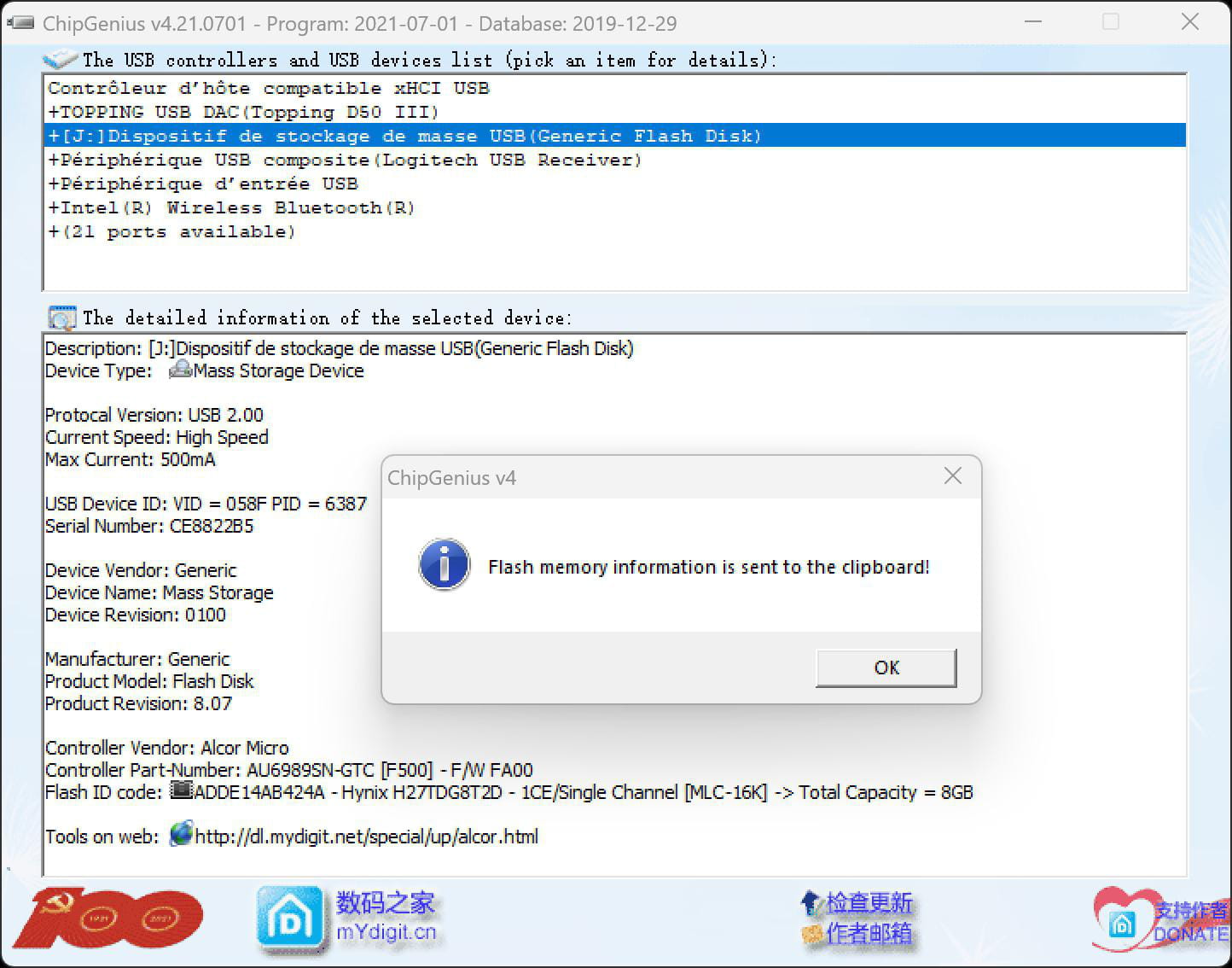
Then press Ctrl + V in your next response to paste the report.
-
Contributor
Hello,
No matter what I do with Smart Screen on Win 11, nothing works, Win 11 prevents or deletes the "ChipGenius" file... new, which I would have really liked to install...
It's very poorly regarded..!! How can I create an exception...?
Thank you in advance.
-
Contributor
OK, thanks for the feedback, informative... I had already sensed the all-terrain Geek in the thread of readings... I approve.

